Minecraft version
Back to mods 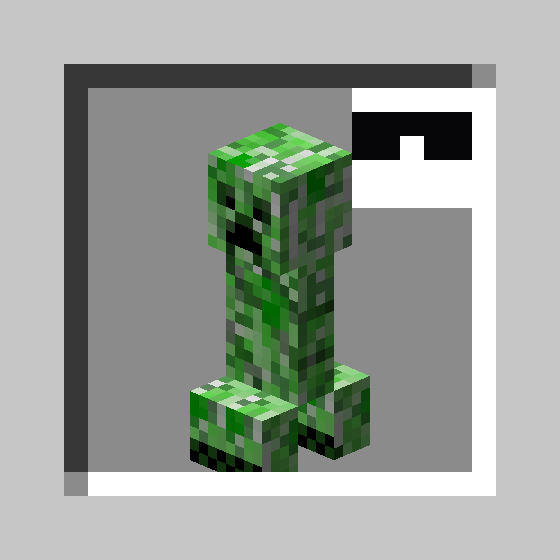
CurseForge · Minecraft mod
Peekaboo!
Disguise as a mob, another player - or maybe just wear a Creeper on your head!
Choose a version Pick your version below, then grab the matching file.
Quick answer
Which Peekaboo! release should I use?
Latest stable file v1.0.4+26.2
Game version 26.2
Loader NeoForge
Peekaboo! v1.0.4+26.2 targets 26.2 with NeoForge. The project page does not say whether this file belongs on the client, dedicated server, or both. No extra mods listed for this file.
Where it goes
Is Peekaboo! required on the client, server, or both?
The project page does not say whether this file belongs on the client, dedicated server, or both.
Client Source doesn’t say
Dedicated server Source doesn’t say
Loader for this release NeoForge
Required install it here Optional supported, not mandatory Not supported do not install here Source doesn’t say do not assume
The source does not explicitly classify this release as client-only or server-only.
What else does Peekaboo! v1.0.4+26.2 need?
v1.0.4+26.2. Change the file and its required mods may change too.
This file does not list any required mods. Do not add a library just because a different file uses it.
This file does not list any required or optional mods.
Before you install it
Add Peekaboo! without breaking your instance.
Built for Peekaboo! v1.0.4+26.2. Pick another file and the loader, install side or required mods may change.
- 01
Stick to this file
Use v1.0.4+26.2. It targets 26.2 with NeoForge; another release may have different loader, side or dependency requirements.
- 02
Bring the mods it needs
This file does not list any required mods. Do not add a library just because a different file uses it.
- 03
Put it on the correct side
The project page does not say whether this file belongs on the client, dedicated server, or both.
- 04
Pick the file you checked
Use the “Get this file” button beside v1.0.4+26.2. It opens that exact file at the source.
About this project
What does Peekaboo! add?
Peekaboo!
Disguise as a mob, another player - or maybe just wear a Creeper on your head! So stylish!
This mod is creative-only right now.
Items
Disguise
Equippable in the head slot, this item replaces the wearer's player model with that of the Disguise item.
A player wearing a Pig Disguise looks just like a normal Pig, but with a player name tag.
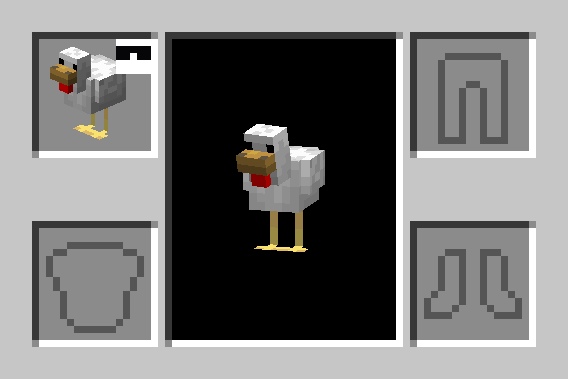
Mob Hat
Equippable in the head slot, this item renders an entity model on the player's head.
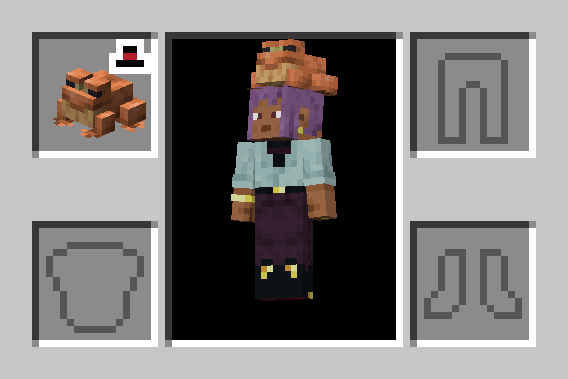
Plushie
Just like a Mob Hat, but cannot be equipped.
Commands
The only command added by Peekaboo! is /disguise. This command modifies the Disguise of the source entity.
/disguise as <entity> [<nbt>]
Disguises the source entity (@s) as the specified entity type argument, with optional additional entity data.
For example:
/disguise as minecraft:pig- disguises as a plain Pig/disguise as minecraft:creeper {powered:true}- disguises as a Charged Creeper
/disguise skin as <player>
Disguises the source player with the skin of the specified player name.
For example:
/disguise skin as Cojomax99- replaces the source player's skin with that of Cojomax99- Note: this will only be visible if the source player is not already disguised as another entity
/disguise skin clear
Clears the current skin disguise of the source player, if any is set.
/disguise name as <name>
Replaces the source entity's custom name with the specified name Text Component.
For example:
/disguise name as "Dwight Schrute"
/disguise name clear
Clears the current custom name disguise of the source entity, if any is set.
/disguise scale <scale>
Sets the scale modifier for the current disguise of the source entity. scale is a float between 0.1 and 20.0.
For example:
/disguise scale 0.5- sized to 50% of normal scale/disguise scale 1- resets scale to normal
/disguise hideShadow <value>
If value is true, the source entity will cast no shadow.
For example:
/disguise hideShadow true- hides the source entity's shadow
/disguise clear
Clears all currently applied disguise properties on the source entity, if any are set.
Applying disguises to other entities
Any Living Entity (generally: entities with AI, Players, and Armor Stands) can be disguised. /execute as can be used to disguise another entity.
For example:
/execute as @n[type=wolf] run disguise as sheep- disguises the nearest Wolf as a Sheep
Item Components
peekaboo:disguise
A specification of the Disguise to be applied when equipping an item.
Format: object with fields:
entity- optional entity data (same format as theminecraft:entity_datacomponent), the entity disguise to apply- If not present, no entity disguise will be applied
scale- optional float between0.1and20.0, the scale modifier to apply- Default:
1.0
- Default:
changes_size- optional boolean,trueif the disguise entity's bounding box should be inherited- Default:
true
- Default:
custom_name- optional Text Component, the display name override (both in-world and in the Tab List)skin_profile- optional profile data (same format as theminecraft:profilecomponent), the player skin disguise to usehide_shadow- optional boolean,trueif the entity's shadow should be hidden- Default:
false
- Default:
- e.g.
peekaboo:disguise={entity:{id:'minecraft:creeper',powered:true}} - e.g.
peekaboo:disguise={skin_profile:{name:'Cojomax99'},scale:1.5}
peekaboo:entity
A specification of the entity to be rendered for the Mob Hat and Plushie items.
Format: same as the minecraft:entity_data component
- e.g.
peekaboo:entity={id:'minecraft:creeper',powered:true}
peekaboo:size
A scale modifier for the rendering of Disguise, Mob Hat, or Plushie items.
Format: positive float e.g. peekaboo:size=1.5
Project description from CurseForge.
Pick your setup
Peekaboo! by Minecraft version and loader
Choose the version and loader you play, then open the matching release.
Minecraft version
26.1.2
1 loader buildMinecraft version
26.1.1
1 loader buildMinecraft version
26.1
1 loader buildMinecraft version
1.21.11
1 loader buildMinecraft version
1.21.8
1 loader buildCheck the dependencies, then try the file in a copied instance before changing a world you care about.
Recent files
Peekaboo! versions and loaders
v1.0.4+26.2
peekaboo-1.0.4-26.2.jar
6 Nov 2026
Client Source doesn’t say Server Source doesn’t say Dependencies No extras listed Listed on Release listing
Check the 26.2 · NeoForge setup NeoForge26.2 release
v1.0.3+26.2
peekaboo-1.0.3-26.2.jar
5 Nov 2026
Client Source doesn’t say Server Source doesn’t say Dependencies No extras listed Listed on Release listing
Check the 26.2 · NeoForge setup NeoForge26.2 release
v1.0.2+26.2
peekaboo-1.0.2-26.2.jar
4 Nov 2026
Client Source doesn’t say Server Source doesn’t say Dependencies No extras listed Listed on Release listing
Check the 26.2 · NeoForge setup NeoForge26.2 release
v1.0.1+26.2
peekaboo-1.0.1-26.2.jar
29 Oct 2026
Client Source doesn’t say Server Source doesn’t say Dependencies No extras listed Listed on Release listing
Check the 26.2 · NeoForge setup NeoForge26.2 release
Update to 26.2
peekaboo-1.0.0+26.2.jar
20 Jun 2026
Client Source doesn’t say Server Source doesn’t say Dependencies No extras listed Listed on Release listing
Check the 26.2 · NeoForge setup NeoForge26.2 release
v1.0.0+26.1.1
peekaboo-1.0.0+26.1.1.jar
5 Apr 2026
Client Source doesn’t say Server Source doesn’t say Dependencies No extras listed Listed on Release listing
Check the 26.1.2 · NeoForge setup NeoForge26.126.1.126.1.2 release
v1.0.0+1.21.11
peekaboo-1.0.0+1.21.11.jar
26 Dec 2025
Client Source doesn’t say Server Source doesn’t say Dependencies No extras listed Listed on Release listing
Check the 1.21.11 · NeoForge setup NeoForge1.21.11 release
v1.0.0+1.21.8
peekaboo-1.0.0+1.21.8.jar
26 Dec 2025
Client Source doesn’t say Server Source doesn’t say Dependencies No extras listed Listed on Release listing
Check the 1.21.8 · NeoForge setup 1.21.8NeoForge release
Looking for an older file? The official CurseForge project page is in Resources.
 mod
CurseForge · Minecraft
ReplayModCinematics: Camera Paths for Replay Mod
Unofficial Replay Mod add-on: smooth camera paths, orbits and entity-follow shots. For Forge, NeoForge and Fabric.
 mod
CurseForge · Minecraft
Viper Cosmetics
A cosmetic mod with a client side where you can customize the cosmetics you choose from the mod.
 mod
CurseForge · Minecraft
Electronic Devices
Decorative mod that adds plenty of electronic devices to decorate your house.