Create Needed by Create : Tick Control createtickcontroller-1.21.1-1.1.1.jar
requiredMatching file found Matched file: Create 6.0.10 for mc1.21.1

CurseForge · Minecraft mod
Create Tick Control optimisation smart block entities ticks optimise create server and client
Quick answer
Create : Tick Control createtickcontroller-1.21.1-1.1.1.jar targets 1.21.1 with NeoForge. The project page does not say whether this file belongs on the client, dedicated server, or both. All 1 required mods have matching files.
Where it goes
The project page does not say whether this file belongs on the client, dedicated server, or both.
The source does not explicitly classify this release as client-only or server-only.
createtickcontroller-1.21.1-1.1.1.jar. Change the file and its required mods may change too.
Install Create first. We found matching files for this game-version and loader setup.
We only count dependency files that match this setup. A file for another loader does not fill the gap.
Before you install it
Built for Create : Tick Control createtickcontroller-1.21.1-1.1.1.jar. Pick another file and the loader, install side or required mods may change.
Use createtickcontroller-1.21.1-1.1.1.jar. It targets 1.21.1 with NeoForge; another release may have different loader, side or dependency requirements.
Install Create first. We found matching files for this game-version and loader setup.
The project page does not say whether this file belongs on the client, dedicated server, or both.
Use the “Get this file” button beside createtickcontroller-1.21.1-1.1.1.jar. It opens that exact file at the source.
About this project
Create Tick Controller is a powerful server-side performance optimization mod that dynamically controls the tick rate of Create mod's mechanical components. Designed for large-scale factory builds and server environments, it prevents TPS drops by intelligently throttling block entity updates while maintaining visual synchronization on the client side.
Features Overview
How It Works
Performance Benchmarks
Installation
Commands Reference
Configuration Guide
Technical Deep-Dive
Best Practices
FAQ
| Feature | Description |
|---|---|
| Global Tick Divisor | Reduce tick frequency for ALL Create block entities at once |
| Per-Type Divisor | Fine-tune tick rates for specific machine types (e.g., only slow down Millstones) |
| Blacklist System | Protect critical machines from global throttling |
| Dynamic TPS Control | Automatic tick adjustment based on server TPS using configurable formulas |
| Emergency MSPT Protection | Safety net that activates when server is struggling |
| Client Animation Sync | Animations visually reflect the actual tick rate — no desync |
| Network Synchronization | All settings automatically sync to connected clients |
| Category | Examples |
|---|---|
| Kinetics | Belts, Gearboxes, Shafts, Clutches, Gearshifts, Flywheels… |
| Processing | Millstones, Crushing Wheels, Saws, Mixers, Presses… |
| Logistics | Funnels, Chutes, Arms, Ejectors, Packagers… |
| Fluids | Pumps, Pipes, Hose Pulleys, Spouts, Fluid Tanks… |
| Contraptions | Bearings, Pulleys, Pistons, Gantries, Elevators… |
| Redstone | Nixie Tubes, Display Links, Redstone Links… |
| Trains | Stations, Signals, Tracks, Train Controls… |
| Game Tick | 1 | 2 | 3 | 4 | 5 | 6 |
|---|---|---|---|---|---|---|
| Normal (No Divisor) | TICK | TICK | TICK | TICK | TICK | TICK |
| Divisor = 3 | TICK | SKIP | SKIP | TICK | SKIP | SKIP |
| Divisor | Ticks Executed | Ticks Skipped | CPU Load Reduction | |||
| 3 | 1 / 3 | 2 / 3 | ~66% |
Key Insight: A divisor of 3 means the block entity only processes every 3rd tick, reducing CPU load by ~66% for that entity type.
To prevent lag spikes, entities don't all tick on the same frame. Instead, they're distributed using position-based offsets:
Divisor = 4, Four Belt segments at different positions:
| Game Tick | 1 | 2 | 3 | 4 | 5 | 6 | 7 | 8 | 9 | 10 | 11 | 12 |
|---|---|---|---|---|---|---|---|---|---|---|---|---|
| Belt A | TICK | TICK | TICK | |||||||||
| Belt B | TICK | TICK | TICK | |||||||||
| Belt C | TICK | TICK | TICK | |||||||||
| Belt D | TICK | TICK | TICK |
Result: Load is evenly distributed across all ticks!
The mod uses Mixins to intercept animation calculations on the client side:
`Server: Block ticks at 1/4 speed (divisor=4)
↓
Network: Divisor synced to client
↓
Client: Animation speed = originalSpeed / 4
Visual Result: Gears rotate 4x slower, matching actual processing speed
`
Hardware: Intel i7-10700K, 32GB RAM, NVMe SSD
Minecraft: 1.21.1 with NeoForge Create
Version: 6.0.8 & 6.0.9
Test World: Superflat with controlled factory setups
Setup: 500 belt segments transporting items in a loop
| Results table | |||||
|---|---|---|---|---|---|
| Divisor | MSPT | TPS | CPU Usage | Items/sec | Efficiency |
| 1 | 78,5 | 12,7 | 94% | 1000 | 100,00% |
| 2 | 52,3 | 19,1 | 71% | 500 | 50,00% |
| 4 | 38,1 | 20,0 | 52% | 250 | 25,00% |
| 8 | 31,2 | 20,0 | 43% | 125 | 12,50% |
| 16 | 27,8 | 20,0 | 38% | 62 | 6,25% |
Setup: 50 Millstones + 50 Mechanical Presses + 100 Funnels
| Setup: 50 Millstones + 50 Mechanical Presses + 100 Funnels | ||||
|---|---|---|---|---|
| Divisor | MSPT | TPS | Throughput | Notes |
| 1 | 89,2 | 11,2 | 100,00% | Unplayable lag |
| 2 | 58,7 | 17,0 | 50,00% | Noticeable improvement |
| 4 | 41,3 | 20,0 | 25,00% | Full TPS restored |
| 8 | 33,6 | 20,0 | 12,50% | Overkill for this setup |
Setup: Complete factory with trains, processing, and logistics
*Optimized configuration:
| Configuration | MSPT | TPS | Description |
|---|---|---|---|
| No mod | 125,4 | 8,0 | Severe lag, unplayable |
| Global divisor = 4 | 45,2 | 20,0 | Playable, slow processing |
| Optimized per-type | 38,7 | 20,0 | Best balance |
| Emergency mode active | 42,1 | 20,0 | Auto-adjusted during stress |
| Example: Optimized per-type divisors | |
|---|---|
| Component | Divisor |
| Belts | 2 |
| Arms | 4 |
| Millstones | 8 |
| Crushing Wheels | 4 |
| Funnels | 2 |
MSPT Improvement by Divisor (200 Block Entities)
125 ─┤ ██████████████████████████████████████████ Baseline │
100 ─┤ ██████████████████████████████████ Div=2 (-20%) │
75 ─┤ ████████████████████████████ Div=3 (-40%) │
50 ─┤ ██████████████████████ Div=4 (-56%) │
40 ─┤ █████████████████ Div=6 (-68%) │
30 ─┤ █████████████ Div=8 (-76%) │
25 ─┤ ██████████ Div=12 (-80%) │
20 ─┤ ████████ Div=16 (-84%)
├────────────────────────────────────────────── 0 25 50 75 100 125 MSPT
| Divisor | MSPT | Note |
|---|---|---|
| 1 | 125 | Baseline |
| 2 | 100 | Div=2 (-20%) |
| 3 | 75 | Div=3 (-40%) |
| 4 | 50 | Div=4 (-56%) |
| 6 | 40 | Div=6 (-68%) |
| 8 | 30 | Div=8 (-76%) |
| 12 | 25 | Div=12 (-80%) |
| 16 | 20 | Div=16 (-84%) |
| Without Mod vs With Divisor=4 | ||
|---|---|---|
| Category | Without Mod (%) | With Divisor=4 (%) |
| Create Block Entities | 45% | 12% |
| World Tick | 22% | 22% |
| Entity Processing | 18% | 18% |
| Other | 15% | 15% |
| Headroom | 0% | 33% |
Download the latest release from CurseForge
Place the .jar file in your mods folder
Launch the game - configuration file will be auto-generated
Use /tickcontrol commands to configure (requires OP level 2)
/tickcontrol status
Displays current tick controller status including:
/tickcontrol global <1-200> Set global tick divisor
/tickcontrol sync <1-200> Set global sync divisor (network updates)
/tickcontrol reset Reset all settings to defaults
/tickcontrol type <TypeName> <1-200> Set divisor for specific type
/tickcontrol type <TypeName> reset Reset type to use global divisor
/tickcontrol list [dimension] List all block entities by type
Example - Slow down only Millstones:
/tickcontrol type MillstoneBlockEntity 8
/tickcontrol blacklist add <TypeName> Protect type from global divisor
/tickcontrol blacklist remove <TypeName> Remove protection
/tickcontrol blacklist list Show all blacklisted types
/tickcontrol blacklist clear Clear entire blacklist
Example - Protect Train Stations:
/tickcontrol blacklist add StationBlockEntity
/tickcontrol dynamic pause Pause automatic TPS adjustment
/tickcontrol dynamic resume Resume automatic adjustment
Configuration file location: config/createtickcontroller-server.toml
[dynamic]
enabled = false
formula = "3 * (21 - tps)"
updateInterval = 20
minDivisor = 1
maxDivisor = 50
targetTps = 20.0
| Formula | Behavior |
|---|---|
3 * (21 - tps) |
At 18 TPS → divisor 9, at 15 TPS → divisor 18 |
(20 - tps) * 2 |
At 18 TPS → divisor 4, at 15 TPS → divisor 10 |
tps < 15 ? 10 : 1 |
Binary: divisor 10 below 15 TPS, else 1 |
min(20, max(1, (20-tps)*3)) |
Clamped aggressive scaling |
Formula Variables:
tps - Current server TPS (0-20)targetTps - Configured target (default 20)mspt - Current milliseconds per tickSupported Functions:
min(a, b), max(a, b), abs(x)floor(x), ceil(x), round(x)sqrt(x), pow(base, exp)condition ? valueIfTrue : valueIfFalse[emergency]
enabled = true
msptThreshold = 55.0
recoveryMspt = 45.0
increment = 2
decrement = 1
updateInterval = 10
maxDivisor = 100
MSPT Timeline Example:
| Step | MSPT | Divisor | Threshold | Recovery | Note |
|---|---|---|---|---|---|
| 1 | 56 | 1 | 55 | 45 | Above threshold |
| 2 | 58 | 3 | 55 | 45 | Peak (above threshold) |
| 3 | 55 | 5 | 55 | 45 | At/above threshold |
| 4 | 50 | 5 | 55 | 45 | Descending |
| 5 | 44 | 4 | 55 | 45 | Below recovery (decrement) |
| 6 | 40 | 3 | 55 | 45 | Recovering low |
| 7 | 56 | 5 | 55 | 45 | Peak (above threshold) |
| 8 | 50 | 5 | 55 | 45 | Descending |
| 9 | 44 | 4 | 55 | 45 | Below recovery (decrement) |
| 10 | 40 | 3 | 55 | 45 | Recovering low |
| 11 | 35 | 2 | 55 | 45 | Lowest point |
| 12 | 40 | 1 | 55 | 45 | Stabilizing |
| Divisor: | 1 → 3 → 5 → 5 → 4 → 3 → 5 → 5 → 4 → 3 → 2 → 1 | ||||
| Actions: | Increment when MSPT > 55, Decrement when MSPT < 45 |
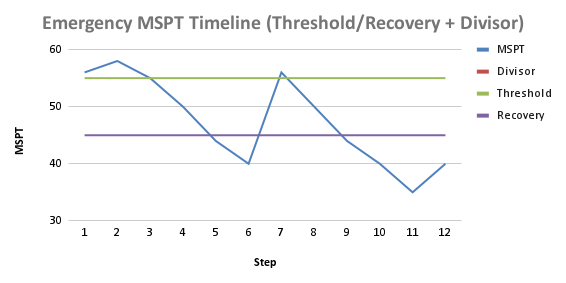
The gap between threshold (55) and recovery (45) prevents oscillation.
| SERVER SIDE | ||||
|---|---|---|---|---|
| DynamicTickController (TPS / MSPT Monitor) |
→ | TickControllerManager - globalTickDivisor - typeTickDivisors - blacklistedTypes - shouldTick() |
→ | SmartBlockEntityMixin (Intercepts tick calls) |
| TickControllerConfig (TOML) |
→ | TickControllerManager | ||
| NETWORK SYNC | TickDivisorSyncPacket - globalDivisor - syncDivisor - typeDivisors - blacklist |
|||
| CLIENT SIDE | ClientTickManager - store divisors - getDivisorForType() - getAnimationSpeedMultiplier() |
|||
| ↓ | ||||
| KineticBE Renderer Mixin | RotatingInstance Mixin (Flywheel) |
LinearActuator Mixin (Pulleys) |
||
| Animation Speed = originalSpeed / divisor |
| Component | Memory Usage |
|---|---|
| TickControllerManager | ~2 KB (static maps) |
| ClientTickManager | ~1 KB (mirror of server state) |
| Per-entity overhead | 0 bytes (uses existing position hash) |
| Network packet | ~200 bytes per sync |
| Recommended Config Snippets (TOML) | |
|---|---|
| Small / Medium / Large server examples | |
| Small Server (1–5 players, light factories) | |
| Key | Value |
| dynamic.enabled | FALSE |
| emergency.enabled | TRUE |
| emergency.msptThreshold | 55 |
| emergency.recoveryMspt | 48 |
| emergency.increment | 1 |
| emergency.decrement | 1 |
| Medium Server (5–20 players, moderate factories) | |
| Key | Value |
| dynamic.enabled | TRUE |
| dynamic.formula | 2 * (20 - tps) |
| dynamic.minDivisor | 1 |
| dynamic.maxDivisor | 20 |
| emergency.enabled | TRUE |
| emergency.msptThreshold | 52 |
| emergency.recoveryMspt | 45 |
| emergency.increment | 2 |
| emergency.decrement | 1 |
| Large Server (20+ players, mega factories) | |
| Key | Value |
| dynamic.enabled | TRUE |
| dynamic.formula | 4 * (21 - tps) |
| dynamic.minDivisor | 1 |
| dynamic.maxDivisor | 50 |
| emergency.enabled | TRUE |
| emergency.msptThreshold | 50 |
| emergency.recoveryMspt | 40 |
| emergency.increment | 3 |
| emergency.decrement | 1 |
| emergency.maxDivisor | 100 |
| Block Entity Type | Recommended Divisor | Reason |
|---|---|---|
| BeltBlockEntity | 2-4 | High count, visual impact |
| MillstoneBlockEntity | 4-8 | Slow processing anyway |
| CrushingWheelController | 4-8 | Heavy computation |
| MechanicalArmBlockEntity | 2-4 | Precision needed |
| FunnelBlockEntity | 2-4 | High count in factories |
| ChainConveyorBlockEntity | 2-4 | Similar to belts |
| PumpBlockEntity | 4-8 | Fluid calc intensive |
| MechanicalMixerBlockEntity | 4-8 | Recipe processing |
| StationBlockEntity | 1 (blacklist) | Critical for trains |
| SignalBlockEntity | 1 (blacklist) | Safety critical |
Always consider blacklisting:
StationBlockEntity, SignalBlockEntity, TrackBlockEntitySequencedGearshiftBlockEntity, BrassDiodeBlockEntityToolboxBlockEntity, LecternControllerBlockEntityA: No. Contraptions (moving structures) are handled differently by Create and are not affected by this mod. Only stationary block entities are throttled.
A: No. Items are still processed, just less frequently. With divisor=4, items move at 1/4 speed but never disappear.
A: This is intentional! Client animations are synchronized with the server tick rate so you can visually confirm the throttling is working. This also helps players understand why processing is slower.
A: The mod is server-side required. Clients need it installed to see synchronized animations, but the server controls all throttling logic.
A: Yes! Any addon that extends SmartBlockEntity will automatically be throttled. You can use per-type divisors for addon-specific machines.
A:
finalDivisor = max(dynamic, emergency)A: Use /tickcontrol list to see all loaded Create block entities grouped by type name.
Create Tick Controller is not affiliated with the Create mod team. Create is developed by simibubi and the Create team.
Project description from CurseForge.
Pick your setup
Choose the version and loader you play, then open the matching release.
Check the dependencies, then try the file in a copied instance before changing a world you care about.
Recent files
10 Aug 2026
9 Aug 2026
4 May 2026
3 May 2026
5 Jan 2026
4 Jan 2026
3 Jan 2026
3 Jan 2026
1 Jan 2026
Looking for an older file? The official CurseForge project page is in Resources.
 mod
modConverts Minecraft blocks and items you specify into Create: Numismatic coins!
 mod
modSummon and dismiss any mount instantly with just one button press — whether it's a Wolf, a Horse, an Axolotl, or any of the many other rideable creatures.
 mod
modThis mod adds a complete system for vehicles, mounts, and pets to Minecraft.