Minecraft version
Back to mods 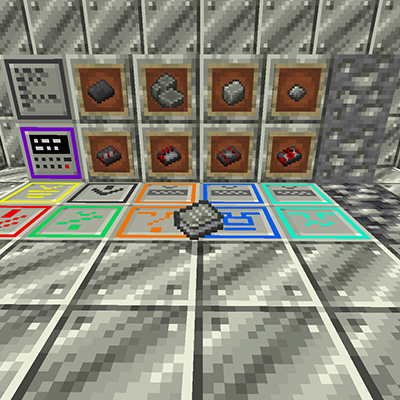
CurseForge · Minecraft mod
Redstone Data
Adds various data processing blocks, enabling advanced logic and data handling.
Choose a version Pick your version below, then grab the matching file.
Quick answer
Which Redstone Data release should I use?
Latest stable file redstone_data-1.0.2-forge-1.20.1.jar
Game version 1.20.1
Loader Forge
Redstone Data redstone_data-1.0.2-forge-1.20.1.jar targets 1.20.1 with Forge. The project page does not say whether this file belongs on the client, dedicated server, or both. No extra mods listed for this file.
Where it goes
Is Redstone Data required on the client, server, or both?
The project page does not say whether this file belongs on the client, dedicated server, or both.
Client Source doesn’t say
Dedicated server Source doesn’t say
Loader for this release Forge
Required install it here Optional supported, not mandatory Not supported do not install here Source doesn’t say do not assume
The source does not explicitly classify this release as client-only or server-only.
What else does Redstone Data redstone_data-1.0.2-forge-1.20.1.jar need?
redstone_data-1.0.2-forge-1.20.1.jar. Change the file and its required mods may change too.
This file does not list any required mods. Do not add a library just because a different file uses it.
This file does not list any required or optional mods.
Before you install it
Add Redstone Data without breaking your instance.
Built for Redstone Data redstone_data-1.0.2-forge-1.20.1.jar. Pick another file and the loader, install side or required mods may change.
- 01
Stick to this file
Use redstone_data-1.0.2-forge-1.20.1.jar. It targets 1.20.1 with Forge; another release may have different loader, side or dependency requirements.
- 02
Bring the mods it needs
This file does not list any required mods. Do not add a library just because a different file uses it.
- 03
Put it on the correct side
The project page does not say whether this file belongs on the client, dedicated server, or both.
- 04
Pick the file you checked
Use the “Get this file” button beside redstone_data-1.0.2-forge-1.20.1.jar. It opens that exact file at the source.
About this project
What does Redstone Data add?
This mod is fairly simple, but very valuable. I am aware of some bugs, and all I am aware of are not harmful and do not make any part of the mod unusable.
This mod adds processors for various data types, the primary ones being Float, Boolean, and String. This mod is designed with scripters/coders/developers in mind, but I hope anyone can learn how to use these tools if they so desire. I designed this project with the idea that this is just an advanced version of redstone and data handling, hence the name "Redstone Data". I do hope that you enjoy this little tidbit of a mod, and that it makes your minecraft experience just a little bit more fun.
Key for non scripters/coders/developers:
Float: a number with a decimal (1.0) - decimal does not need to have value, just be present.
Int: a number without a decimal (1)
Boolean: logic - true/false
String: text
Descriptions, Do's, and Dont's:
Seek the Guide Book in-game for more information. This is general and not very specific. (only notes what the book does not properly convey)
DATA TRANFER IS PULL BASED, which means they grab info from the block behind, and store it. this means blocks like processors, take in data, and hold it in themselves. Do not assume they must have data pulled from the front, the blocks do not care and will pull it from any open face.
The Build Tool - A combination of many other utility tools provided by mods like create. my favorite feature is the actual building feature, which involves selecting 2 points, and then swinging the build tool to construct. this feature only works at a distance. (outside players physical reach)
Cables - Transfer a single data type or all data types depending on the cable variation.
Processors - perform operations to determine an output, most have 2 inputs, (the sides) and users should be careful not to mix up how data flows when using these.
Inputs - The Manual Input and Reader are very different, but are very easy to use, and are as friendly as possible.
Outputs - Data Reader only reads STRING data from block below, and the Redstone Output outputs its stored FLOAT as INT redstone output (also only connects to redstone dust)
Project description from CurseForge.
Pick your setup
Redstone Data by Minecraft version and loader
Choose the version and loader you play, then open the matching release.
Check the dependencies, then try the file in a copied instance before changing a world you care about.
Recent files
Redstone Data versions and loaders
redstone_data-1.0.2-forge-1.20.1.jar
3 Jan 2026
Client Source doesn’t say Server Source doesn’t say Dependencies No extras listed Listed on Release listing
Check the 1.20.1 · Forge setup 1.20.1Forge release
Looking for an older file? The official CurseForge project page is in Resources.
 mod
mod CurseForge + Modrinth · Minecraft
Reliable Recipes
A lightweight utility for recipe and tag manipulation via simple JSON configuration!
 mod
mod CurseForge + Modrinth · Minecraft
Better Search
Search for items even with typos, in other languages and more!
 mod
mod Modrinth · Minecraft
Viper Economy
A server-side Fabric economy mod featuring dynamic virtual or physical currency toggles, multi-database drivers, cross-server Redis syncing, and custom-category interactive /servershop container GUIs with zero client-side requirements.