Just Enough Items (JEI) Needed by Create JEI Compat createjeicompat-1.0.1_forge_1.20.1.jar
requiredMatching file found Matched file: jei-1.20.2-forge-16.0.0.2.jar
CurseForge · Minecraft mod
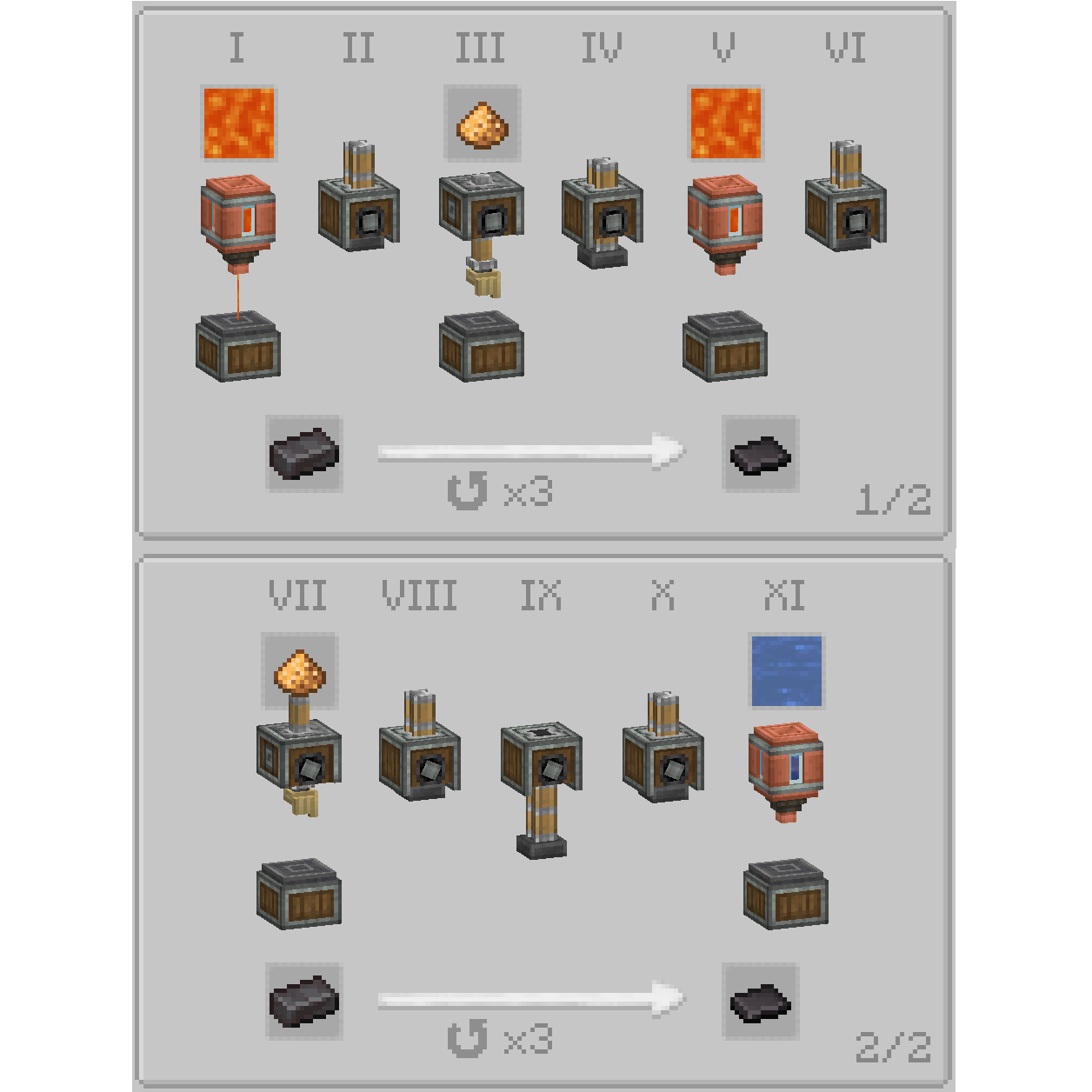
A compatibility mod for Create and JEI that enhances the display of sequenced assembly recipes in JEI for 7+ steps.
Quick answer
Create JEI Compat createjeicompat-1.0.1_forge_1.20.1.jar targets 1.20.2, 1.20.5, 1.20.1 with Forge. The project page does not say whether this file belongs on the client, dedicated server, or both. 1 required mod needs a matching file.
Where it goes
The project page does not say whether this file belongs on the client, dedicated server, or both.
The source does not explicitly classify this release as client-only or server-only.
createjeicompat-1.0.1_forge_1.20.1.jar on 1.20.2 Forge. Every mod below is checked against that same setup.
Install Just Enough Items (JEI), Create first, but 1 required mod has no matching file for this setup. Do not mix loader builds to force a match.
We only count dependency files that match this setup. A file for another loader does not fill the gap.
Before you install it
Built for Create JEI Compat createjeicompat-1.0.1_forge_1.20.1.jar on 1.20.2 Forge. Pick another file and the loader, install side or required mods may change.
Use createjeicompat-1.0.1_forge_1.20.1.jar. It targets 1.20.2, 1.20.5, 1.20.1 with Forge; another release may have different loader, side or dependency requirements.
Install Just Enough Items (JEI), Create first, but 1 required mod has no matching file for this setup. Do not mix loader builds to force a match.
The project page does not say whether this file belongs on the client, dedicated server, or both.
Use the “Get this file” button beside createjeicompat-1.0.1_forge_1.20.1.jar. It opens that exact file at the source.
About this project
A compatibility mod for Create and JEI that enhances the display of sequenced assembly recipes in JEI for 7+ steps.
At the moment, Create and JEI display step numbers from 1 to 6 due to a limitation in Create; without this mod, 7+ steps are shown as “-”. The recipe is centered, and steps that do not fit within the JEI UI extend beyond its boundaries.
Project description from CurseForge.
Pick your setup
Choose the version and loader you play, then open the matching release.
Check the dependencies, then try the file in a copied instance before changing a world you care about.
Recent files
27 Jul 2026
27 Feb 2026
Looking for an older file? The official CurseForge project page is in Resources.
 mod
Stop rerolling villagers. Press Pick trade and select any 2 trades its profession can offer (max-level enchanted books included). Fast trade and saves time.
 mod
14 animated furnaces with speed, fuel and output trade-offs, a kitchen with new dishes and a workbench that builds them in front of you.
 mod
Pixelmon adds many aspects of the Pokémon into Minecraft, including the Pokémon themselves, battling, trading, and breeding. Pixelmon also includes an assortment of new items, including prominent items like Poké Balls and TMs, new resources like bauxite ore and Apricorns, and new decorative blocks like chairs and clock