Minecraft version
Back to mods 
CurseForge · Minecraft mod
Maze
An advanced Minecraft maze generator with themes, life rooms, timed resets, exits control, and deep gameplay customization.
Choose a version Pick your version below, then grab the matching file.
Quick answer
Which Maze release should I use?
Latest stable file Maze 1.4.0 - NeoForge 26.3
Game version 26.3
Loader NeoForge
Maze 1.4.0 - NeoForge 26.3 targets 26.3 with NeoForge. The project page does not say whether this file belongs on the client, dedicated server, or both. No extra mods listed for this file.
Where it goes
Is Maze required on the client, server, or both?
The project page does not say whether this file belongs on the client, dedicated server, or both.
Client Source doesn’t say
Dedicated server Source doesn’t say
Loader for this release NeoForge
Required install it here Optional supported, not mandatory Not supported do not install here Source doesn’t say do not assume
The source does not explicitly classify this release as client-only or server-only.
What else does Maze 1.4.0 - NeoForge 26.3 need?
Maze 1.4.0 - NeoForge 26.3. Change the file and its required mods may change too.
This file does not list any required mods. Do not add a library just because a different file uses it.
This file does not list any required or optional mods.
Before you install it
Add Maze without breaking your instance.
Built for Maze 1.4.0 - NeoForge 26.3. Pick another file and the loader, install side or required mods may change.
- 01
Stick to this file
Use Maze 1.4.0 - NeoForge 26.3. It targets 26.3 with NeoForge; another release may have different loader, side or dependency requirements.
- 02
Bring the mods it needs
This file does not list any required mods. Do not add a library just because a different file uses it.
- 03
Put it on the correct side
The project page does not say whether this file belongs on the client, dedicated server, or both.
- 04
Pick the file you checked
Use the “Get this file” button beside Maze 1.4.0 - NeoForge 26.3. It opens that exact file at the source.
About this project
What does Maze add?
Maze - is an advanced Minecraft mod for creating dynamic, configurable labyrinths with timers, automatic updates, themes, Life Rooms, roof control, mob management, loot systems, and full material overrides.
The mod allows you to turn any selected area into a fully functional maze that can be used as an arena, event map, minigame, or challenge. Each maze is independent, customizable, and replayable.
undefined
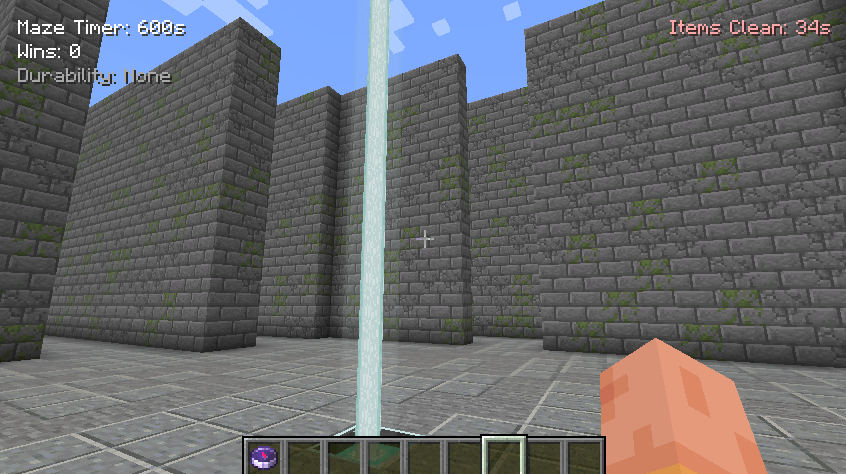
🏗️ Main Features
Generate mazes between pos1 and pos2
Automatic maze refresh when the timer reaches zero
Manual refresh and full rebuild commands
YAML-based theme system (maze_themes.yml)
Optional roof (closed maze)
Life Room (safe living area)
Flexible exit management (1–4 exits)
Chest and loot control
Mob spawn control
Drop cleanup system
Full material override mode (P)
HUD visible only inside the maze
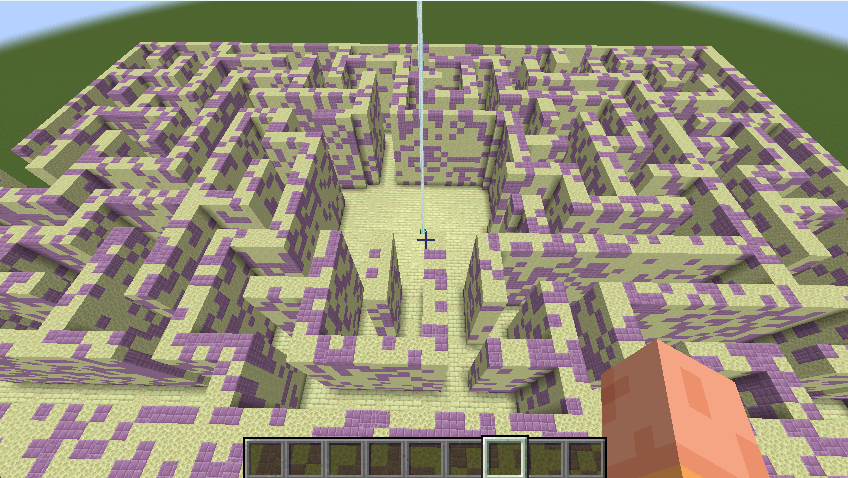
🧱 Labyrinth Themes (maze_themes.yml)
Themes define which blocks are used in different parts of the maze using weighted randomness.
Example Themecastle: wall: STONE_BRICKS: 40 CRACKED_STONE_BRICKS: 20 MOSSY_STONE_BRICKS: 15 floor: POLISHED_ANDESITE: 20 STONE: 10 top: CHISELED_STONE_BRICKS: 3 box: STONE_BRICKS: 40 CRACKED_STONE_BRICKS: 20 MOSSY_STONE_BRICKS: 15
Theme Sections
wall — maze walls
floor — maze floor
top — roof / top layer
box — maze outer boundaries (replaces black_concrete)
You should create a folder in Minecraft\config\ called maze_mod and place this file in it.
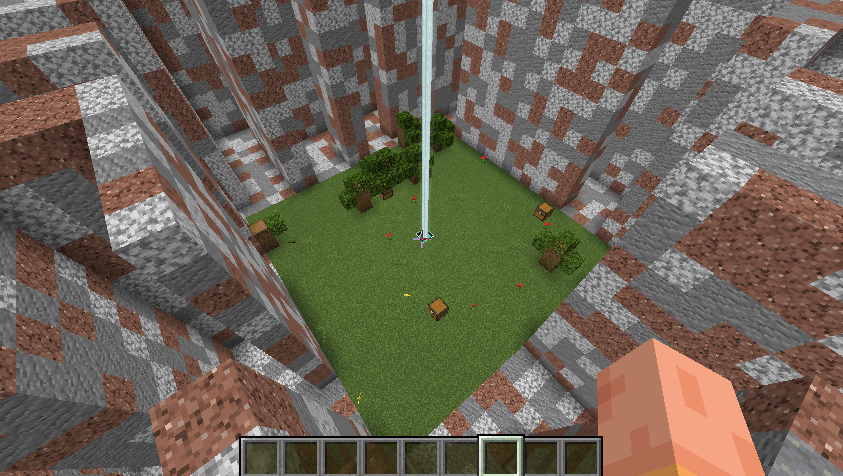
🧠 Life Room (L:true)
The Life Room is a safe living room located inside the maze.
Features
Floor is always GRASS_BLOCK
Natural environment:
grass
flowers
trees with leaves
Central structure:
beacon (lighthouse)
iron blocks under the beacon
Mobs cannot spawn or enter**
Players are immune to maze refresh**
The Life Room never resets on timer or refresh
Chests
Spawn only inside the room
Do not regenerate on refresh or timer
Player Behavior
When entering the maze from outside, players are teleported near the beacon
Players inside the Life Room do not die when the maze updates
📍 Area Selection Commands
/maze pos1 Set first position
/maze pos2 Set second position
/maze poslist Show all saved positions
/maze poscancel Remove a saved position
🏗️ Create a Maze
/maze create [arguments]
Arguments
| Argument | Description |
|---|---|
L:true/false |
Enable Life Room |
CL:true/false |
Enable roof |
P: |
Full material override (entire maze) |
LE:<1-4> |
Number of exits |
LC:true/false |
Chest generation |
ms:true/false |
Natural mob spawning |
| Examples | *** |
| /maze create test L:true CL:true LE:4 | create a life room with a roof and four exits |
| /maze create hell P:35 CL:true | labyrinth with a roof |
| /maze create arena L:true LC:false | create a life room without chests |
🔁 Refresh Maze
/maze refresh [arguments]
Rebuilds the maze logic and structure
Life Room remains unchanged
CL:false fully removes the roof
Examples
/maze refresh test
/maze refresh test CL:false
🔨 Full Rebuild
/maze rebuild [arguments]
Deletes the maze and immediately recreates it.
/maze rebuild test L:true CL:true
⏱️ Timer System
Each maze has its own timer
When the timer reaches 0, the maze refreshes automatically
The Life Room is never affected
Players inside the Life Room take no damage
🚪 Exits
Controlled by LE:<1-4>
Exits are placed at the center of each side of the maze
You can choose between 1 and 4 exits
📦 Chests & Loot
LC:true
Chests spawn:
in the maze
in the Life Room (if enabled)
LC:false
No chests at all
🧟 Mob Control
/maze ms true/false
Controls natural mob spawning
Does not affect maze-controlled mobs
Works instantly (no refresh required)
🧹 Drop Clearing System
/maze LD on/off
/maze LD Time
Examples
/maze LD on
/maze LD Time 2 min
Automatically removes dropped items
Timer works independently of maze timer
HUD shows remaining cleanup time
🎯 Use Cases
Minigames
PvE challenges
Event arenas
Adventure maps
Custom survival challenges
Project description from CurseForge.
Pick your setup
Maze by Minecraft version and loader
Choose the version and loader you play, then open the matching release.
Minecraft version
26.2
3 loader buildsMinecraft version
26.1.2
3 loader buildsMinecraft version
26.1.1
3 loader buildsMinecraft version
26.1
3 loader buildsMinecraft version
1.21.11
3 loader buildsMinecraft version
1.21.10
3 loader buildsMinecraft version
1.21.9
3 loader buildsMinecraft version
1.21.8
3 loader buildsMinecraft version
1.21.7
3 loader buildsMinecraft version
1.21.6
3 loader buildsMinecraft version
1.21.5
3 loader buildsShowing the newest 12 of 17 game versions. Older files are in the list below.
Check the dependencies, then try the file in a copied instance before changing a world you care about.
Recent files
Maze versions and loaders
Maze 1.4.0 - NeoForge 26.3
maze-neoforge-26.3-1.4.0.jar
4 Oct 2026
Client Source doesn’t say Server Source doesn’t say Dependencies No extras listed Listed on Release listing
Check the 26.3 · NeoForge setup NeoForge26.3 release
Maze 1.4.0 - Forge 26.3
maze-forge-26.3-1.4.0.jar
4 Oct 2026
Client Source doesn’t say Server Source doesn’t say Dependencies No extras listed Listed on Release listing
Check the 26.3 · Forge setup Forge26.3 release
Maze 1.4.0 - Fabric 26.3
maze-fabric-26.3-1.4.0.jar
4 Oct 2026
Client Source doesn’t say Server Source doesn’t say Dependencies 1 required · 1 unchecked Listed on Release listing
Check the 26.3 · Fabric setup Fabric26.3 release
Maze 1.4.0 - NeoForge 26.2
maze-neoforge-26.2-1.4.0.jar
4 Oct 2026
Client Source doesn’t say Server Source doesn’t say Dependencies No extras listed Listed on Release listing
Check the 26.2 · NeoForge setup NeoForge26.2 release
Maze 1.4.0 - Forge 26.2
maze-forge-26.2-1.4.0.jar
4 Oct 2026
Client Source doesn’t say Server Source doesn’t say Dependencies No extras listed Listed on Release listing
Check the 26.2 · Forge setup Forge26.2 release
Maze 1.4.0 - Fabric 26.2
maze-fabric-26.2-1.4.0.jar
4 Oct 2026
Client Source doesn’t say Server Source doesn’t say Dependencies 1 required · 1 unchecked Listed on Release listing
Check the 26.2 · Fabric setup Fabric26.2 release
Maze 1.4.0 - NeoForge 26.1.2
maze-neoforge-26.1.2-1.4.0.jar
4 Oct 2026
Client Source doesn’t say Server Source doesn’t say Dependencies No extras listed Listed on Release listing
Check the 26.1.2 · NeoForge setup NeoForge26.1.2 release
Maze 1.4.0 - Forge 26.1.2
maze-forge-26.1.2-1.4.0.jar
4 Oct 2026
Client Source doesn’t say Server Source doesn’t say Dependencies No extras listed Listed on Release listing
Check the 26.1.2 · Forge setup Forge26.1.2 release
Maze 1.4.0 - Fabric 26.1.2
maze-fabric-26.1.2-1.4.0.jar
4 Oct 2026
Client Source doesn’t say Server Source doesn’t say Dependencies 1 required · 1 unchecked Listed on Release listing
Check the 26.1.2 · Fabric setup Fabric26.1.2 release
Maze 1.4.0 - NeoForge 26.1.1
maze-neoforge-26.1.1-1.4.0.jar
4 Oct 2026
Client Source doesn’t say Server Source doesn’t say Dependencies No extras listed Listed on Release listing
Check the 26.1.1 · NeoForge setup NeoForge26.1.1 release
Maze 1.4.0 - Forge 26.1.1
maze-forge-26.1.1-1.4.0.jar
4 Oct 2026
Client Source doesn’t say Server Source doesn’t say Dependencies No extras listed Listed on Release listing
Check the 26.1.1 · Forge setup Forge26.1.1 release
Maze 1.4.0 - Fabric 26.1.1
maze-fabric-26.1.1-1.4.0.jar
4 Oct 2026
Client Source doesn’t say Server Source doesn’t say Dependencies 1 required · 1 unchecked Listed on Release listing
Check the 26.1.1 · Fabric setup Fabric26.1.1 release
Looking for an older file? The official CurseForge project page is in Resources.
 mod
mod CurseForge + Modrinth · Minecraft
Born In Configuration
An Unofficial Configuration for Born In Chaos
 mod
mod CurseForge · Minecraft
Mage Additions
Allows the easy configuration of spells and more config options of Irons Spells n' Spellbooks
 mod
mod CurseForge · Minecraft
Economy: Currency & Chunks ("FTB Chunks/OPAC" & "Lightman/Numismatics")
Turns claiming into a living, self-managing economy with the help of currency mods: claiming costs money, protection is billed per region, wars have a price, and players can buy and sell land from each other — all fully configurable.