
Minecraft version
Back to mods 
CurseForge · Minecraft mod
IV scanner- cobblemon
IV Scanner adds a handheld device to Cobblemon that lets you locate nearby wild Pokémon and evaluate their IV quality, competitive strength, and investment potential using immersive ratings
Choose a version Pick your version below, then grab the matching file.
Quick answer
Which IV scanner- cobblemon release should I use?
Latest stable file iv-scanner-1.0.4-cobblemon-1.7.3.jar
Game version 1.21.1
Loader Fabric
IV scanner- cobblemon iv-scanner-1.0.4-cobblemon-1.7.3.jar targets 1.21.1 with Fabric. The project page does not say whether this file belongs on the client, dedicated server, or both. No extra mods listed for this file.
Where it goes
Is IV scanner- cobblemon required on the client, server, or both?
The project page does not say whether this file belongs on the client, dedicated server, or both.
Client Source doesn’t say
Dedicated server Source doesn’t say
Loader for this release Fabric
Required install it here Optional supported, not mandatory Not supported do not install here Source doesn’t say do not assume
The source does not explicitly classify this release as client-only or server-only.
What else does IV scanner- cobblemon iv-scanner-1.0.4-cobblemon-1.7.3.jar need?
iv-scanner-1.0.4-cobblemon-1.7.3.jar. Change the file and its required mods may change too.
This file does not list any required mods. Do not add a library just because a different file uses it.
This file does not list any required or optional mods.
Before you install it
Add IV scanner- cobblemon without breaking your instance.
Built for IV scanner- cobblemon iv-scanner-1.0.4-cobblemon-1.7.3.jar. Pick another file and the loader, install side or required mods may change.
- 01
Stick to this file
Use iv-scanner-1.0.4-cobblemon-1.7.3.jar. It targets 1.21.1 with Fabric; another release may have different loader, side or dependency requirements.
- 02
Bring the mods it needs
This file does not list any required mods. Do not add a library just because a different file uses it.
- 03
Put it on the correct side
The project page does not say whether this file belongs on the client, dedicated server, or both.
- 04
Pick the file you checked
Use the “Get this file” button beside iv-scanner-1.0.4-cobblemon-1.7.3.jar. It opens that exact file at the source.
About this project
What does IV scanner- cobblemon add?
 IV Scanner

IV Scanner adds a handheld device to Cobblemon that helps you evaluate a Pokemon’s genetic quality and competitive value before catching it.
Instead of numbers, the scanner uses ratings, colors and visual cues to help you decide if a Pokémon is worth catching or investing in.

 How It Works

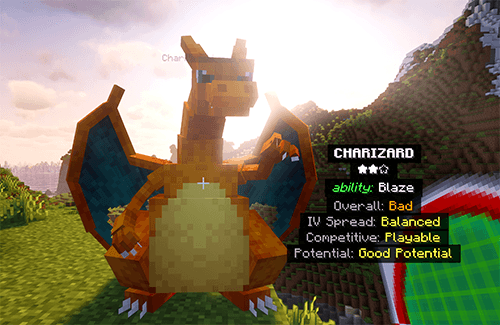
Hold the scanner to search for nearby wild Pokémon with 1 or more perfect IV. (option to search for 1,2,3 or 4 perfect IVs before the sounds/light is triggered)
The antenna blinks green faster as you get closer.
An optional beeping sound that gets faster as you get closer. (can be turned of by right clicking while holding the scanner)
Your own Pokémon (party roaming, pasture) are ignored by detection so you never hunt what you already own.
When you are very close and looking at a Pokémon, a HUD appears.
The HUD works on both wild and owned Pokémon for intentional inspection.
⭐ Rating System
All ratings use color grading from red → yellow → green
the star system means that 1 star= 1 perfect IV, 2 stars=2 perfect IVs, 3 stars=3 perfect IVs and 3 red stars=4+ perfect IVs
Overall
General IV quality.
This is done so you do not pass up on pokemon that have alot of potential and good IVs but just none that are perfect.
Horrible → Bad → Average → Good → Great → Perfect
IV Spread
How evenly IVs are distributed.
Low → Balanced → High
Competitive (At the moment)
How viable the Pokémon is right now, without investment.
Strict and honest
Heavily penalizes catastrophic IVs
IV-based only (no abilities, moves, or species bias)
Competitive Potential (Red → Yellow → Green)
How good the Pokémon could become with IV candies/bottle caps (see my other mod)
Ready (Green) – 0 bad IVs
High Potential (Green) – 1 bad IV
Good Potential (Yellow) – 2 bad IVs
Costly Fix (Orange) – 3 bad IVs
Low Potential (Red) – 4+ bad IVs
This takes into consideration how costly it will be for you to raise the pokemon IVs to make it good and viable.
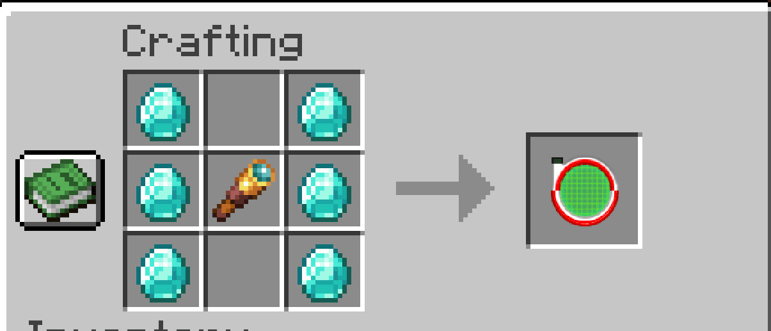
🎮 Recipe
⚙️ Additional Notes
Craftable item
Fabric mod
Cobblemon 1.7.1 compatible
Multiplayer-safe (was only tested in singleplayer)
Minimal performance impact
Project description from CurseForge.
Pick your setup
IV scanner- cobblemon by Minecraft version and loader
Choose the version and loader you play, then open the matching release.
Check the dependencies, then try the file in a copied instance before changing a world you care about.
Recent files
IV scanner- cobblemon versions and loaders
iv-scanner-1.0.4-cobblemon-1.7.3.jar
19 Jul 2026
Client Source doesn’t say Server Source doesn’t say Dependencies No extras listed Listed on Release listing
Check the 1.21.1 · Fabric setup Fabric1.21.1 release
iv-scanner-1.0.jar
9 Jan 2026
Client Source doesn’t say Server Source doesn’t say Dependencies No extras listed Listed on Release listing
Check the 1.21.1 · Fabric setup Fabric1.21.1 release
Looking for an older file? The official CurseForge project page is in Resources.
 mod
CurseForge + Modrinth · Minecraft
TacZ Mesh Loader [TML]
This mod allows you to load mesh geo models created with the Meshy plugin into TacZ.
 mod
CurseForge · Minecraft
Plain Enchantment Levels
Read standard enchantment tooltip levels as plain numbers, including levels above 10. Client-side for NeoForge 1.21.1.
 mod
CurseForge · Minecraft
Keep My Chat Draft
Close vanilla chat with Escape and restore your unsent draft when you reopen it. Client-side, session-only memory with command exclusions.