Minecraft version
Back to mods 
CurseForge · Minecraft mod
BasicHUD
BasicHUD is a Forge mod for Minecraft 1.8.9 that displays basic information as a customizable HUD.
Choose a version Pick your version below, then grab the matching file.
Quick answer
Which BasicHUD release should I use?
Latest stable file BasicHUD 3.6.2
Game version 1.8.9
Loader Forge
BasicHUD 3.6.2 targets 1.8.9 with Forge. The project page does not say whether this file belongs on the client, dedicated server, or both. No extra mods listed for this file.
Where it goes
Is BasicHUD required on the client, server, or both?
The project page does not say whether this file belongs on the client, dedicated server, or both.
Client Source doesn’t say
Dedicated server Source doesn’t say
Loader for this release Forge
Required install it here Optional supported, not mandatory Not supported do not install here Source doesn’t say do not assume
The source does not explicitly classify this release as client-only or server-only.
What else does BasicHUD 3.6.2 need?
BasicHUD 3.6.2. Change the file and its required mods may change too.
This file does not list any required mods. Do not add a library just because a different file uses it.
This file does not list any required or optional mods.
Before you install it
Add BasicHUD without breaking your instance.
Built for BasicHUD 3.6.2. Pick another file and the loader, install side or required mods may change.
- 01
Stick to this file
Use BasicHUD 3.6.2. It targets 1.8.9 with Forge; another release may have different loader, side or dependency requirements.
- 02
Bring the mods it needs
This file does not list any required mods. Do not add a library just because a different file uses it.
- 03
Put it on the correct side
The project page does not say whether this file belongs on the client, dedicated server, or both.
- 04
Pick the file you checked
Use the “Get this file” button beside BasicHUD 3.6.2. It opens that exact file at the source.
About this project
What does BasicHUD add?

BasicHUD
BasicHUD is a Forge mod for Minecraft 1.8.9 that displays basic information as a customizable HUD.
Features
- Stats Display: Real-time FPS, Ping, CPS, Keystrokes and active Potion Effects.
- Customization: Fully configurable position, text colors (incl. RGB/Chroma), background and on/off toggle.
- GUI: Built-in config menu (default Shortcut: K) for easy adjustments with Drag and Drop to change the Position.
Installation
Download jar file manually
- Download the latest
.jarfrom Modrinth / Curseforge / the Releases tab. - Make sure you have Minecraft Forge 1.8.9 installed.
- Drop the file into your
.minecraft/modsfolder.
Use Prism Launcher
- Open Prism Launcher and select your Minecraft 1.8.9 Forge instance.
- Click on Edit in the right-side menu.
- Navigate to the Mods tab in the left sidebar and click Download Mods at the top right.
- Search for BasicHUD (ensure Modrinth or CurseForge is selected as the source), select the mod, and click Review and Confirm.
Use Modrinth / Curseforge Lauchner
- Use Modrinth / CurseForge Launcher
- Open your Modrinth App or CurseForge Launcher.
- Navigate to your Minecraft 1.8.9 Forge profile/instance.
- Click the Add Mods button (Modrinth App) or Add More Content button (CurseForge).
- Search for BasicHUD and click Install.
Usage
- The HUD appears automatically when you join a world or server.
- To edit settings: Press K to open the config, there you can edit the position (Drag and Drop) and more settings (Open more settings button) of the HUD Elements.
Screenshots


Building from Source
If you want to compile the mod yourself:
- Clone this repository.
- Run the build command:
bash ./gradlew build - The output file will be in
build/libs.
Credits
- Created by Marschi47.
- Based on Forge1.8.9Template by lineargraph.
Project description from CurseForge.
Pick your setup
BasicHUD by Minecraft version and loader
Choose the version and loader you play, then open the matching release.
Check the dependencies, then try the file in a copied instance before changing a world you care about.
Recent files
BasicHUD versions and loaders
BasicHUD 3.6.2
basichud-3.6.2.jar
12 Oct 2026
Client Source doesn’t say Server Source doesn’t say Dependencies No extras listed Listed on Release listing
Check the 1.8.9 · Forge setup Forge1.8.9 release
BasicHUD 3.6.0
basichud-3.6.0.jar
14 Aug 2026
Client Source doesn’t say Server Source doesn’t say Dependencies No extras listed Listed on Release listing
Check the 1.8.9 · Forge setup Forge1.8.9 release
BasicHUD 3.4.0
basichud-3.4.0.jar
30 Mar 2026
Client Source doesn’t say Server Source doesn’t say Dependencies No extras listed Listed on Release listing
Check the 1.8.9 · Forge setup Forge1.8.9 release
Basichud 3.2.3
basichud-3.2.3.jar
20 Mar 2026
Client Source doesn’t say Server Source doesn’t say Dependencies No extras listed Listed on Release listing
Check the 1.8.9 · Forge setup Forge1.8.9 release
BasicHUD 3.2.2
basichud-3.2.2.jar
18 Mar 2026
Client Source doesn’t say Server Source doesn’t say Dependencies No extras listed Listed on Release listing
Check the 1.8.9 · Forge setup Forge1.8.9 release
BasicHUD 3.1.0
BasicHUD-3.1.0.jar
15 Jan 2026
Client Source doesn’t say Server Source doesn’t say Dependencies No extras listed Listed on Release listing
Check the 1.8.9 · Forge setup Forge1.8.9 release
Looking for an older file? The official CurseForge project page is in Resources.
 mod
CurseForge · Minecraft
Target Highlight
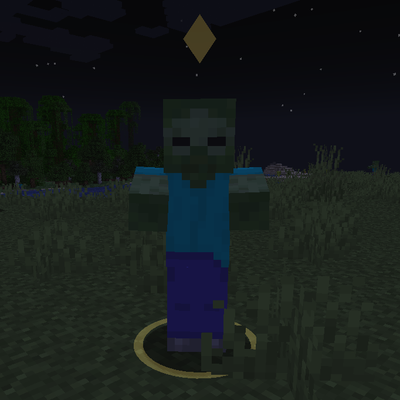
Marks the enemy nearest your crosshair with a soft ground ring and a small marker above its head. Client-side only and fully configurable.
 mod
CurseForge · Minecraft
OG'S Backpacks
Backpack mod on all versions
 mod
CurseForge · Minecraft
Let Your Friend Drink
Allows Let Your Friend Eating to feed potions to other players as well.