Roughly Enough Items Fabric/Forge/NeoForge (REI) Optional for Not Enough Calculator notenoughcalculator-3.1.1.jar
optionalMatching file found Matched file: [Fabric 26.3] v26.3.824
CurseForge · Minecraft mod
A NEU-style calculator that works standalone or inside Roughly Enough Items (REI) & Skyblock Item List search bars!
Quick answer
Not Enough Calculator notenoughcalculator-3.1.1.jar targets 26.3 with Fabric. The project page does not say whether this file belongs on the client, dedicated server, or both. All 1 required mods have matching files.
Where it goes
The project page does not say whether this file belongs on the client, dedicated server, or both.
The source does not explicitly classify this release as client-only or server-only.
notenoughcalculator-3.1.1.jar. Change the file and its required mods may change too.
Install Fabric API first. We found matching files for this game-version and loader setup. 3 come through another mod in the chain.
3 extra mods were pulled in by other dependencies. Indented rows show who needs each one. We only count dependency files that match this setup. A file for another loader does not fill the gap.
Before you install it
Built for Not Enough Calculator notenoughcalculator-3.1.1.jar. Pick another file and the loader, install side or required mods may change.
Use notenoughcalculator-3.1.1.jar. It targets 26.3 with Fabric; another release may have different loader, side or dependency requirements.
Install Fabric API first. We found matching files for this game-version and loader setup. 3 come through another mod in the chain.
The project page does not say whether this file belongs on the client, dedicated server, or both.
Use the “Get this file” button beside notenoughcalculator-3.1.1.jar. It opens that exact file at the source.
About this project


A NEU-style calculator that works standalone or inside Roughly Enough Items (REI) & Skyblock Item List search bars. Type calculations directly in the search bar and get instant results.
Inspired by NotEnoughUpdates calculator. Recreated for newer Minecraft versions where NEU isn't available.

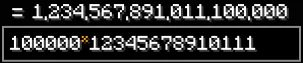
Type calculations directly in the search bar and get instant results! Works inside Roughly Enough Items (REI)'s search bar, Skyblock Item List's search bar, or completely Standalone with its own bar at the bottom of inventory screens. If you played with NEU on older versions, you already know how this works.
Example: Type 100m - 50m in the search bar → See = 50,000,000 instantly
| Feature | Operator | Example Input | Result |
|---|---|---|---|
| Addition | + |
5 + 3 |
8 |
| Subtraction | - |
10 - 4 |
6 |
| Multiplication | *, x, X |
6 * 7 or 6x7 |
42 |
| Division | / |
20 / 4 |
5 |
| Exponents | ^ |
2 ^ 8 |
256 |
| Modulo | % |
10 % 3 |
1 |
| Factorial | ! |
5! |
120 |
| Percentage | % |
100 + 10% |
110 |
| Parentheses & Grouping | ( ) |
(2 + 3) * 4 |
20 |
| Implicit Multiplication | (a)(b) or a(b) |
2(3 + 4) |
14 |
| Bitwise AND | & |
12 & 10 |
8 |
| Bitwise OR | `\ | ` | 12 | 10 |
| Bitwise NOT | ~ |
~5 |
-6 |
| Bitwise XOR | xor(a, b) |
xor(12, 10) |
6 |
| Bitwise Left Shift | << |
1 << 4 |
16 |
| Bitwise Right Shift | &gt;&gt; |
16 >> 2 |
4 |
| Radix Literals | 0b, 0x, 0o |
0xFF + 1 |
256 |
| Function | Syntax | Description | Example Input | Result |
|---|---|---|---|---|
| Square Root | sqrt(x) |
Square root | sqrt(144) |
12 |
| Absolute Value | abs(x) |
Absolute value | abs(-25) |
25 |
| Floor | floor(x) |
Round down to nearest integer | floor(4.9) |
4 |
| Ceiling | ceil(x) |
Round up to nearest integer | ceil(4.1) |
5 |
| Round | round(x) |
Round to nearest integer | round(4.5) |
5 |
| Logarithm (Base 10) | log(x) |
Logarithm base 10 | log(1000) |
3 |
| Natural Logarithm | ln(x) |
Natural logarithm (base e) | ln(2.71828) |
1 |
| Sine | sin(x) |
Sine (degrees) | sin(90) |
1 |
| Cosine | cos(x) |
Cosine (degrees) | cos(0) |
1 |
| Tangent | tan(x) |
Tangent (degrees) | tan(45) |
1 |
| Radians to Degrees | deg(x) |
Convert radians to degrees | deg(pi) |
180 |
| Degrees to Radians | rad(x) |
Convert degrees to radians | rad(180) |
3.1415926536 |
| Minimum | min(a, b, ...) |
Smallest value in arguments | min(5, 2, 8) |
2 |
| Maximum | max(a, b, ...) |
Largest value in arguments | max(5, 2, 8) |
8 |
| Clamp | clamp(v, min, max) |
Constrain value between min and max | clamp(15, 0, 10) |
10 |
| Average | avg(a, b, ...) |
Arithmetic mean of values | avg(10, 20, 30) |
20 |
| Percentage Ratio | pct(part, total) |
Calculates percentage ratio | pct(25, 200) |
12.5 |
| GCD | gcd(a, b) |
Greatest common divisor | gcd(24, 36) |
12 |
| LCM | lcm(a, b) |
Least common multiple | lcm(4, 6) |
12 |
| Hexadecimal | hex(x) |
Convert number to Hex (0x...) |
hex(255) |
0xFF |
| Binary | bin(x) |
Convert number to Binary (0b...) |
bin(10) |
0b1010 |
| Octal | oct(x) |
Convert number to Octal (0o...) |
oct(63) |
0o77 |
| Compact Formatter | fmt(x) |
Format number with SkyBlock suffix | fmt(1500000) |
1.5m |
| Unit | Multiplier / Value | Description | Example Input | Result |
|---|---|---|---|---|
k |
1,000 |
Thousand | 5k |
5,000 |
m |
1,000,000 |
Million | 2.5m |
2,500,000 |
b |
1,000,000,000 |
Billion | 1.2b |
1,200,000,000 |
t |
1,000,000,000,000 |
Trillion | 0.5t |
500,000,000,000 |
s, st, stack |
64 |
Standard item stack | 3s or 3st |
192 |
e |
160 |
Enchanted item (2.5 stacks) | 5e |
800 |
h, sc |
1,728 |
Shulker Box / Small Chest (27 slots) | 2h or 2sc |
3,456 |
dc |
3,456 |
Double Chest (54 slots) | 1.5dc |
5,184 |
eb |
2,880 |
Ender Chest (45 slots) | 2eb |
5,760 |
| Function | Syntax | Description | Example Input | Result |
|---|---|---|---|---|
| Skill XP (Standard) | skillxp(lvl, [toLvl]) |
Total XP for level or between levels (1–60) | skillxp(50) |
55,172,425 |
| Catacombs XP | cataxp(lvl, [toLvl]) |
Total XP for Cata level or range (1–50+) | cataxp(24) |
3,029,540 |
| Hunting XP | huntingxp(lvl, [toLvl]) |
Total XP for Hunting level or range (1–50) | huntingxp(20) |
2,000,000 |
| Runecrafting XP | runecraftingxp(lvl, [toLvl]) |
Runecrafting skill milestones (1–25) | runecraftingxp(25) |
100,000 |
| Social XP | socialxp(lvl, [toLvl]) |
Social skill milestones (1–25) | socialxp(20) |
160,000 |
| Universal Slayer XP | slayerxp(boss, lvl) |
Milestones for Zombie, Spider, Wolf, Eman, Blaze, Vampire (1–9) | slayerxp("eman", 7) |
100,000 |
| Specific Slayer Bosses | zombiexp(), spiderxp(), wolfxp(), emanxp(), blazexp(), vampirexp() |
Slayer boss milestones (1–9) | emanxp(7) |
100,000 |
| Function | Syntax | Hours Param | Description | Example Input | Result |
|---|---|---|---|---|---|
| Bazaar Net Payout | bz(price) |
N/A | Net payout after Bazaar tax (scales with Flipper perk) | bz(100m) |
98,750,000 |
| AH Auction Net Payout | ah(price, [hrs]) |
1, 6, 12, 24, 48 (Default: 24) |
Net payout after AH 5% fee + duration fee | ah(100m) |
94,980,000 |
| AH BIN Net Payout | ahbin(price, [hrs]) |
1, 6, 12, 24, 48 (Default: 24) |
Net payout after AH BIN listing fee + collection tax | ahbin(100m) |
96,980,000 |
| Identifier | Syntax | Scope | Description | Example Input |
|---|---|---|---|---|
| Previous Answer | ans |
Session | Result of the last successful calculation | ans * 2 |
| Pi | pi |
Constant | Mathematical constant $\pi \approx 3.1415926535$ | 2 * pi * 10 |
| Euler's Number | e |
Constant | Mathematical constant $e \approx 2.7182818284$ | e ^ 2 |
| Custom Variables | $name |
Global (Persistent) | User-defined custom variables created via /calcset or /calcconfig |
$ratio * 500k |
| Category | Color Code | Examples |
|---|---|---|
| Numbers & Radix | §b (Aqua / Cyan) |
100, 2.5, 0xFF, 0b1010 |
| Units & Storage | §3 (Dark Aqua) |
k, m, b, t, s, st, e, dc, sc, eb |
| Math Functions | §e (Yellow) |
sqrt(), abs(), log(), sin(), min(), max(), avg(), fmt() |
| Progression | §6 (Gold) |
skillxp(), cataxp(), slayerxp(), zombiexp() |
| Taxes | §9 (Royal Blue) |
bz(), ah(), ahbin() |
| Built-in Constants | §b (Aqua) |
ans, pi, e |
| Custom Variables | §b (Aqua) |
$cost, $gem, $tax |
| Operators & Punctuation | §c (Light Red) |
+, -, *, /, ^, %, !, (, ), , |
| Live Result Preview | §a (Light Green) |
= 50,000,000 |
Open the configuration screen with /calcconfig or via Mod Menu to access:
/calcpos) to reposition the standalone search bar with drag-and-drop handles.| Shortcut | Context | Action |
|---|---|---|
Ctrl+Z |
Search Bar | Undo calculation history step |
Ctrl+Y |
Search Bar | Redo calculation history step |
Ctrl+C |
Search Bar (No Selection) | Copy full equation and answer to clipboard (100m - 25m = 75m) |
Ctrl+C |
Search Bar (With Selection) | Copy selected text to clipboard |
Ctrl+X |
Search Bar | Cut selected text to clipboard |
Ctrl+V |
Search Bar | Paste clipboard text into search bar |
Ctrl+A |
Search Bar | Select all text in search bar |
Ctrl+Left |
Search Bar | Jump cursor backward by word boundary |
Ctrl+Right |
Search Bar | Jump cursor forward by word boundary |
Ctrl+Backspace |
Search Bar | Delete word to the left of cursor |
Ctrl+Delete |
Search Bar | Delete word to the right of cursor |
Enter |
Search Bar | Commit calculation equation and answer to history |
Shift + Click & Drag |
Standalone Bar | Reposition search bar freely anywhere on screen |
Right-Click & Drag |
Standalone Bar | Reposition search bar freely anywhere on screen |
Click on Chat Result |
Chat | Click any /calc result in chat to copy answer directly to clipboard |
| Command | Arguments | Description | Example |
|---|---|---|---|
/calc |
<expression> |
Evaluates any mathematical expression directly in chat with click-to-copy formatting | /calc 150m - 25m |
/calchist |
None | Displays the list of recent calculation history entries in chat | /calchist |
/calcclear |
None | Clears your current session's calculation history | /calcclear |
/calcset |
<name> <expression> |
Creates or updates a persistent custom variable | /calcset tax 100m * 0.01 |
/calcconfig |
None | Opens the interactive settings and Custom Variables GUI | /calcconfig |
/calcpos |
None | Opens the interactive search bar position editor | /calcpos |
/calchelp |
[topic] |
Displays in-game help pages and function manuals in chat | /calchelp functions |
| Topic | Description |
|---|---|
/calchelp operators |
List all supported math, grouping, and bitwise operators with examples |
/calchelp functions |
List all math functions (sqrt, abs, round, min, max, avg, deg, rad, fmt) |
/calchelp units |
List all SkyBlock numeric and container units (k, m, b, t, s, st, e, dc, sc, eb) |
/calchelp progression |
List all XP table functions (skillxp, cataxp, slayerxp, zombiexp, etc.) |
/calchelp taxes |
Reference for Bazaar and Auction House tax calculation formulas |
/calchelp variables |
Guide on using built-in constants (ans, pi, e) and custom variables ($name) |
/calchelp shortcuts |
Reference for search bar navigation and clipboard shortcuts |
/calchelp commands |
Overview of all /calc commands |
| Setting Name | Config Key | Default | Description |
|---|---|---|---|
| Custom Variables Manager | GUI Tab Custom Variables |
N/A | Interactive GUI tab to add, edit, delete, and paginate (< / >) custom variables |
| Inline Results | showInlineResults |
true |
ON: Renders live calculation results (= 50m) directly inside the search bar as you type.OFF: Hides live result overlays in search bars. |
| Unit Suggestions | showUnitSuggestions |
true |
ON: Displays unit conversions and item equivalents (e.g. (1 double chest)) below the search bar.OFF: Hides unit conversion tooltips. |
| Comma Formatting | enableCommaFormatting |
true |
ON: Formats large numbers with thousand separator commas (e.g. 1,000,000).OFF: Outputs plain numbers without commas (e.g. 1000000). |
| Shorthand Results | enableShorthandResults |
false |
ON: Formats results in compact SkyBlock notation (e.g. 1.5m, 2.5b).OFF: Displays the full numeric value with comma formatting. |
| Syntax Highlighting | enableSyntaxHighlighting |
true |
ON: Color-codes numbers (cyan), units (aqua), math functions (yellow), progression (gold), taxes (royal blue), variables (aqua/cyan), operators (red), and results (green). OFF: Renders search bar text in plain standard white. |
| Decimal Precision | decimalPrecision |
10 |
Configures maximum decimal places for outputs (1 to 50). Numbers exceeding this scale are rounded using HALF_UP. |
| Bazaar Flipper Perk | bazaarFlipperLevel |
0 |
Selects your account's Community Center perk: Lvl 0 (1.25% tax), Lvl 1 (1.125% tax), or Lvl 2 (1.0% tax). |
| History Shortcuts | enableHistoryNavigation |
true |
ON: Traverses calculation history in search bars using Ctrl+Z (Undo) and Ctrl+Y (Redo).OFF: Disables Ctrl+Z/Ctrl+Y history recall. |
| Full Equation Copy | enableFullEquationCopy |
true |
ON: Pressing Ctrl+C with no text selected copies the entire equation and answer (e.g. 100m - 25m = 75m).OFF: Copies only the formatted result value ( 75m). |
| Force Standalone Mode | forceStandaloneMode |
false |
ON: Unhooks calculator from REI & Item List search bars, using our dedicated standalone bar (dynamically sized and moveable). OFF: Integrates directly inside the active REI or Item List search bar. |
| Edit GUI | GUI Button Edit GUI |
N/A | Opens interactive GUI positioning editor to drag and place search bar anywhere on screen. |
| Reset Position | GUI Button §f§l⟲ / Edit GUI |
N/A | Resets search bar position back to default (beside active search bar or centered at bottom). |
| Item List Integration | enableItemListIntegration |
true |
ON: Enables calculator within SkyBlock Item List search bar (when installed). OFF: Disables calculator hooks in SkyBlock Item List. |
| Name | Version |
|---|---|
| Fabric Loader | 0.20.1+ |
| Fabric API | 0.161.0+ |
| Name | Version |
|---|---|
| Roughly Enough Items (REI) | 26.2.820+ |
| Skyblock Item List | 0.0.24+ |
| Mod Menu | 20.0.3+ |
mods/ folder:Shift+Drag or Right-Click Drag)./calc <expression>.Shift and left-click drag (or right-click drag) the search bar to move it anywhere on your screen./calcpos or open /calcconfig and click Edit GUI to interactively drag the bar. Click the reset button (§f§l⟲) to restore the default position.Ctrl+C with no selection to copy the full equation (100m - 25m = 75m)./calcconfig). Under Bazaar Flipper Perk, select your account's Community Center perk level (Lvl 0 = 1.25%, Lvl 1 = 1.125%, Lvl 2 = 1.0%) so bz() calculations match your profile's exact tax rate.sqrt($mysize)), with custom variables (e.g. $profit - $cost), or combined together (e.g. $profit * $tax)./calcconfig GUI under the Custom Variables tab. To reset everything to default, delete config/notenoughcalculator.json in your .minecraft folder while the game is closed.hex()), Binary (bin()), and Octal (oct()) functions operate on integer values. Floating-point numbers are rounded to nearest integers when performing bitwise operations (&, |, ~, <<, >>, xor).6912+0, 2dc, 1sc) or run /calc 6912 in chat.0xFF = 0xFF, 0b1010 = 0b1010, 0o77 = 0o77). To convert to decimal, use standard math (e.g. 0xFF + 0 = 255, 0b1010 + 0 = 10). To convert any decimal into a radix format, use hex(255), bin(10), or oct(63).NEU (NotEnoughUpdates) had a great calculator built into its search bar. NEU doesn't exist for newer Minecraft versions though, so this mod fills that gap. Works with Roughly Enough Items (REI), Skyblock Item List, or runs completely standalone.
Feel free to include this mod in any modpack without restriction! Adding a link back to the mod page is also not mandatory, but is greatly appreciated.
Want to help improve Not Enough Calculator? Check out our Contributing Guide.
Read Licensing Notice and Transition Statement.
See the full license text in View LICENSE.
Maintained by Laze & Rijz
Type. Calculate. Profit.
Last updated: 09-11-2026
Project description from CurseForge.
Pick your setup
Choose the version and loader you play, then open the matching release.
Check the dependencies, then try the file in a copied instance before changing a world you care about.
Recent files
9 Nov 2026
9 Nov 2026
3 Oct 2026
3 Oct 2026
3 Oct 2026
12 Sept 2026
12 Sept 2026
28 Aug 2026
15 Aug 2026
13 Aug 2026
12 Aug 2026
7 Aug 2026
Looking for an older file? The official CurseForge project page is in Resources.
 mod
Improves the Stonecutter GUI, adding Search Bar, 3D Preview and other things. More features soon!
 mod
Don't let walls and fences stop you! Jump over them!
 mod
Adds Minecraft Story Mode inspired white pumpkins that will generate in the pale garden. Made for SpookyJam 2024


