Cloth Config API (Fabric/Forge/NeoForge) Needed by Twenty-four Hours 24-hours-1.4.0.jar
requiredMatching file found Matched file: [Fabric 26.1] v26.1.154
CurseForge · Minecraft mod
Make Minecraft day like a real day.
Quick answer
Twenty-four Hours 24-hours-1.4.0.jar targets 26.1, 26.1.1, 26.1.2 with Fabric. The project page does not say whether this file belongs on the client, dedicated server, or both. All 1 required mods have matching files.
Where it goes
The project page does not say whether this file belongs on the client, dedicated server, or both.
The source does not explicitly classify this release as client-only or server-only.
24-hours-1.4.0.jar on 26.1.2. Every mod below is checked against that same setup.
Install Cloth Config API (Fabric/Forge/NeoForge) first. We found matching files for this game-version and loader setup.
We only count dependency files that match this setup. A file for another loader does not fill the gap.
Before you install it
Built for Twenty-four Hours 24-hours-1.4.0.jar on 26.1.2. Pick another file and the loader, install side or required mods may change.
Use 24-hours-1.4.0.jar. It targets 26.1, 26.1.1, 26.1.2 with Fabric; another release may have different loader, side or dependency requirements.
Install Cloth Config API (Fabric/Forge/NeoForge) first. We found matching files for this game-version and loader setup.
The project page does not say whether this file belongs on the client, dedicated server, or both.
Use the “Get this file” button beside 24-hours-1.4.0.jar. It opens that exact file at the source.
About this project
The mod allows you to play minecraft world with time like in real world
<center>

Main Setting
you can enable/disable mods, and also can choose time mode (Time Zone or Manual).

Manual Start Hour Setting
You can set the time in Minecraft world. The top part is for hours and the bottom part is for minutes.
 </center><center></center><center>
Country Time Zone
Here there are several countries that you can choose from and the time will automatically adjust to that country.

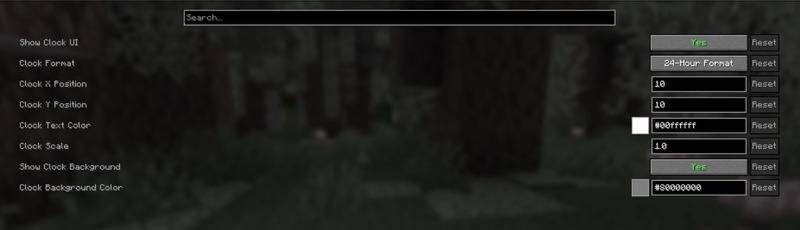
UI Setting
You can set the position of the clock in this mod, and there are several other settings (default top left corner).

</center>
keybind to open mod configuration, default key "O".
you can also use command /24sync and /24debug
Project description from CurseForge.
Pick your setup
Choose the version and loader you play, then open the matching release.
Showing the newest 12 of 17 game versions. Older files are in the list below.
Check the dependencies, then try the file in a copied instance before changing a world you care about.
Recent files
17 Oct 2026
Looking for an older file? The official CurseForge project page is in Resources.
 mod
Adding 45+ mobs, 8+ bosses, 3 fleshed out dimensions, and more
 mod
Discover, track, and master encounters that are triggered by your everyday gameplay actions.
 mod
Data-driven minecraft in-game documentation with progress visualization.