Minecraft version
Back to mods 
CurseForge · Minecraft mod
Cooling Boots
Adds the Cooling Boots, allowing players to walk on water/lava by creating ice/obsidian beneath their feet. New modes: Off/ Melt/ Permanent
Choose a version Pick your version below, then grab the matching file.
Quick answer
Which Cooling Boots release matches 26.2 Forge?
Best match for your filters coolingboots-4.0.3-forge-26.2.jar
Game version 26.2
Loader Forge
Cooling Boots coolingboots-4.0.3-forge-26.2.jar targets 26.2 with Forge. The project page does not say whether this file belongs on the client, dedicated server, or both. No extra mods listed for this file.
Where it goes
Is Cooling Boots required on the client, server, or both?
The project page does not say whether this file belongs on the client, dedicated server, or both.
Client Source doesn’t say
Dedicated server Source doesn’t say
Loader for this release Forge
Required install it here Optional supported, not mandatory Not supported do not install here Source doesn’t say do not assume
The source does not explicitly classify this release as client-only or server-only.
What else does Cooling Boots coolingboots-4.0.3-forge-26.2.jar need?
coolingboots-4.0.3-forge-26.2.jar on 26.2 Forge. Every mod below is checked against that same setup.
This file does not list any required mods. Do not add a library just because a different file uses it.
This file does not list any required or optional mods.
Before you install it
Add Cooling Boots without breaking your instance.
Built for Cooling Boots coolingboots-4.0.3-forge-26.2.jar on 26.2 Forge. Pick another file and the loader, install side or required mods may change.
- 01
Stick to this file
Use coolingboots-4.0.3-forge-26.2.jar. It targets 26.2 with Forge; another release may have different loader, side or dependency requirements.
- 02
Bring the mods it needs
This file does not list any required mods. Do not add a library just because a different file uses it.
- 03
Put it on the correct side
The project page does not say whether this file belongs on the client, dedicated server, or both.
- 04
Pick the file you checked
Use the “Get this file” button beside coolingboots-4.0.3-forge-26.2.jar. It opens that exact file at the source.
About this project
What does Cooling Boots add?
❄️COOLING BOOTS -V4.0.3❄️
(NO MORE UPDATE ON THIS MOD last version is 26.2)
With these boots equipped, you can safely walk on water/lava as it instantly turns into blue ice/obsidian beneath your feet. Just walk like it’s solid ground.

🧊 Features
-Walk on water/lava by creating a blue ice/obsidian path under your feet
-Full fire and lava immunity while wearing the boots
-Jump height and movement speed increased (×1.33) when wearing the boots
-Negate fall damages when jumping from high in water/lava (or on blue ice/obsidian)
-Added 3 modes when boots are equipped:
-OFF: Liquids are not transformed (you got fire immunity)
-MELT: The blocks will melt into 15sc
-PERMANENT: The blocks will stay solid
-Use "V" key to switch modes, configurable in options>command
-ADMIN : You can block permanent mode on your server; Use /coolingboots permanent allowed true/false
-Return to MELT mode for all players on PERMANENT if this command was used
-Added some sound effects
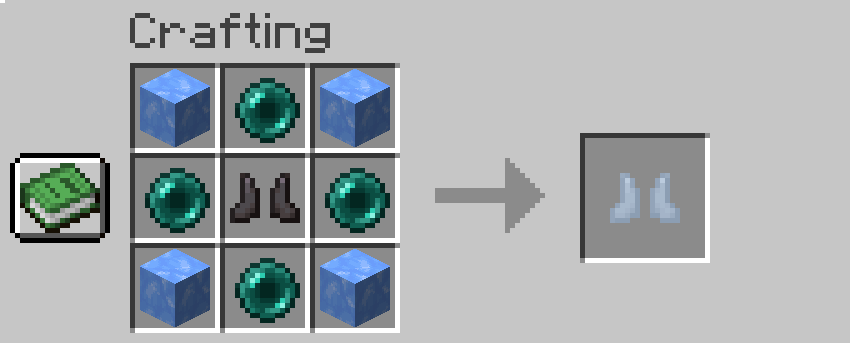
🛠 Crafting & Configuration
-1 netherite boots, 4 ender pearl, 4 blue ice
-The recipe is configurable in the instance /mods folder and directly inside coolingboots-xx-xx-xx.jar
-Edit the recipe file at data/coolingboots/recipe(s)/cooling_boots.json (7-Zip, WinRAR, etc.)
-Follow easy pattern explained in the code, LETTERS 3x3 are your crafting table
-Use only item ID's, and don't forget to save your change! (need save on notepad + confirm save with the pop up on 7zip)
Note:
-⚠️ Some functions may vary slightly depending on the version.
-⚠️ Use /recipe give @p coolingboots:cooling_boots if you did not obtain any résult on the crafting table.
Whether you’re exploring the Nether or just tired of dying in stupid lava accidents, Cooling Boots add a practical and fun gameplay mechanic without breaking multiplayer or protection systems.
Project description from CurseForge.
Pick your setup
Cooling Boots by Minecraft version and loader
Choose the version and loader you play, then open the matching release.
Minecraft version
26.1.2
3 loader buildsMinecraft version
26.1.1
3 loader buildsMinecraft version
26.1
3 loader buildsMinecraft version
1.21.11
2 loader buildsMinecraft version
1.21.1
2 loader buildsMinecraft version
1.20.1
2 loader buildsCheck the dependencies, then try the file in a copied instance before changing a world you care about.
Recent files
Cooling Boots versions and loaders
coolingboots-4.0.3-forge-26.2.jar
23 Jun 2026
Client Source doesn’t say Server Source doesn’t say Dependencies No extras listed Listed on Release listing
Check the 26.2 · Forge setup Forge26.2 release
Looking for an older file? The official CurseForge project page is in Resources.
 mod
CurseForge · Minecraft
Celestial Ascent
An endgame boss ladder past the Ender Dragon: ten evolving bosses, armor that grows with you, two new dimensions, an economy and an in-game guide.
 mod
CurseForge · Minecraft
OG'S Backpacks
Backpack mod on all versions
 mod
CurseForge · Minecraft
Salvage OG - Uncrafting Table & Recycling
A salvage table that takes crafted things apart again: tools, armour and blocks give back their recipe's materials, worn gear gives less, and a book keeps the enchantments.