Minecraft version
Back to mods 
CurseForge · Minecraft mod
Bending Styles
This mod gives you the ability to use the bending powers from avatar the last airbender.
Choose a version Pick your version below, then grab the matching file.
Quick answer
Which Bending Styles release should I use?
Latest stable file BendingStyles-1.1.1-neoforge-1.21.8.jar
Game version 1.21.1
Loader NeoForge
Bending Styles BendingStyles-1.1.1-neoforge-1.21.8.jar targets 1.21.1 with NeoForge. The project page does not say whether this file belongs on the client, dedicated server, or both. No extra mods listed for this file.
Where it goes
Is Bending Styles required on the client, server, or both?
The project page does not say whether this file belongs on the client, dedicated server, or both.
Client Source doesn’t say
Dedicated server Source doesn’t say
Loader for this release NeoForge
Required install it here Optional supported, not mandatory Not supported do not install here Source doesn’t say do not assume
The source does not explicitly classify this release as client-only or server-only.
What else does Bending Styles BendingStyles-1.1.1-neoforge-1.21.8.jar need?
BendingStyles-1.1.1-neoforge-1.21.8.jar. Change the file and its required mods may change too.
This file does not list any required mods. Do not add a library just because a different file uses it.
This file does not list any required or optional mods.
Before you install it
Add Bending Styles without breaking your instance.
Built for Bending Styles BendingStyles-1.1.1-neoforge-1.21.8.jar. Pick another file and the loader, install side or required mods may change.
- 01
Stick to this file
Use BendingStyles-1.1.1-neoforge-1.21.8.jar. It targets 1.21.1 with NeoForge; another release may have different loader, side or dependency requirements.
- 02
Bring the mods it needs
This file does not list any required mods. Do not add a library just because a different file uses it.
- 03
Put it on the correct side
The project page does not say whether this file belongs on the client, dedicated server, or both.
- 04
Pick the file you checked
Use the “Get this file” button beside BendingStyles-1.1.1-neoforge-1.21.8.jar. It opens that exact file at the source.
About this project
What does Bending Styles add?
This mod gives the player the ability to use all four elements from avatar the last airbender, wich are fire, air, earth and water. The player can activate specific abilities by pressing different key combinations. Kinda like how different moves are activated in mortal combat like games.
How to get started with the mod:
The player does not start off with all the elemental powers. To get one of the elements you will need to create and read first a normal scroll and then buy and read one of the elemental scrolles.
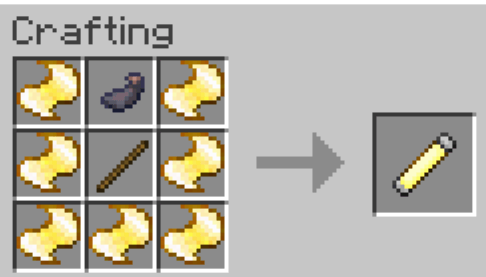
The crafting recipie of a scroll. It uses 7 ancient lore pieces wich you can obtain by (right now) either slaying a gargoyle from a fire temple or completing a parkour thing in the air islands. Once you have the scroll simply right click while holding it in your right arm, that will open the scroll and give you the advancement Bender. When you have this advancement your character will pose whenever you press the keys (changable in the settings) R, G or V.
Then you will need to get a librarian villager and trade with him for a scroll of one of the specific elements. 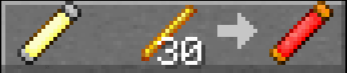 <---- The trade for a fire scroll.
Once you get the new scroll just simply open it like the scroll before and you´ll get the element.
All Fire Abilities:
R, G, R -----> FirePunch: Shoots out a bunch of fire
G, V ----> FireJump: Boosts you into the air while burning the ground.
G, R, R -----> FireRing: Shoots fire around you forming a circle.
R, G, V, R(holding) ----> FireBreath: Like a flamethrower.
V, G, R -----> Firewall: Lits the ground.
G, V, (after Firejump) -----> FireJet: Hovering (forwards with elytras).
All Air Abilities:
R, V -----> AirJump: Propeles you upwards (forwards with elytras).
R, G, G -----> AirSlice: Shoots a blade of air that can go through targets.
G, R, G ------> WindGust: Shoots a large cloud of wind that pushes the target.
V, R, G(holding) -----> That ball thing Aang liked doing / AirScooter: You ride a ball of air.
All Earth Abilities:
R, V, G -----> EarthingUp: Creates two blocks of the specific earth block you are looking at in the direction of the face of the block you are looking at.
G, R, V ----> EarthKick: Transforms the earth block you are looking at into a projectile and shoots it. The damage depends on the hardness of the block.
G, V, V ----> EarthPillar: Lifts you up and creates a pillar underneath you.
R, G, V, G -----> EarthWall: uses the earth blocks in front of you to create a wall.
R, G, V, V ------> Digging: Destroys earth blocks infront of you.
V, G, V ------> Geokinesis: Picks up an earth block and holds it infront of you.
G (after Geokinesis) ----> Place: Places the block you are holding with Geokinesis.
R (after Geokinesis) ----> Throw: Throws the block you are holding with Geokinesis.
V, G, G, R -----> WallRamm : Like EarthKick but bigger and less mobile.
R (Holding the EarthDisk) -----> Throw: You throw the disk. And it comes back.
All Water Abilities:
G, V, R ----> PickUp: Picks up water and holds it infront of you. (Ice, bottles and buckets can be used as sources.)
G (after PickUp (works with after Freeze aswell)) ----> Splash: Shoots the water or ice you are holding.
V (after PickUp) -----> Freeze: Freezes the water you are holding.
R, V (after PickUp) -----> WaterShield: Creates a bubble of water around you.
R (after PickUp and Freeze) ----> Spear: Shoots a single strong shot that can deal a lot of damage.
V (after PickUp and Freeze) ----> Unfreeze: Melts the ice back to water.
R, G (after PickUp) ----> Concentrate: Concentrates the water you are holding.
R (after Concentrate) -----> WaterWhip: You use the balanced water like a whip.
R, G, V (with WaterBoots) -----> WaterSerf: You serf... on water.
Project description from CurseForge.
Pick your setup
Bending Styles by Minecraft version and loader
Choose the version and loader you play, then open the matching release.
Minecraft version
1.21.1
1 loader buildCheck the dependencies, then try the file in a copied instance before changing a world you care about.
Recent files
Bending Styles versions and loaders
BendingStyles-1.1.1-neoforge-1.21.8.jar
26 Jul 2026
Client Source doesn’t say Server Source doesn’t say Dependencies No extras listed Listed on Release listing
Check the 1.21.1 · NeoForge setup 1.21.1NeoForge release
BendingStyles-1.1.1-neoforge-1.21.1.jar
26 Jul 2026
Client Source doesn’t say Server Source doesn’t say Dependencies No extras listed Listed on Release listing
Check the 1.21.1 · NeoForge setup 1.21.1NeoForge beta
BendingStyles.Vidk
mymod-1.1.0-neoforge-1.21.1.jar
23 Jun 2026
Client Source doesn’t say Server Source doesn’t say Dependencies No extras listed Listed on Release listing
Check the 1.21.1 · NeoForge setup 1.21.1NeoForge beta
BendingStyles.Vidk
BendingStyles-1.1.0-neoforge-1.21.8.jar
23 Jun 2026
Client Source doesn’t say Server Source doesn’t say Dependencies No extras listed Listed on Release listing
Check the 1.21.8 · NeoForge setup 1.21.8NeoForge beta
BendingStyles-1.0.9-neoforge-1.21.8
BendingStyles-1.0.9-neoforge-1.21.8.jar
30 Mar 2026
Client Source doesn’t say Server Source doesn’t say Dependencies No extras listed Listed on Release listing
Check the 1.21.8 · NeoForge setup 1.21.8NeoForge beta
BendingStyles-1.0.9-neoforge-1.21.1
BendingStyles-1.0.9-neoforge-1.21.1.jar
29 Mar 2026
Client Source doesn’t say Server Source doesn’t say Dependencies No extras listed Listed on Release listing
Check the 1.21.1 · NeoForge setup 1.21.1NeoForge beta
BendingStyles-1.0.8-neoforge-1.21.8
BendingStyles-1.0.8-neoforge-1.21.8.jar
19 Mar 2026
Client Source doesn’t say Server Source doesn’t say Dependencies No extras listed Listed on Release listing
Check the 1.21.8 · NeoForge setup 1.21.8NeoForge beta
BendingStyles-1.0.8-neoforge-1.21.1
BendingStyles-1.0.8-neoforge-1.21.1.jar
19 Mar 2026
Client Source doesn’t say Server Source doesn’t say Dependencies No extras listed Listed on Release listing
Check the 1.21.1 · NeoForge setup 1.21.1NeoForge beta
BendingStyles-1.0.7-neoforge-1.21.1
BendingStyles-1.0.7-neoforge-1.21.1.jar
17 Mar 2026
Client Source doesn’t say Server Source doesn’t say Dependencies No extras listed Listed on Release listing
Check the 1.21.1 · NeoForge setup 1.21.1NeoForge beta
BendingStyles-1.0.7-neoforge-1.21.8
BendingStyles-1.0.7-neoforge-1.21.8.jar
17 Mar 2026
Client Source doesn’t say Server Source doesn’t say Dependencies No extras listed Listed on Release listing
Check the 1.21.8 · NeoForge setup 1.21.8NeoForge beta
BendingStyles-1.0.6-neoforge-1.21.8
BendingStyles-1.0.6-neoforge-1.21.8.jar
16 Mar 2026
Client Source doesn’t say Server Source doesn’t say Dependencies No extras listed Listed on Release listing
Check the 1.21.8 · NeoForge setup 1.21.8NeoForge beta
BendingStyles-1.0.6-neoforge-1.21.1
BendingStyles-1.0.6-neoforge-1.21.1.jar
16 Mar 2026
Client Source doesn’t say Server Source doesn’t say Dependencies No extras listed Listed on Release listing
Check the 1.21.1 · NeoForge setup 1.21.1NeoForge beta
Looking for an older file? The official CurseForge project page is in Resources.
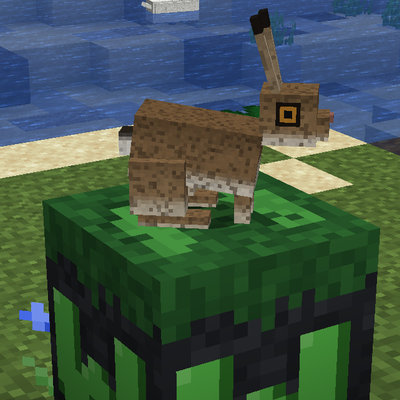 mod
CurseForge · Minecraft
Wuddler Nature
Grab your binoculars and discover 49 native wild animals of Central Europe: deer, foxes, wild boar, badgers, ducks, swans, birds of prey and many more. Sneak up quietly, look closely and learn something new about every animal.
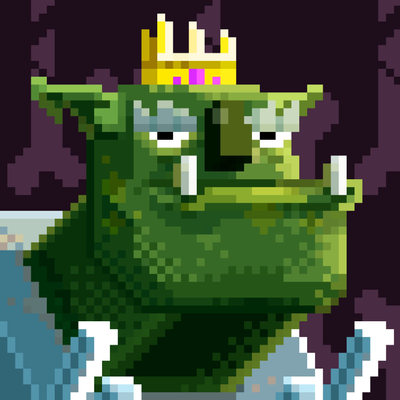 mod
CurseForge · Minecraft
Kings & Monsters
An adventure and progression mod featuring the Ogre Tribe, guarded outposts, escalating patrols, powerful relics, a massive fort, and a multi-stage boss fight.
 mod
CurseForge · Minecraft
Invincibility Potion
Adds two new potions—the Invincibility Potion and Notch’s Potion—that grant temporary total damage immunity.