Minecraft version
Back to mods 
CurseForge · Minecraft mod
Private Chat
Private direct messages for Minecraft servers with notifications, quick reply, and DND mode.
Choose a version Pick your version below, then grab the matching file.
Quick answer
Which Private Chat release should I use?
Latest stable file Private Chat - 1.0.0 - (Forge).jar
Game version 1.20.2-Snapshot, 1.20.5-Snapshot, 1.20.2
Loader Forge
Private Chat - 1.0.0 - (Forge).jar targets 1.20.2-Snapshot, 1.20.5-Snapshot, 1.20.2 with Forge. The project page does not say whether this file belongs on the client, dedicated server, or both. No extra mods listed for this file.
Where it goes
Is Private Chat required on the client, server, or both?
The project page does not say whether this file belongs on the client, dedicated server, or both.
Client Source doesn’t say
Dedicated server Source doesn’t say
Loader for this release Forge
Required install it here Optional supported, not mandatory Not supported do not install here Source doesn’t say do not assume
The source does not explicitly classify this release as client-only or server-only.
What else does Private Chat - 1.0.0 - (Forge).jar need?
Private Chat - 1.0.0 - (Forge).jar. Change the file and its required mods may change too.
This file does not list any required mods. Do not add a library just because a different file uses it.
This file does not list any required or optional mods.
Before you install it
Add Private Chat without breaking your instance.
Built for Private Chat - 1.0.0 - (Forge).jar. Pick another file and the loader, install side or required mods may change.
- 01
Stick to this file
Use Private Chat - 1.0.0 - (Forge).jar. It targets 1.20.2-Snapshot, 1.20.5-Snapshot, 1.20.2 with Forge; another release may have different loader, side or dependency requirements.
- 02
Bring the mods it needs
This file does not list any required mods. Do not add a library just because a different file uses it.
- 03
Put it on the correct side
The project page does not say whether this file belongs on the client, dedicated server, or both.
- 04
Pick the file you checked
Use the “Get this file” button beside Private Chat - 1.0.0 - (Forge).jar. It opens that exact file at the source.
About this project
What does Private Chat add?
📬 Private Chat
Private Chat adds private direct messages (DMs) to Minecraft multiplayer servers with a clean UI and instant notifications.
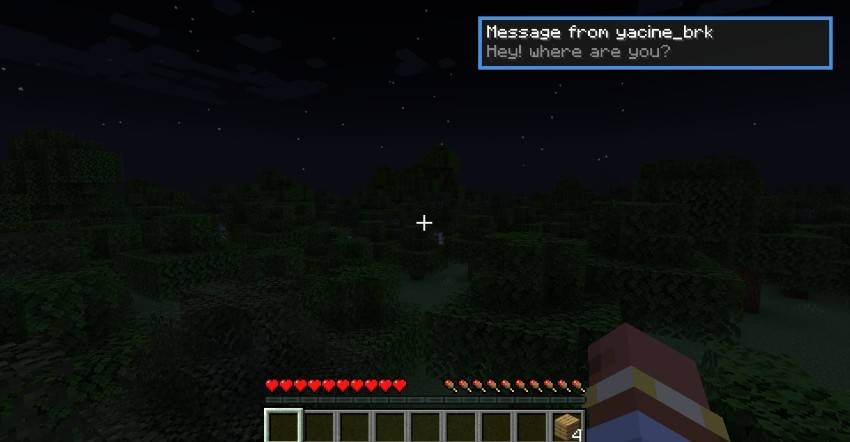
When another player messages you, you receive an in-game pop-up notification with sound, so you never miss a message while playing.
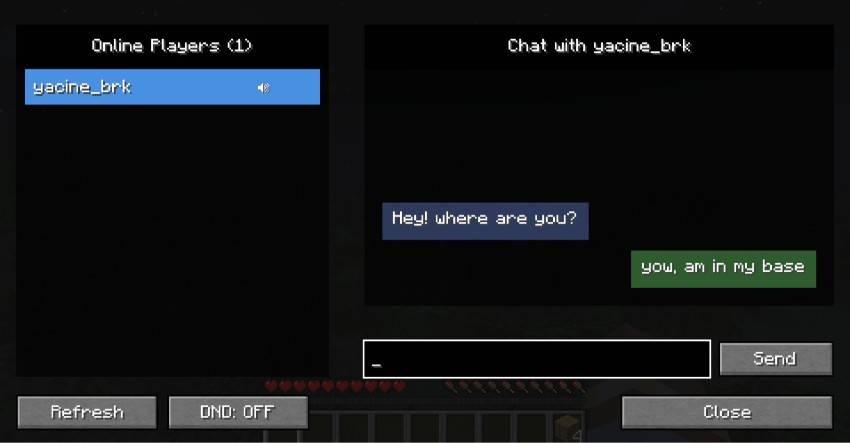
You can open the private chat menu using the Y key (fully configurable), select a player from the online list, and start chatting privately.
Unread messages are clearly marked with a green dot, and you can instantly reply using the R key.
The mod also includes Do Not Disturb (DND) mode and player muting, giving you full control over your private conversations.
✨ Features
- Private 1-to-1 direct messages
- In-game message notifications with sound
- Open private chat menu with Y (configurable keybind)
- Quick reply using the R key (configurable keybind)
- Do Not Disturb (DND) mode
- Mute / unmute specific players
- Unread message indicator (green dot)
- Simple, clean UI with online player list
🕹 How It Works
- Receive a private message → get notified instantly.
- Press R to quick-reply, or press Y to open the private chat menu.
- Select a player and chat privately.
- Enable DND to block interruptions when needed.
Designed for multiplayer servers where private communication matters.
⚠️ Important
- This mod is required on both the client and the server.
- Designed for multiplayer use.
🖼 Screenshots
Incoming private message notification
Private chat menu with online players
Quick reply popup
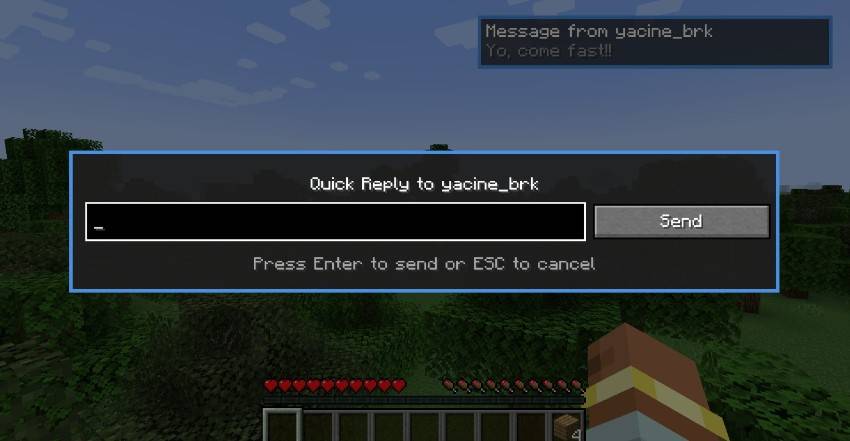
Project description from CurseForge.
Pick your setup
Private Chat by Minecraft version and loader
Choose the version and loader you play, then open the matching release.
Minecraft version
1.20.5-Snapshot
1 loader buildMinecraft version
1.20.5
1 loader buildMinecraft version
1.20.4
1 loader buildMinecraft version
1.20.3-Snapshot
1 loader buildMinecraft version
1.20.3
1 loader buildMinecraft version
1.20.2-Snapshot
1 loader buildMinecraft version
1.20.2
1 loader buildMinecraft version
1.20.1
1 loader buildMinecraft version
1.20-Snapshot
1 loader buildMinecraft version
1.20
1 loader buildCheck the dependencies, then try the file in a copied instance before changing a world you care about.
Recent files
Private Chat versions and loaders
Private Chat - 1.0.0 - (Forge).jar
2 Feb 2026
Client Source doesn’t say Server Source doesn’t say Dependencies No extras listed Listed on Release listing
Check the 1.20.6 · Forge setup 1.20.2-Snapshot1.20.5-Snapshot1.20.21.20.5 release
Looking for an older file? The official CurseForge project page is in Resources.
 mod
mod CurseForge · Minecraft
MineCoin: Economy & Trade
Complete physical economy system with tiered coins, functional wallets, lottery scratch-offs, and player-to-player auctions.
 mod
mod CurseForge · Minecraft
CullingAO
Mod that includes Battle royale like Rules
 mod
mod CurseForge · Minecraft
EnchantStats: Enchantment Descriptions +Tooltip+Inventory HUD+ + Monster HP+Damage Indicator+Tool Info Hub
EnchantStats is the combat & magic sequel to AppleStats — enchanting your HUD with exact enchantment values, advanced tooltips, and monster combat stats.