GeckoLib Needed by Bambioli's Mobs and Oddities bambiolis_mobs_and_oddities-1.1.0-forge-1.20.1.jar
requiredMatching file found Matched file: geckolib-forge-1.20.1-4.8.4.jar
CurseForge · Minecraft mod
Bm&O (Bambioli's Mobs And Oddities) Is a mod aimed to push the player into exploring, looting and crafting using different and various early-game additions.
Quick answer
Bambioli's Mobs and Oddities bambiolis_mobs_and_oddities-1.1.0-forge-1.20.1.jar targets 1.20.1, 1.20 with Forge. The project page does not say whether this file belongs on the client, dedicated server, or both. All 1 required mods have matching files.
Where it goes
The project page does not say whether this file belongs on the client, dedicated server, or both.
The source does not explicitly classify this release as client-only or server-only.
bambiolis_mobs_and_oddities-1.1.0-forge-1.20.1.jar. Change the file and its required mods may change too.
Install GeckoLib first. We found matching files for this game-version and loader setup.
We only count dependency files that match this setup. A file for another loader does not fill the gap.
Before you install it
Built for Bambioli's Mobs and Oddities bambiolis_mobs_and_oddities-1.1.0-forge-1.20.1.jar. Pick another file and the loader, install side or required mods may change.
Use bambiolis_mobs_and_oddities-1.1.0-forge-1.20.1.jar. It targets 1.20.1, 1.20 with Forge; another release may have different loader, side or dependency requirements.
Install GeckoLib first. We found matching files for this game-version and loader setup.
The project page does not say whether this file belongs on the client, dedicated server, or both.
Use the “Get this file” button beside bambiolis_mobs_and_oddities-1.1.0-forge-1.20.1.jar. It opens that exact file at the source.
About this project
Bambioli's Mobs And Oddities is a mod aimed to add various Mobs, weapons, tools and food useful for both early-game Minecraft and different modes with restrictions such as Skyblock.
¿What is Bm&O?
-It's my first mod ever published in CurseForge. I've always loved Minecraft, but I've always felt like there was something off, and with this Mod I'll try to add what I would like to see in Modded Minecraft.
¿What should the player expect from the Mod?
-A growing experience. Not a complete Minecraft-Changer mod, but something, as the name says, that adds Mobs and "Oddities". Aimed at the early-game phase of Minecraft, and tools that could be used in either the first hours of your world, or in another mode, like Skyblock.
Current version: 1.1.0 (Uptade)
Current Item(s) added:
 Cobblestone Effigy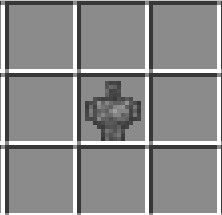
Crafting Recipe: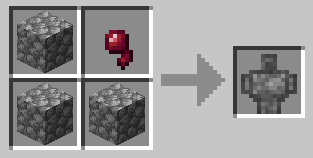
In use: Spawn Cobblestone Terroid
Cobblestone Terroid: Short description, The Cobblestone Terroid is simple, an early-game, easy to craft Cobblestone Golem. Beware, as it is neutral. It's priority it's to attack Zombies and Skeletons, but, as a downside, if you hit it, you will become a target. It is short-sighted and if you run enough blocks away it will lose interest. Cheap enough to defend your home from a few Zombies before dying, but also cheap enough to replace him anytime.
1.1.0 Changelog:
-Added Item Matchstick
-Added Item Burnt Matchstick
-Added Weapon Burnt Matchstick Sword
Project description from CurseForge.
Pick your setup
Choose the version and loader you play, then open the matching release.
Check the dependencies, then try the file in a copied instance before changing a world you care about.
Recent files
7 Feb 2026
3 Feb 2026
Looking for an older file? The official CurseForge project page is in Resources.
 mod
modThis mod has been revived by the GregTech New Horizons team, with the official blessing of TheKentington.
 mod
modA compilation of various dual-wielded weapon addons for Epic Fight
 mod
modA Simple Helper Mod that helps you automate your daily Tasks