LDLib Needed by Epic Fight - Better Skill Menu epic_fight_better_skill_menu-1.0.2.jar
requiredMatching file found Matched file: LDLib 1.20.1-1.0.52.a-forge
CurseForge · Minecraft mod
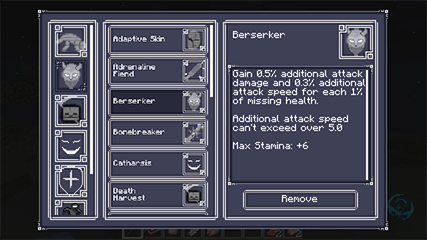
Replaces the default skill menu with a clean, modern panel that lets you see and manage all your equipped skills at a glance
Quick answer
Epic Fight - Better Skill Menu epic_fight_better_skill_menu-1.0.2.jar targets 1.20.1 with Forge. The project page does not say whether this file belongs on the client, dedicated server, or both. All 2 required mods have matching files.
Where it goes
The project page does not say whether this file belongs on the client, dedicated server, or both.
The source does not explicitly classify this release as client-only or server-only.
epic_fight_better_skill_menu-1.0.2.jar. Change the file and its required mods may change too.
Install LDLib, Epic Fight first. We found matching files for this game-version and loader setup.
We only count dependency files that match this setup. A file for another loader does not fill the gap.
Before you install it
Built for Epic Fight - Better Skill Menu epic_fight_better_skill_menu-1.0.2.jar. Pick another file and the loader, install side or required mods may change.
Use epic_fight_better_skill_menu-1.0.2.jar. It targets 1.20.1 with Forge; another release may have different loader, side or dependency requirements.
Install LDLib, Epic Fight first. We found matching files for this game-version and loader setup.
The project page does not say whether this file belongs on the client, dedicated server, or both.
Use the “Get this file” button beside epic_fight_better_skill_menu-1.0.2.jar. It opens that exact file at the source.
About this project
Brief Description: Replaces the default skill book with a clean, modern panel that lets you see and manage all your equipped skills at a glance.
Epic Fight - Better Skill Menu is a sleek client-side interface mod that completely overhauls the Epic Fight Mod's skill management screen. Built on the ldlib library, it swaps out the original book-style editor for a straightforward, functional panel designed for clarity and ease of use.
This mod addresses a simple but common pain point: in the default system, it's hard to get a quick overview of your active build. Now, you can see every equipped skill—along with its full description—on a single, well-organized screen. Perfect for players who frequently tweak and optimize their combat loadouts.
Upgrade your skill management from a cryptic book to a clear command center. Install Better Skill Menu and spend less time searching, more time fighting.
Project description from CurseForge.
Pick your setup
Choose the version and loader you play, then open the matching release.
Check the dependencies, then try the file in a copied instance before changing a world you care about.
Recent files
15 Feb 2026
13 Feb 2026
Looking for an older file? The official CurseForge project page is in Resources.
 mod
modUnique sleep overhaul and rest system
 mod
modChop entire trees by breaking one log - fully configurable with auto replant and tool safety.
 mod
modChange Minecraft Font in-game. Using Google Fonts library