
Minecraft version
Back to mods 
CurseForge · Minecraft mod
Clean UI Advancement | CUA
A New, Clean, Modern Achievement Screen
Choose a version Pick your version below, then grab the matching file.
Quick answer
Which Clean UI Advancement | CUA release should I use?
Latest stable file newlookingadvancement-1.0.0.jar
Game version 1.20.1
Loader Forge
Clean UI Advancement | CUA newlookingadvancement-1.0.0.jar targets 1.20.1 with Forge. The project page does not say whether this file belongs on the client, dedicated server, or both. No extra mods listed for this file.
Where it goes
Is Clean UI Advancement | CUA required on the client, server, or both?
The project page does not say whether this file belongs on the client, dedicated server, or both.
Client Source doesn’t say
Dedicated server Source doesn’t say
Loader for this release Forge
Required install it here Optional supported, not mandatory Not supported do not install here Source doesn’t say do not assume
The source does not explicitly classify this release as client-only or server-only.
What else does Clean UI Advancement | CUA newlookingadvancement-1.0.0.jar need?
newlookingadvancement-1.0.0.jar. Change the file and its required mods may change too.
This file does not list any required mods. Do not add a library just because a different file uses it.
This file does not list any required or optional mods.
Before you install it
Add Clean UI Advancement | CUA without breaking your instance.
Built for Clean UI Advancement | CUA newlookingadvancement-1.0.0.jar. Pick another file and the loader, install side or required mods may change.
- 01
Stick to this file
Use newlookingadvancement-1.0.0.jar. It targets 1.20.1 with Forge; another release may have different loader, side or dependency requirements.
- 02
Bring the mods it needs
This file does not list any required mods. Do not add a library just because a different file uses it.
- 03
Put it on the correct side
The project page does not say whether this file belongs on the client, dedicated server, or both.
- 04
Pick the file you checked
Use the “Get this file” button beside newlookingadvancement-1.0.0.jar. It opens that exact file at the source.
About this project
What does Clean UI Advancement | CUA add?
Clean UI Advancement (CUA)
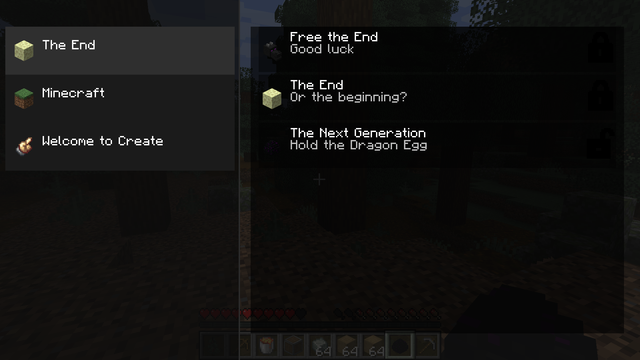
A New, Clean, Modern Achievement Screen for Minecraft.
Clean UI Advancement replaces the vanilla advancement screen with a streamlined, modern layout inspired by clean RPG interfaces.
It keeps full compatibility with datapacks and mods, while making achievements easier to browse and read.
Features
- Left-side category tabs with icons
- Smooth animated expand/collapse for the tab column
- Scrollable achievement list
- Locked/Unlocked status with timestamps
- Long text wrapping without overlap
- Supports colored text used by modded advancements
- Works with vanilla, datapacks, and mods
Screenshots
If you have suggestions or want UI tweaks, feel free to leave feedback.
Project description from CurseForge.
Pick your setup
Clean UI Advancement | CUA by Minecraft version and loader
Choose the version and loader you play, then open the matching release.
Check the dependencies, then try the file in a copied instance before changing a world you care about.
Recent files
Clean UI Advancement | CUA versions and loaders
newlookingadvancement-1.0.0.jar
7 Feb 2026
Client Source doesn’t say Server Source doesn’t say Dependencies No extras listed Listed on Release listing
Check the 1.20.1 · Forge setup 1.20.1Forge release
Looking for an older file? The official CurseForge project page is in Resources.
 mod
CurseForge + Modrinth · Minecraft
Tinkers' Gadgets
A lightweight Tinkers' Construct addon featuring tools, new materials, and exclusive projectile traits.
 mod
CurseForge + Modrinth · Minecraft
Shared Lootr
Share Lootr container inventories globally or per team (FTB Teams / vanilla teams) while keeping Lootr protections, visuals, advancements, and refresh.
 mod
CurseForge · Minecraft
Mystical Agriculture Plus
An addon for Mystical Agriculture: new seeds and essences, an Infinity tier, tiered furnaces and chests, machines and compatibility with many mods.