AE2 Unofficial Extended Life Needed by AE2 Toggleable View Cells ae2-ToggleableViewCells-v1.0.2.jar
requiredMatching file found Matched file: AE2 Unofficial Extended Life − v0.56.6
CurseForge · Minecraft mod
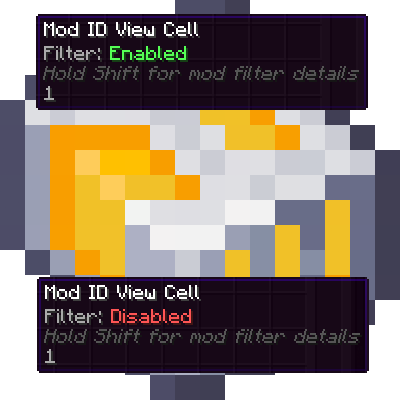
Toggle AE2 View Cells on/off with a right-click. Disabled cells stop filtering your terminals and show a clear disabled icon. Works with the standard AE2 View Cell and compatible modded variants.
Quick answer
AE2 Toggleable View Cells ae2-ToggleableViewCells-v1.0.2.jar targets 1.12.2 with Forge. The project page does not say whether this file belongs on the client, dedicated server, or both. All 2 required mods have matching files.
Where it goes
The project page does not say whether this file belongs on the client, dedicated server, or both.
The source does not explicitly classify this release as client-only or server-only.
ae2-ToggleableViewCells-v1.0.2.jar on 1.12.2 Forge. Every mod below is checked against that same setup.
Install AE2 Unofficial Extended Life, MixinBooter first. We found matching files for this game-version and loader setup.
We only count dependency files that match this setup. A file for another loader does not fill the gap.
Before you install it
Built for AE2 Toggleable View Cells ae2-ToggleableViewCells-v1.0.2.jar on 1.12.2 Forge. Pick another file and the loader, install side or required mods may change.
Use ae2-ToggleableViewCells-v1.0.2.jar. It targets 1.12.2 with Forge; another release may have different loader, side or dependency requirements.
Install AE2 Unofficial Extended Life, MixinBooter first. We found matching files for this game-version and loader setup.
The project page does not say whether this file belongs on the client, dedicated server, or both.
Use the “Get this file” button beside ae2-ToggleableViewCells-v1.0.2.jar. It opens that exact file at the source.
About this project
This mod adds a simple Enable / Disable toggle to Applied Energistics 2 View Cells.
Instead of removing a View Cell when you want to temporarily stop filtering, you can disable it and enable it again later. The cell keeps all its settings; it is simply ignored while disabled.
Supported versions:
View Cells are great, but sometimes you only want their filtering sometimes:
Normally, this means removing the cell from the slot or constantly swapping cells around. This mod solves that by letting you toggle a cell on/off instantly.
Project description from CurseForge.
Pick your setup
Choose the version and loader you play, then open the matching release.
Check the dependencies, then try the file in a copied instance before changing a world you care about.
Recent files
8 Feb 2026
8 Feb 2026
Looking for an older file? The official CurseForge project page is in Resources.
 mod
1.14 Village & Pillage on 1.12.2: new villages and villagers, raids, pillagers and ravagers, the crossbow, foxes, pandas and cats, and more.
 mod
Bellows make furnaces burn twice as fast, water wheels and windmills work them for you, and a grinder turns every ore into two dusts.
 mod
A companion to Base Metals and Modern Metals that adds a wide variety of gems and things that can be built from them.