Fabric API Needed by SecondaryKeybind 1.1.0+1.21.11-fabric
requiredMatching file found Matched file: [1.21.11] Fabric API 0.141.6+1.21.11

CurseForge · Minecraft mod
Assign secondary key to all keybinds
Quick answer
SecondaryKeybind 1.1.0+1.21.11-fabric targets 1.21.11 with Fabric. The project page does not say whether this file belongs on the client, dedicated server, or both. All 1 required mods have matching files.
Where it goes
The project page does not say whether this file belongs on the client, dedicated server, or both.
The source does not explicitly classify this release as client-only or server-only.
1.1.0+1.21.11-fabric. Change the file and its required mods may change too.
Install Fabric API first. We found matching files for this game-version and loader setup.
We only count dependency files that match this setup. A file for another loader does not fill the gap.
Before you install it
Built for SecondaryKeybind 1.1.0+1.21.11-fabric. Pick another file and the loader, install side or required mods may change.
Use 1.1.0+1.21.11-fabric. It targets 1.21.11 with Fabric; another release may have different loader, side or dependency requirements.
Install Fabric API first. We found matching files for this game-version and loader setup.
The project page does not say whether this file belongs on the client, dedicated server, or both.
Use the “Get this file” button beside 1.1.0+1.21.11-fabric. It opens that exact file at the source.
About this project
Secondary Keybinds allows you to assign an additional key to existing actions without replacing your primary keybinds.
This makes it easier to create flexible and comfortable control setups, especially for players who use alternative layouts, accessibility bindings, or multiple input styles.
The feature is fully integrated into the vanilla Controls menu and behaves just like native keybinds.
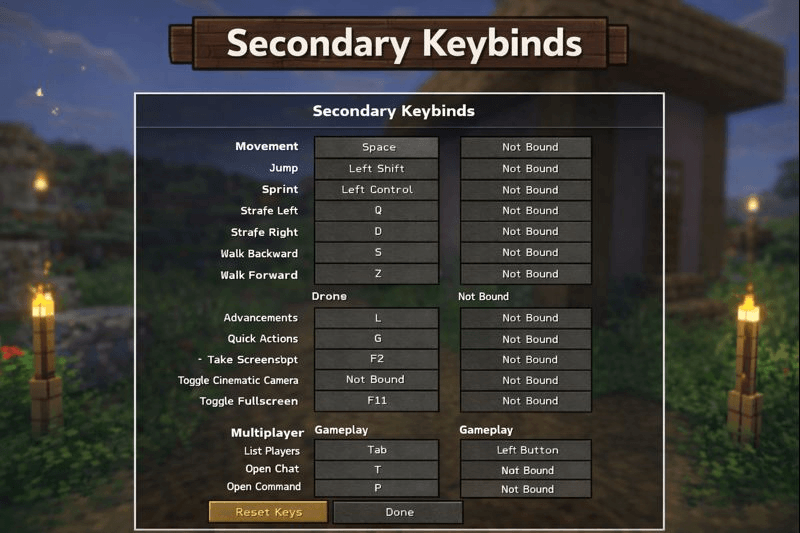
Project description from CurseForge.
Pick your setup
Choose the version and loader you play, then open the matching release.
Check the dependencies, then try the file in a copied instance before changing a world you care about.
Recent files
secondarykeybind-1.1.0 1.21.11.jar
8 Feb 2026
secondarykeybind-1.1.0-1.21.9-1.21.10.jar
8 Feb 2026
secondarykeybind-1.1.0 1.21.6-1.21.8.jar
8 Feb 2026
secondarykeybind-1.1.0 1.21.4-1.21.5.jar
8 Feb 2026
secondarykeybind-1.1.0 1.21-1.21.3.jar
8 Feb 2026
Looking for an older file? The official CurseForge project page is in Resources.
 mod
What the hell is that? A fork of Hwyla which is a fork of Waila.
 mod
Disposable public fixture for testing the Modpacks.ch GitHub catalogue flow
 mod
A Mod That Adds QOL Recruits And Extras!