Fabric API Optional for Just Coordinates 0.10.0
optionalNo matching file
CurseForge · Minecraft mod
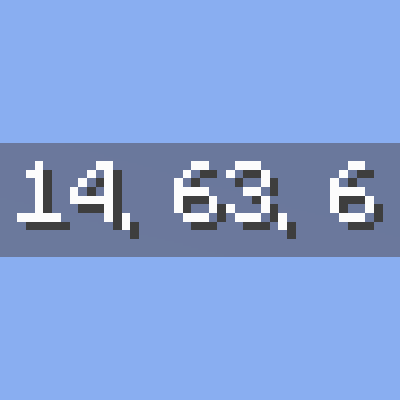
Just Coordinates shows only XYZ coordinates on your screen — nothing more. Inspired by Bedrock Edition, designed for simplicity and beginners.
Quick answer
Just Coordinates 0.10.0 targets 26.1.2 with Forge. The project page does not say whether this file belongs on the client, dedicated server, or both. No extra mods listed for this file.
Where it goes
The project page does not say whether this file belongs on the client, dedicated server, or both.
The source does not explicitly classify this release as client-only or server-only.
Just Coordinates 0.10.0 on 26.1.2 Forge. Every mod below is checked against that same setup.
This file does not list any required mods. Do not add a library just because a different file uses it.
We only count dependency files that match this setup. A file for another loader does not fill the gap.
Before you install it
Built for Just Coordinates 0.10.0 on 26.1.2 Forge. Pick another file and the loader, install side or required mods may change.
Use Just Coordinates 0.10.0. It targets 26.1.2 with Forge; another release may have different loader, side or dependency requirements.
This file does not list any required mods. Do not add a library just because a different file uses it.
The project page does not say whether this file belongs on the client, dedicated server, or both.
Use the “Get this file” button beside Just Coordinates 0.10.0. It opens that exact file at the source.
About this project
A lightweight client-side mod that displays XYZ coordinates, inspired by Bedrock Edition
No minimap, no extra info — just your position on screen. Clean and simple.
Position: X, Y, Z — exactly what you need, nothing moreconfig/justcoordinates.json when you close the settings screenJ to toggle the coordinates HUD on or off (rebindable in Controls settings)/justcoordinates share, or assign a "Share Coordinates" key — no server permission needed (on Forge 1.16.5 and 1.17.1, the keybind is the only option — those versions have no client-command API)This mod supports multiple mod loaders across many Minecraft versions!
| Minecraft | Fabric | Quilt | NeoForge | Forge |
|---|---|---|---|---|
| 26.3 | Yes | Yes | Yes | - |
| 26.2 | Yes | Yes | Yes | Yes |
| 26.1.2 | Yes | Yes | Yes | Yes |
| 26.1.1 | Yes | Yes | Yes | Yes |
| 26.1 | Yes | Yes | Yes | - |
| 1.21.11 | Yes | Yes | Yes | Yes |
| 1.21.10 | Yes | Yes | Yes | Yes |
| 1.21.9 | Yes | Yes | Yes | Yes |
| 1.21.8 | Yes | Yes | Yes | Yes |
| 1.21.7 | Yes | Yes | Yes | Yes |
| 1.21.6 | Yes | Yes | Yes | Yes |
| 1.21.5 | Yes | Yes | Yes | Yes |
| 1.21.4 | Yes | Yes | Yes | Yes |
| 1.21.3 | Yes | Yes | Yes | Yes |
| 1.21.1 | Yes | Yes | Yes | Yes |
| 1.20.1 | Yes | Yes | - | Yes |
| 1.19.2 | Yes | Yes | - | Yes |
| 1.18.2 | Yes | Yes | - | Yes |
| 1.17.1 | Yes | Yes | - | Yes |
| 1.16.5 | Yes | Yes | - | Yes |
Download the correct version for your Minecraft version and mod loader.
Found a bug or have a suggestion? Report it on our GitHub Issues page!
Check out the Gallery tab above for screenshots of the coordinates HUD in action.
License: LGPL-3.0 - Copyright (C) 2025 Soichiro Kashima
Source Code: Available on GitHub
Freedom to Use: ✅ Free to use, modify, and redistribute under LGPL-3.0 terms
Modpack Inclusion: ✅ Allowed - You may include this mod in modpacks
Redistribution: ✅ Allowed - You may redistribute this mod (must remain LGPL-3.0)
Simple coordinates, inspired by Bedrock Edition 🧭
Project description from CurseForge.
Pick your setup
Choose the version and loader you play, then open the matching release.
Showing the newest 12 of 20 game versions. Older files are in the list below.
Check the dependencies, then try the file in a copied instance before changing a world you care about.
Recent files
justcoordinates-0.10.0+26.1.2-forge.jar
20 Sept 2026
justcoordinates-0.9.0+26.1.2-forge.jar
19 Sept 2026
Looking for an older file? The official CurseForge project page is in Resources.
 mod
modStack size of 64 for all items!
 mod
modEnhance your fire safety with a straightforward and effective fire extinguisher modification that incorporates essential items for combating fires.
 mod
modHighly configurable third person camera mod