Minecraft version
Back to mods 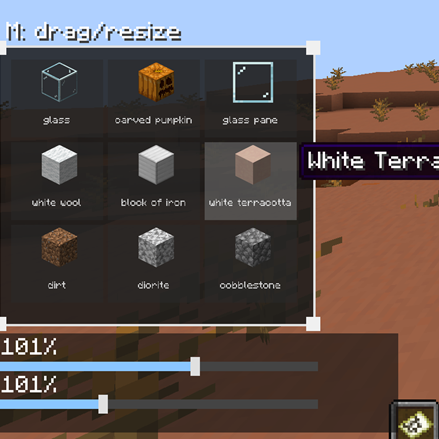
CurseForge · Minecraft mod
Bingo overlay
Adds a bingo overlay to the play.bingomc.net server to make card viewing easy
Choose a version Pick your version below, then grab the matching file.
Quick answer
Which Bingo overlay release matches 26.3 Forge?
Best match for your filters bingo overlay forge 26.3 V2.3.jar
Game version 26.3
Loader Forge
bingo overlay forge 26.3 V2.3.jar targets 26.3 with Forge. The project page does not say whether this file belongs on the client, dedicated server, or both. No extra mods listed for this file.
Where it goes
Is Bingo overlay required on the client, server, or both?
The project page does not say whether this file belongs on the client, dedicated server, or both.
Client Source doesn’t say
Dedicated server Source doesn’t say
Loader for this release Forge
Required install it here Optional supported, not mandatory Not supported do not install here Source doesn’t say do not assume
The source does not explicitly classify this release as client-only or server-only.
What else does bingo overlay forge 26.3 V2.3.jar need?
bingo overlay forge 26.3 V2.3.jar on 26.3 Forge. Every mod below is checked against that same setup.
This file does not list any required mods. Do not add a library just because a different file uses it.
This file does not list any required or optional mods.
Before you install it
Add Bingo overlay without breaking your instance.
Built for bingo overlay forge 26.3 V2.3.jar on 26.3 Forge. Pick another file and the loader, install side or required mods may change.
- 01
Stick to this file
Use bingo overlay forge 26.3 V2.3.jar. It targets 26.3 with Forge; another release may have different loader, side or dependency requirements.
- 02
Bring the mods it needs
This file does not list any required mods. Do not add a library just because a different file uses it.
- 03
Put it on the correct side
The project page does not say whether this file belongs on the client, dedicated server, or both.
- 04
Pick the file you checked
Use the “Get this file” button beside bingo overlay forge 26.3 V2.3.jar. It opens that exact file at the source.
About this project
What does Bingo overlay add?
An upgrade to the play.bingomc.net server's /search command which makes it easier to see what is on your card via an overlay.
Press m to edit card size + position, and get access to sliders on the bottom left to edit icon and text size. Also in this mode, hovering your cursor over an item shows the crafting recipe for it, and right clicking on an item on the card marks it as completed in the event that you accidentally reset the card midgame or something didn't register.
Press n to hide/show the card overlay.
Press v to hide/show the map in your offhand.
(old) 1.21.11 only: Auto reroll card feature: If playing on singleplayer, then when in 'm' mode, hovering over an item and pressing 'p' on it adds it to a blacklist which you can view by pressing 'p' (right clicking an item on the blacklist removes it from blacklist), pressing 'O' auto generates new cards until one without any items on your blacklist appears in which it will play a ringing sound to alert you.
Keybinds can be customised in control settings uner bingo overlay.
Project description from CurseForge.
Pick your setup
Bingo overlay by Minecraft version and loader
Choose the version and loader you play, then open the matching release.
Minecraft version
26.1.2
2 loader buildsMinecraft version
1.21.11
2 loader buildsMinecraft version
1.21.4
1 loader buildMinecraft version
1.21.3
1 loader buildCheck the dependencies, then try the file in a copied instance before changing a world you care about.
Recent files
Bingo overlay versions and loaders
bingo overlay forge 26.3 V2.3.jar
bingo overlay forge 26.4 V2.3.jar
19 Oct 2026
Client Source doesn’t say Server Source doesn’t say Dependencies No extras listed Listed on Release listing
Check the 26.3 · Forge setup Forge26.3 release
bingo overlay forge 26.3 V2.3.jar
1 Oct 2026
Client Source doesn’t say Server Source doesn’t say Dependencies No extras listed Listed on Release listing
Check the 26.3 · Forge setup Forge26.3 release
bingo overlay forge 26.3 V2.1.jar
28 Sept 2026
Client Source doesn’t say Server Source doesn’t say Dependencies No extras listed Listed on Release listing
Check the 26.3 · Forge setup Forge26.3 release
bingo overlay forge 26.3 V2.jar
27 Sept 2026
Client Source doesn’t say Server Source doesn’t say Dependencies No extras listed Listed on Release listing
Check the 26.3 · Forge setup Forge26.3 release
bingo overlay 26.3 forge V1.1.jar
27 Sept 2026
Client Source doesn’t say Server Source doesn’t say Dependencies No extras listed Listed on Release listing
Check the 26.3 · Forge setup Forge26.3 release
bingo overlay forge 26.3 V1.jar
bingo overlay 26.3 V3.2.jar
27 Sept 2026
Client Source doesn’t say Server Source doesn’t say Dependencies No extras listed Listed on Release listing
Check the 26.3 · Forge setup Forge26.3 release
Looking for an older file? The official CurseForge project page is in Resources.
 mod
CurseForge · Minecraft
Keep On Chance (keepinventory)
Keeps players inventories on death if given chance succeeds.
 mod
CurseForge · Minecraft
Best in Pack
Which food, armor, weapon, tool and fuel is the best in your modpack? Press B to see every item from every mod ranked by its real stats.
 mod
CurseForge · Minecraft
MissingRecipeJEI
View broken and disabled recipes directly in JEI to instantly identify missing mods, items, or empty tags in your modpack.