YetAnotherConfigLib Optional for Picture Mode 1.1.7
optionalMatching file found Matched file: 3.9.7 for neoforge 26.3

CurseForge · Minecraft mod
This mod adds an isometric view of the world dedicated for taking pictures.
Quick answer
Picture Mode 1.1.7 targets 26.3 with NeoForge. The project page does not say whether this file belongs on the client, dedicated server, or both. No extra mods listed for this file.
Where it goes
The project page does not say whether this file belongs on the client, dedicated server, or both.
The source does not explicitly classify this release as client-only or server-only.
Picture Mode 1.1.7. Change the file and its required mods may change too.
This file does not list any required mods. Do not add a library just because a different file uses it.
We only count dependency files that match this setup. A file for another loader does not fill the gap.
Before you install it
Built for Picture Mode 1.1.7. Pick another file and the loader, install side or required mods may change.
Use Picture Mode 1.1.7. It targets 26.3 with NeoForge; another release may have different loader, side or dependency requirements.
This file does not list any required mods. Do not add a library just because a different file uses it.
The project page does not say whether this file belongs on the client, dedicated server, or both.
Use the “Get this file” button beside Picture Mode 1.1.7. It opens that exact file at the source.
About this project
Picture Mode is a mod that adds an isometric picture taking mode to Minecraft. It is inspired by the Photo Mode from Better than Adventure. The interface is simple to use and the isometric perspective gives a unique way to capture images of structures.
Below is a screenshot of the main interface of the mod. 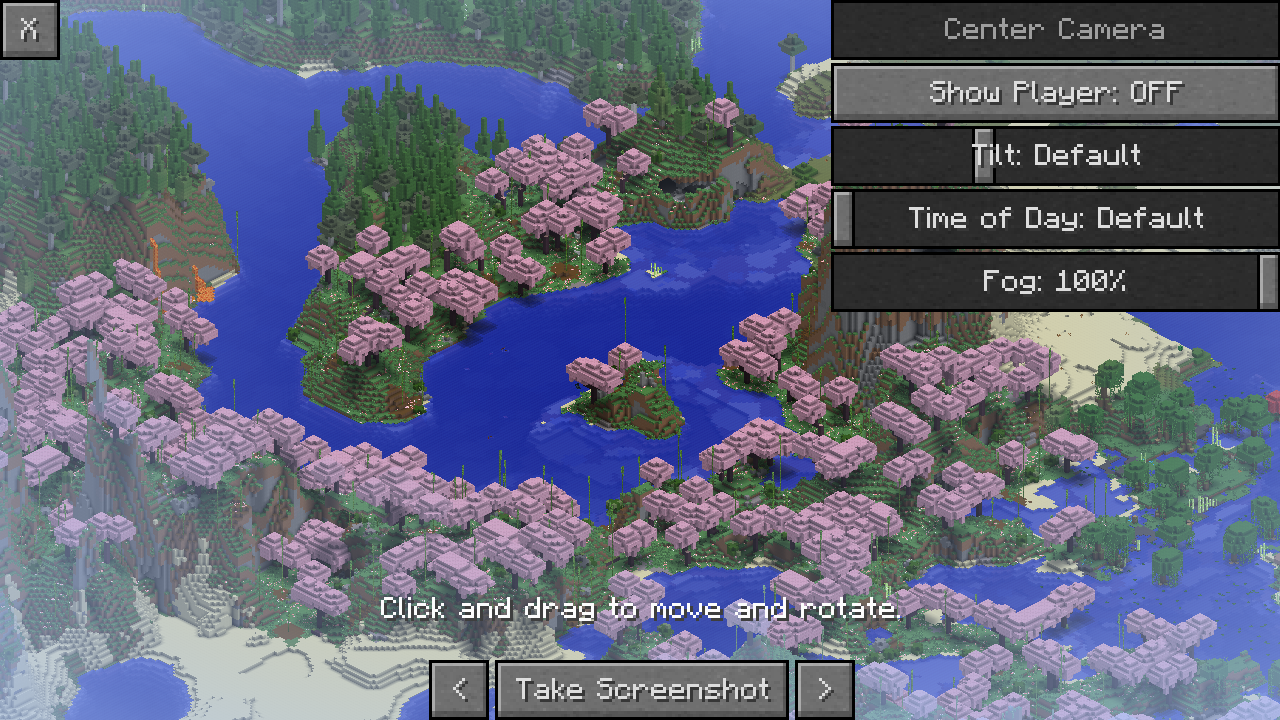
Server owners or modpack makers can disable Picture Mode in a dimension by adding its dimension type to the picturemode:disabled tag. The button will be disabled once the player is in a dimension of the disabled type
Thanks to the Better than Adventure! team for the original Photo Mode, which is a huge inspiration for this mod.
Thanks to Bestsoft100 for letting me use their shader code for the filters.
Project description from CurseForge.
Pick your setup
Choose the version and loader you play, then open the matching release.
Check the dependencies, then try the file in a copied instance before changing a world you care about.
Recent files
picturemode-neoforge-1.1.7+26.3.jar
15 Sept 2026
picturemode-fabric-1.1.7+26.3.jar
15 Sept 2026
picturemode-neoforge-1.1.7+26.2.jar
15 Sept 2026
picturemode-fabric-1.1.7+26.2.jar
15 Sept 2026
picturemode-neoforge-1.1.7+26.1.jar
15 Sept 2026
picturemode-fabric-1.1.7+26.1.jar
15 Sept 2026
picturemode-neoforge-1.1.7+1.21.11.jar
15 Sept 2026
picturemode-fabric-1.1.7+1.21.11.jar
15 Sept 2026
picturemode-neoforge-1.1.7+1.21.1.jar
15 Sept 2026
picturemode-fabric-1.1.7+1.21.1.jar
15 Sept 2026
picturemode-forge-1.1.7+1.20.1.jar
15 Sept 2026
picturemode-fabric-1.1.7+1.20.1.jar
15 Sept 2026
Looking for an older file? The official CurseForge project page is in Resources.
 mod
modFences connecting diagonally? Wait. That's illegal.
 mod
modAdds immersive phrases to villagers when you interact with or walk near them.
 mod
modThe missing diagonal blocks are here! After all these years. Finally, you have them all.