Minecraft version
Back to mods 
CurseForge · Minecraft mod
[INDL] EMERGENCY OP
Grant temporary OP safely. Daily rotating passwords, full blackbox audit logging, command blacklist, anti-duplication Clean Room system, and Admin GUI panel. Every action tracked — commands, blocks, items, containers. No permanent OP, full accountability.
Choose a version Pick your version below, then grab the matching file.
Quick answer
Which [INDL] EMERGENCY OP release should I use?
Latest stable file [INDL] Emergency-OP_1.0.0.jar
Game version 1.20.1
Loader Forge
[INDL] EMERGENCY OP [INDL] Emergency-OP_1.0.0.jar targets 1.20.1 with Forge. The project page does not say whether this file belongs on the client, dedicated server, or both. No extra mods listed for this file.
Where it goes
Is [INDL] EMERGENCY OP required on the client, server, or both?
The project page does not say whether this file belongs on the client, dedicated server, or both.
Client Source doesn’t say
Dedicated server Source doesn’t say
Loader for this release Forge
Required install it here Optional supported, not mandatory Not supported do not install here Source doesn’t say do not assume
The source does not explicitly classify this release as client-only or server-only.
What else does [INDL] EMERGENCY OP [INDL] Emergency-OP_1.0.0.jar need?
[INDL] Emergency-OP_1.0.0.jar. Change the file and its required mods may change too.
This file does not list any required mods. Do not add a library just because a different file uses it.
This file does not list any required or optional mods.
Before you install it
Add [INDL] EMERGENCY OP without breaking your instance.
Built for [INDL] EMERGENCY OP [INDL] Emergency-OP_1.0.0.jar. Pick another file and the loader, install side or required mods may change.
- 01
Stick to this file
Use [INDL] Emergency-OP_1.0.0.jar. It targets 1.20.1 with Forge; another release may have different loader, side or dependency requirements.
- 02
Bring the mods it needs
This file does not list any required mods. Do not add a library just because a different file uses it.
- 03
Put it on the correct side
The project page does not say whether this file belongs on the client, dedicated server, or both.
- 04
Pick the file you checked
Use the “Get this file” button beside [INDL] Emergency-OP_1.0.0.jar. It opens that exact file at the source.
About this project
What does [INDL] EMERGENCY OP add?
[INDL] EMERGENCY OP: Controlled Emergency Operator Access
Grant temporary OP safely. INDL Emergency OP is a server/client-side security mod that lets trusted admins grant themselves temporary operator status using a daily rotating password. Every single action during the session is recorded in a full blackbox audit log — commands, blocks, items, containers — nothing goes unnoticed.
Why choose INDL Emergency OP?
Giving OP to a player is one of the most dangerous actions on a server. INDL Emergency OP makes it safe and accountable — sessions are time-limited, critical commands are blocked, inventories are isolated, and every action is logged with forensic detail.
No permanent OP. No trust issues. Full accountability.
The Hybrid Cipher — Daily Rotating Passwords
The password system is deterministic and offline — no internet required, no database to hack.
Password = SHA-256(secretWord + DDMMYYYY) → INDL-XXXXXXXX
| Concept | Description |
|---|---|
| Secret Word | A shared secret between server and admin. Set in the config file. |
| Date | Today's date in DDMMYYYY format. The password changes every day. |
| Hash | SHA-256 produces a unique 64-char hex string. Only the first 8 chars are used. |
| Format | INDL- + 8 hex characters (e.g., INDL-a3f7b2c1) |
How it works
Admin knows: secretWord = "MyS3cretK3y"
Today's date: 16022026

SHA-256("MyS3cretK3y16022026") → "a3f7b2c1e4d5..."
Password = INDL-a3f7b2c1
Even if someone sees today's password, it's useless tomorrow. And without the secret word, they can't predict the next one.
Cipher Generator Tool
A standalone HTML tool is included to calculate the daily password without needing access to the server. Simply enter the secret word and today's date.
Clean Room — Anti-Duplication System
When a session starts, the player's inventory is completely saved and cleared. They begin the emergency session with an empty inventory.
Session Start ───→ Inventory saved ───→ Inventory cleared ───→ OP granted
                                                                │
Session End ←──── Inventory restored ←──── OP removed ←────────┘
This prevents every duplication vector:
- ✅ Items traded to other players → irrelevant, original inventory returns
- ✅ Creative mode items → tracked and logged, then removed
Full Blackbox Audit
Every action during an emergency OP session is recorded with millisecond timestamps to a JSON log file. The audit log is a forensic record of exactly what happened.
Tracked Events
| Icon | Event | Description |
|---|---|---|
| ▶ | Session Start | Session initiated with duration |
| ■ | Session End | Session ended (manual or timeout) |
| 🔧 | Command | Any command executed |
| 🚫 | Command Blocked | Blacklisted command attempt |
| 📦 | Creative Item | Items taken from Creative mode |
| ⛏ | Block Break | Block broken with position |
| 🧱 | Block Place | Block placed with position |
| 📂 | Container Open | Chest/barrel/hopper opened |
| 📥 | Container Add | Items added to a container |
| 📤 | Container Remove | Items taken from a container |
| 📁 | Container Close | Container closed |
| 🎮 | Gamemode Change | Creative/Survival/Adventure switch |
| ⚠ | Alert | Security alert or anomaly |
Example Log Entry
{
  "playerName": "Admin123",
  "startTime": 1708100000000,
  "durationMinutes": 5,
  "events": [
    { "timestamp": 0, "type": "SESSION_START", "details": "Sesión iniciada - Duración: 5 min" },
    { "timestamp": 5230, "type": "COMMAND", "details": "/gamemode creative", "x": 100, "y": 64, "z": 200 },
    { "timestamp": 12450, "type": "BLOCK_PLACE", "details": "minecraft:diamond_block", "x": 101, "y": 65, "z": 201 },
    { "timestamp": 300000, "type": "SESSION_END", "details": "Sesión finalizada (timeout)" }
  ]
}
Admin Audit Panel (GUI)
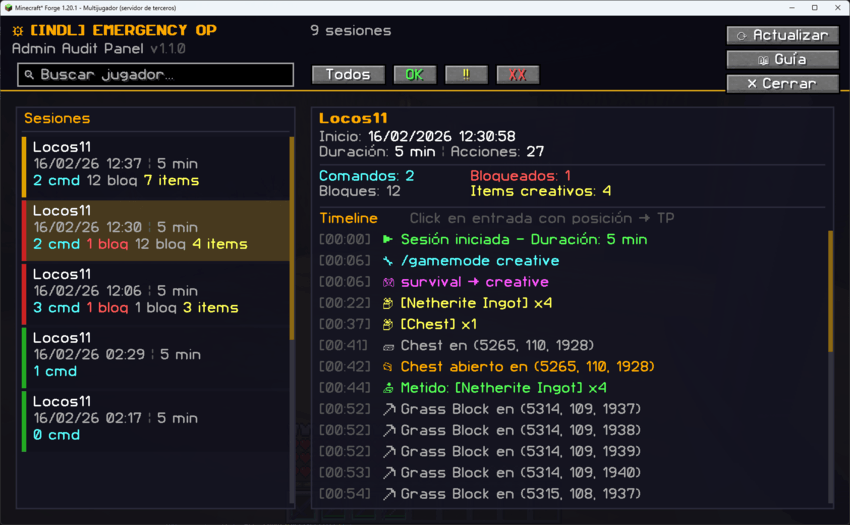
Open the Admin Panel with /eop gui for a visual inspection of all sessions and their timeline.
Features:
- Session list with colored risk badges (✅ Clean, ⚠ Warning, ❌ Danger)
- Full event timeline with icons, timestamps, and details
- Click-to-teleport — click any entry with coordinates to teleport there
- Search and filter — find sessions by player name or risk level
- Interactive guide — built-in icon reference panel
- Refresh button — live data from the server
Risk Classification
| Badge | Condition |
|---|---|
| ✅ Clean | No blocked commands, fewer than 5 creative items, fewer than 50 blocks modified |
| ⚠ Warning | More than 5 creative items or more than 50 blocks modified |
| ❌ Danger | One or more blocked commands attempted |
Command Blacklist
Critical commands are blocked during emergency OP sessions, even with full operator permissions:
/stop, /op, /deop, /ban, /ban-ip, /pardon, /pardon-ip, /emergencyop, /eop, /whitelist
All blocked attempts are logged as COMMAND_BLOCKED events. The blacklist is fully configurable.
Key Features
- ✅ Time-Limited Sessions — Auto-expires after configurable duration (default: 5 min)
- ✅ Daily Rotating Passwords — SHA-256 based Hybrid Cipher, changes every day
- ✅ Full Blackbox Audit — Every action logged with timestamps and positions
- ✅ Command Blacklist — Critical commands blocked even with OP
- ✅ Clean Room Inventory — Anti-duplication: inventory saved, cleared, and restored
- ✅ Admin GUI Panel — Visual session inspector with click-to-teleport
- ✅ Creative Item Tracking — Detects items taken from Creative menu
- ✅ Container Tracking — Logs every item added/removed from chests
- ✅ Block Tracking — Logs every block broken or placed with coordinates
- ✅ Admin Notifications — All OPs receive real-time session alerts
- ✅ Cipher Generator Tool — Standalone HTML page to calculate passwords
- ✅ Fully Configurable — Duration, blacklist, audit granularity, and more
Commands & Permissions
| Command | Alias | Permission | Description |
|---|---|---|---|
/emergencyop login <password> |
/eop login |
Level 0 | Start emergency OP session (validated by cipher) |
/emergencyop logout |
/eop logout |
Level 0 | End your own session early |
/emergencyop help |
/eop help |
OP (2) | Show help menu |
/emergencyop gui |
/eop gui |
OP (2) | Open the Admin Audit Panel |
/emergencyop status |
/eop status |
OP (2) | View active sessions and today's password |
/emergencyop history |
/eop history |
OP (2) | View recent session summaries |
Note:
loginandlogoutare accessible by ANY player (level 0), but are validated by the Hybrid Cipher password. All other commands require OP Level 2.
Configuration
File: config/indl-emergencyop-common.toml
The mod is highly configurable. You control session behavior, password generation, security policies, and audit granularity.
#=== Session Settings ===
[session]
    # Duration of emergency OP session in minutes (1-60, default: 5)
    sessionDurationMinutes = 5

    # Max concurrent sessions (1-5, default: 1)
    maxActiveSessions = 1

#=== Hybrid Cipher Settings ===
[cipher]
    # Secret word for password generation. Share only with trusted admins.
    # Set to 'AUTO_GENERATE' to create a random 10-char string on first boot.
    secretWord = "AUTO_GENERATE"

    # Number of hex characters from the SHA-256 hash (4-16, default: 8)
    hashLength = 8

#=== Security Settings ===
[security]
    # Commands blocked during emergency OP sessions
    commandBlacklist = ["/stop", "/op", "/deop", "/ban", "/ban-ip", "/pardon",
                        "/pardon-ip", "/emergencyop", "/eop", "/whitelist"]

    # Allow switching to Creative mode during session
    allowCreativeMode = true

    # Save and restore inventory on session start/end (Clean Room system)
    restoreInventoryOnEnd = true

#=== Audit / Blackbox Settings ===
[audit]
    # Save session logs to config/indl-emergencyop/sessions/
    logToFile = true

    # Log events to server console in real-time
    logToConsole = true

    # Log block breaks and placements
    logBlockChanges = true

    # Log container interactions (chests, barrels, hoppers)
    logContainerAccess = true

    # Log items taken from Creative menu
    logCreativeItems = true
File Structure
The mod generates the following files in config/indl-emergencyop/:
| File / Directory | Description |
|---|---|
indl-emergencyop-common.toml |
Main configuration file |
sessions/ |
JSON audit logs, one per session |
inventory_snapshots/ |
Saved inventories (Clean Room system) |
Example session filename:
Admin123_2026-02-16_12-30-00.json
Important Notes
- The secret word is critical. Anyone who knows it can calculate today's password. Store it securely and share only with trusted admins.
- Changing the secret word invalidates all current passwords. Useful for emergency revocation.
- Session logs are permanent. Even if the mod is removed, the JSON files remain as forensic evidence.
- The Clean Room system prevents ALL duplication vectors. The player starts with an empty inventory and gets their original back when the session ends.
- Blocked commands are logged, not silently dropped. Admins can see exactly what was attempted.
Links
- Cipher Generator: locos11.github.io/INDL_Emergency-OP
- Part of the [INDL] ecosystem — Compatible with all mods.
Project description from CurseForge.
Pick your setup
[INDL] EMERGENCY OP by Minecraft version and loader
Choose the version and loader you play, then open the matching release.
Check the dependencies, then try the file in a copied instance before changing a world you care about.
Recent files
[INDL] EMERGENCY OP versions and loaders
[INDL] Emergency-OP_1.0.0.jar
indl_emergency_op-1.0.0.jar
16 Feb 2026
Client Source doesn’t say Server Source doesn’t say Dependencies No extras listed Listed on Release listing
Check the 1.20.1 · Forge setup 1.20.1Forge release
Looking for an older file? The official CurseForge project page is in Resources.
 mod
CurseForge · Minecraft
Caravans & Convoys - Automatic Trade
Place a dock, post an offer, and horse-drawn wagons haul goods between docks on their own, guarded by soldiers on the road.
 mod
CurseForge · Minecraft
POIs and Raid-Bosses
Trigger raid‑style events at custom Points of Interest where players sacrifice items for rewards and hidden enemy challenges.
 mod
CurseForge · Minecraft
Dead or Alive - Player Bounties & Wanted Posters
Put a price on another player's head, nail up their Wanted Poster, and let the whole server hunt them.