Mod Menu Optional for Piglin Trading Menu Piglin_Trading_Menu-1.1.1-Fabric-MC1.21.1.jar
optionalMatching file found Matched file: v11.0.4 for 1.21
CurseForge · Minecraft mod
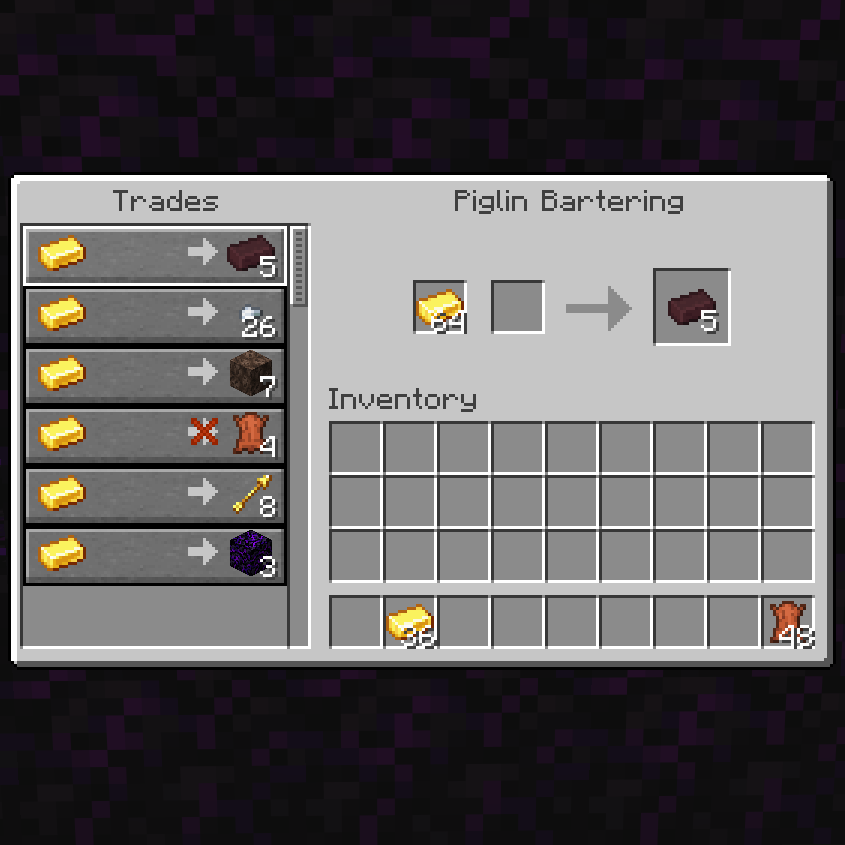
Transform Piglin bartering into a traditional villager trading interface. Exchange gold massively, quickly, and comfortably with 100% vanilla-accurate loot.
Quick answer
Piglin Trading Menu Piglin_Trading_Menu-1.1.1-Fabric-MC1.21.1.jar targets 1.21.1 with Fabric. The project page does not say whether this file belongs on the client, dedicated server, or both. All 2 required mods have matching files.
Where it goes
The project page does not say whether this file belongs on the client, dedicated server, or both.
The source does not explicitly classify this release as client-only or server-only.
Piglin_Trading_Menu-1.1.1-Fabric-MC1.21.1.jar. Change the file and its required mods may change too.
Install Cloth Config API (Fabric/Forge/NeoForge), Fabric API first. We found matching files for this game-version and loader setup. 1 comes through another mod in the chain.
1 extra mod was pulled in by another dependency. Indented rows show who needs each one. We only count dependency files that match this setup. A file for another loader does not fill the gap.
Before you install it
Built for Piglin Trading Menu Piglin_Trading_Menu-1.1.1-Fabric-MC1.21.1.jar. Pick another file and the loader, install side or required mods may change.
Use Piglin_Trading_Menu-1.1.1-Fabric-MC1.21.1.jar. It targets 1.21.1 with Fabric; another release may have different loader, side or dependency requirements.
Install Cloth Config API (Fabric/Forge/NeoForge), Fabric API first. We found matching files for this game-version and loader setup. 1 comes through another mod in the chain.
The project page does not say whether this file belongs on the client, dedicated server, or both.
Use the “Get this file” button beside Piglin_Trading_Menu-1.1.1-Fabric-MC1.21.1.jar. It opens that exact file at the source.
About this project
Tired of throwing gold on the ground and waiting for Piglins to inspect it? Piglin Trading Menu overhauls the vanilla bartering system by introducing a clean, traditional Villager-style trading interface! 🐷✨


Because Piglins now retain their unique trades and restock over time, you can finally build organized Piglin Trading Halls in the Nether just like you would with Villagers. Lock in your favorite trades and farm resources efficiently! 🏰

I make these mods in my free time — if they save you time or make you smile, a coffee keeps the updates coming ☕

Project description from CurseForge.
Pick your setup
Choose the version and loader you play, then open the matching release.
Check the dependencies, then try the file in a copied instance before changing a world you care about.
Recent files
21 Aug 2026
21 Aug 2026
21 Aug 2026
21 Aug 2026
21 Aug 2026
21 Aug 2026
21 Aug 2026
21 Aug 2026
21 Aug 2026
21 Aug 2026
22 Mar 2026
22 Feb 2026
Looking for an older file? The official CurseForge project page is in Resources.
 mod
modCall your companions instantly from anywhere — even across unloaded chunks — using powerful magical crystals. Fully configurable and designed for seamless companion mobility and world traversal.
 mod
modA mod that prevents players from messing with generated structures! Liberation Mode included!
 mod
modOptimize Create contraptions, factories and visual effects for smoother FPS.