Minecraft version
Back to mods 
CurseForge · Minecraft mod
Radial Aggro Indicator
Shows a radial indicator on screen to show the direction of the mob that is currently targeting the player
Choose a version Pick your version below, then grab the matching file.
Quick answer
Which Radial Aggro Indicator release matches 26.1.2?
beta file RadialAggroIndicator-26.1.2-4.0.0.jar
Game version 26.1.2
Loader NeoForge
Radial Aggro Indicator RadialAggroIndicator-26.1.2-4.0.0.jar targets 26.1.2 with NeoForge. The project page does not say whether this file belongs on the client, dedicated server, or both. No extra mods listed for this file.
Where it goes
Is Radial Aggro Indicator required on the client, server, or both?
The project page does not say whether this file belongs on the client, dedicated server, or both.
Client Source doesn’t say
Dedicated server Source doesn’t say
Loader for this release NeoForge
Required install it here Optional supported, not mandatory Not supported do not install here Source doesn’t say do not assume
The source does not explicitly classify this release as client-only or server-only.
What else does Radial Aggro Indicator RadialAggroIndicator-26.1.2-4.0.0.jar need?
RadialAggroIndicator-26.1.2-4.0.0.jar on 26.1.2. Every mod below is checked against that same setup.
This file does not list any required mods. Do not add a library just because a different file uses it.
This file does not list any required or optional mods.
Before you install it
Add Radial Aggro Indicator without breaking your instance.
Built for Radial Aggro Indicator RadialAggroIndicator-26.1.2-4.0.0.jar on 26.1.2. Pick another file and the loader, install side or required mods may change.
- 01
Stick to this file
Use RadialAggroIndicator-26.1.2-4.0.0.jar. It targets 26.1.2 with NeoForge; another release may have different loader, side or dependency requirements.
- 02
Bring the mods it needs
This file does not list any required mods. Do not add a library just because a different file uses it.
- 03
Put it on the correct side
The project page does not say whether this file belongs on the client, dedicated server, or both.
- 04
Pick the file you checked
Use the “Get this file” button beside RadialAggroIndicator-26.1.2-4.0.0.jar. It opens that exact file at the source.
About this project
What does Radial Aggro Indicator add?
Radial Aggro Indicator
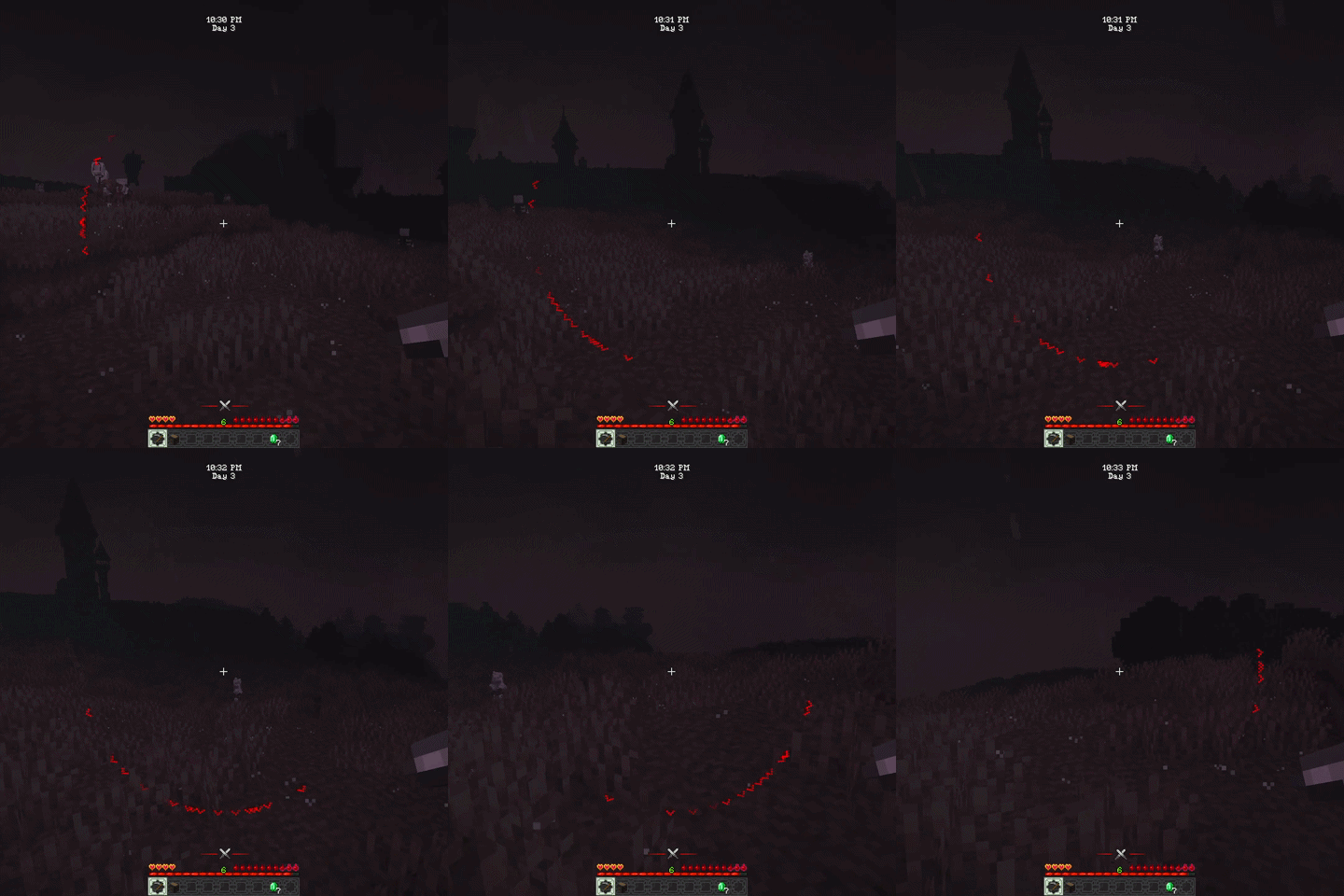
Displays an on-screen indicator showing the direction of mobs that have targeted the player. When targeted a red ^ will appear on the screen pointing in the direction of the mob.
Multiple indicators can appear at once if multiple mobs have targeted the player.
There are some entity tags available to customize the behavior of the indicator for specific mobs.
The radialaggro:unfading tag can be added to mobs to make their indicators stay visible indefinitely instead of disappearing after a certain duration.
The radialaggro:blacklist tag can be added to mobs to prevent them from showing an indicator at all.
If the invertBlacklist config option is enabled, then only mobs with the radialaggro:blacklist tag will show indicators, effectively making it a whitelist instead.
The indicator can be customized through the config file, allowing you to change the color, size, symbol and more. The following general config options are available:
- initialAggro - If true the indicator will be shown when a mob first targets the player (default: false)
- indicatorDuration - The duration in ticks that the aggro indicator will be shown for (default: 200, 10 seconds)
- hideInView - If true the indicator will be hidden when the entity is within the player's field of view (default: false)
- invertBlacklist - If true the blacklist will be inverted to a whitelist, meaning only entities in the list will show the indicator (default: false)
The following client config options are also available:
- fadeIn - If true the indicator will fade in when it appears (default: true)
- fadeOut - If true the indicator will fade out when it disappears (default: true)
- radiusScale - The scale of the wheel around which the aggro symbol spins. Higher values will make the wheel larger (default: 1.0D)
- symbol - The symbol used for the aggro indicator. This can be any single character or a string of characters (default: "^")
- symbolColorRed - The red value of the symbol color rgb (default: 255)
- symbolColorGreen - The green value of the symbol color rgb (default: 0)
- symbolColorBlue - The blue value of the symbol color rgb (default: 0)
- symbolRotationLock - If true the symbol will not rotate to match the direction of the entity, it will always be upright (default: false)
- symbolScale - The scale of the symbol used for the aggro indicator. Higher values will make the symbol larger (default: 2.0D)
Project description from CurseForge.
Pick your setup
Radial Aggro Indicator by Minecraft version and loader
Choose the version and loader you play, then open the matching release.
Minecraft version
1.21.11
1 loader buildMinecraft version
1.21.1
1 loader buildMinecraft version
1.20.1
2 loader buildsCheck the dependencies, then try the file in a copied instance before changing a world you care about.
Recent files
Radial Aggro Indicator versions and loaders
RadialAggroIndicator-26.1.2-4.0.0.jar
15 Apr 2026
Client Source doesn’t say Server Source doesn’t say Dependencies No extras listed Listed on Release listing
Check the 26.1.2 · NeoForge setup NeoForge26.1.2 beta
Looking for an older file? The official CurseForge project page is in Resources.
 mod
CurseForge + Modrinth · Minecraft
Modulation
A growing collection of quality-of-life tweaks, bug fixes, and cross-mod integrations for modpack creators!
 mod
CurseForge + Modrinth · Minecraft
SimpleVoiceChat Broadcast
Broadcast audio to everyone
 mod
CurseForge · Minecraft
Prometheus
🔥 Backbone of modded fire 🔥