Minecraft version
Back to mods 
CurseForge · Minecraft mod
TheTrackers
A projector mod that point where the entity is
Choose a version Pick your version below, then grab the matching file.
Quick answer
Which TheTrackers release should I use?
Latest stable file the_trackers-1.20.1-0.2.6.jar
Game version 1.20.1
Loader Forge
TheTrackers the_trackers-1.20.1-0.2.6.jar targets 1.20.1 with Forge. The project page does not say whether this file belongs on the client, dedicated server, or both. No extra mods listed for this file.
Where it goes
Is TheTrackers required on the client, server, or both?
The project page does not say whether this file belongs on the client, dedicated server, or both.
Client Source doesn’t say
Dedicated server Source doesn’t say
Loader for this release Forge
Required install it here Optional supported, not mandatory Not supported do not install here Source doesn’t say do not assume
The source does not explicitly classify this release as client-only or server-only.
What else does TheTrackers the_trackers-1.20.1-0.2.6.jar need?
the_trackers-1.20.1-0.2.6.jar. Change the file and its required mods may change too.
This file does not list any required mods. Do not add a library just because a different file uses it.
This file does not list any required or optional mods.
Before you install it
Add TheTrackers without breaking your instance.
Built for TheTrackers the_trackers-1.20.1-0.2.6.jar. Pick another file and the loader, install side or required mods may change.
- 01
Stick to this file
Use the_trackers-1.20.1-0.2.6.jar. It targets 1.20.1 with Forge; another release may have different loader, side or dependency requirements.
- 02
Bring the mods it needs
This file does not list any required mods. Do not add a library just because a different file uses it.
- 03
Put it on the correct side
The project page does not say whether this file belongs on the client, dedicated server, or both.
- 04
Pick the file you checked
Use the “Get this file” button beside the_trackers-1.20.1-0.2.6.jar. It opens that exact file at the source.
About this project
What does TheTrackers add?
Mod Introduction
This mod provides multiple types of entity-tracking cursors (two available, one planned), assisting players in locating targets. It also serves as a specialized HUD library.
When you're facing mobs flying chaotically across the screen or clipping through walls, you'll need this. (Vex: huh?)
By default, the mod includes tracking cursors for the Ender Dragon and Wither, as well as boss pointers integrated with Confluence: Otherworld.
Do not load this mod together with Confluence: Otherworld, as it is already built into Confluence: Otherworld.
The mod is a submodule in Confluence: Otherworld, but it can also be played standalone as a util mod.
Users can configure the mod (via config file or in-game GUI) with the following options:
- Enable/Disable: Toggle the tracking functionality.
- Cursor Size: Adjust the relative global size of cursors. Default: 0.6.
- Max Tracking Count: Limit the number of tracked entities to prevent excessive clutter. Only the nearest n entities will be shown. Default: 10, maximum: 400.
- Central Surround Cursor Toggle: One of the most commonly used cursor types. See details below.
- Projection Algorithm: Choose the projection used in central surround mode. Aitoff generally performs best, so switching is not recommended.
- Direct Projection Cursor Toggle: A more common quest-marker style seen in other games. See details below.
- Longitude Axis Toggle: A pre-assigned third cursor type, not yet developed. Currently non-functional.
- Tracking List: A list where each entry corresponds to an EntityType + Cursor. You can specify which entity types to track and which cursor style to use. See configuration details below.
Tracking Details
Currently, tracking is limited to the following range: x: ±64 blocks, y: +64 / -48 blocks, z: ±64 blocks
Central Surround Cursor (TRelativeCursor)
This completed mode creates HUD pointers circling the center to indicate entity direction.
Old version 0.0.3 (ignore Vpet): 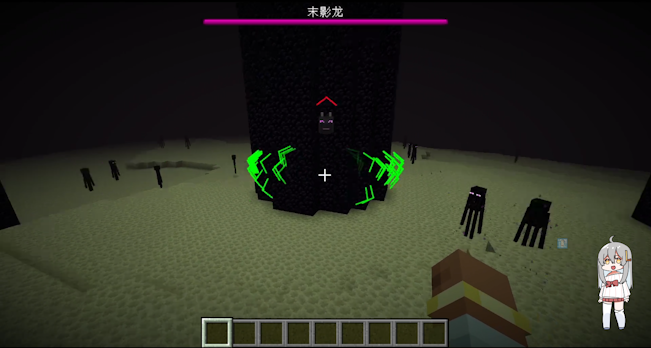
New version 0.2.5: 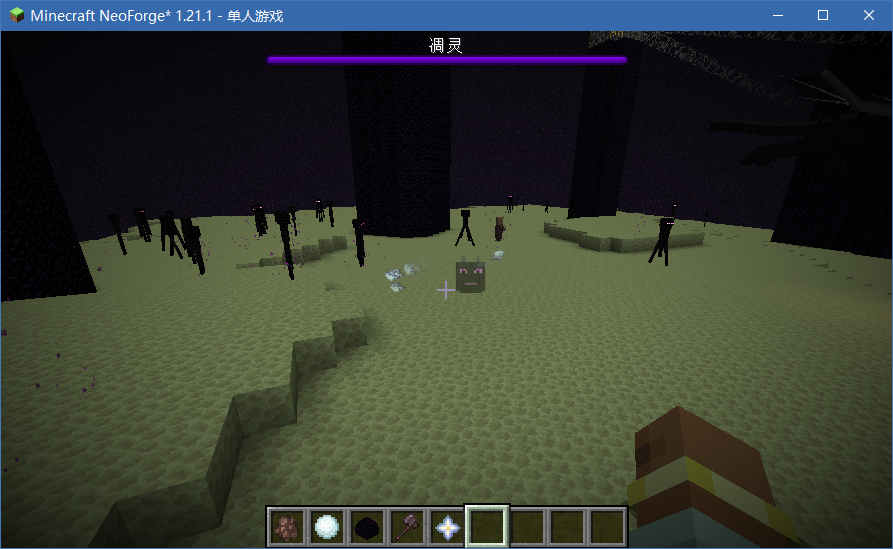
It’s clear that these pointers indicate "which way to turn to see the entity" rather than "where the entity is in the world."
The cursor's distance from the center reflects how much you need to rotate your view. When the entity's direction nearly overlaps with your view, the cursor fades out. (In the old image, the green pointer indicates a nearby Enderman.)
Three projection algorithms are available: Mercator, Aitoff, and Winkel Tripel. Tests show little visual difference, but Aitoff performs best, so the others are not recommended.
Some may wonder about using vanilla matrices for 2D-to-3D direction, but research suggests a slight curved offset produces a more useful effect.
Direct Projection Cursor (TDirectProjCursor)
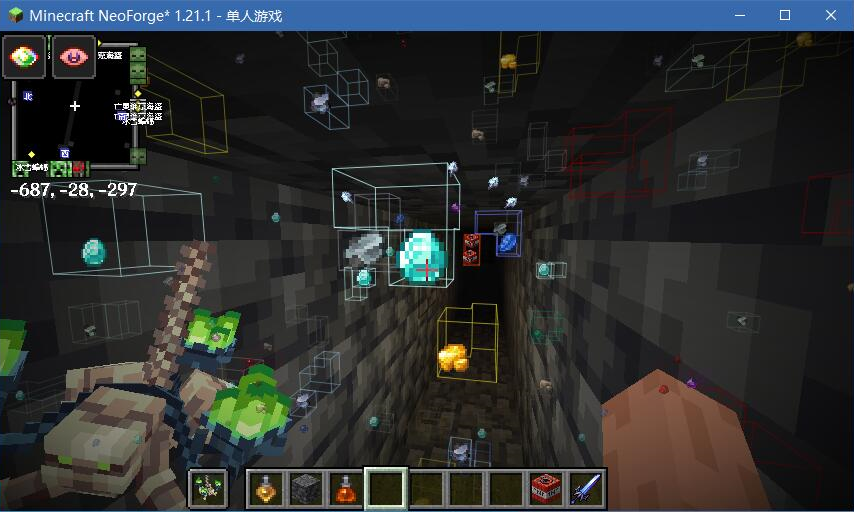
This screenshot was taken while developing Confluence: Otherworld's Mining Potion. The ore markers are implemented via this mod.
This mode directly overlays the cursor onto the target entity (not a world marker, but a true 2D overlay).
Variants include a single portrait-style marker and three icons circling the target. There are also Easter eggs!
Configuring the Mod
In-game, you can create a central surround cursor with the following format:
<modid:entity_type>|<cursor_arrow_type>|<cursor_icon_type>
Example: the default Ender Dragon cursor is configured as:
minecraft:ender_dragon|normal|ender_dragon_head
For direct projection cursors, configuration is more complex and experimental. Format:
<modid:entity_type>|<cursor_type>:<cursor_icon_type>(|easter_eggs_type)
Available Cursor Arrows
normal, normal_red, normal_green, normal_white
normal is the updated arrow shown in the new screenshots, artwork by LazyPillow.
Available Icons
- Vanilla-based:
ender_dragon_head,wither_head. - Confluence: Otherworld:
king_slime,eye_of_cthulhu,brain_of_cthulhu,queen_bee,eater_of_worlds,skeletron,deerclops,wall_of_flesh.
These icons can be used without requiring Confluence: Otherworld as a dependency.
If you set a field to none, that part of the cursor will not display.
You can also add new textures via resource packs, as long as they share the same directory as this mod’s assets. As long as names don’t conflict, they can be referenced directly.
Note: For visual optimization, entities derived from PartEntity (e.g., Ender Dragon’s wings and tail) will not be tracked.
Tip
Many tracking features are already complete and deployed in Confluence: Otherworld. However, configuration and usage may still have imperfections. Feedback is welcome!
Notes
Join the Confluence: Otherworld Discord to support the author.
If you are a mod developer, check the GitPage documentation for more details(Chinese only).
Project description from CurseForge.
Pick your setup
TheTrackers by Minecraft version and loader
Choose the version and loader you play, then open the matching release.
Minecraft version
1.20.1
1 loader buildCheck the dependencies, then try the file in a copied instance before changing a world you care about.
Recent files
TheTrackers versions and loaders
the_trackers-1.20.1-0.2.6.jar
13 Jun 2026
Client Source doesn’t say Server Source doesn’t say Dependencies No extras listed Listed on Release listing
Check the 1.20.1 · Forge setup 1.20.1Forge release
the_trackers-1.21.1-0.2.6.jar
13 Jun 2026
Client Source doesn’t say Server Source doesn’t say Dependencies No extras listed Listed on Release listing
Check the 1.21.1 · NeoForge setup 1.21.1NeoForge release
the_trackers-1.21.1-0.2.5.jar
26 Feb 2026
Client Source doesn’t say Server Source doesn’t say Dependencies No extras listed Listed on Release listing
Check the 1.21.1 · NeoForge setup 1.21.1NeoForge release
Looking for an older file? The official CurseForge project page is in Resources.
 mod
mod CurseForge · Minecraft
Compound: Core
Core gameplay systems and custom integrations for the Compound modpack.
 mod
mod CurseForge + Modrinth · Minecraft
TaczCurios
TaczCurios adds custom curios (accessories) to the game Tacz.
 mod
mod Modrinth · Minecraft
Better loading screen
Enjoy a more beautiful loading screen when you load world!