Minecraft version
Back to mods 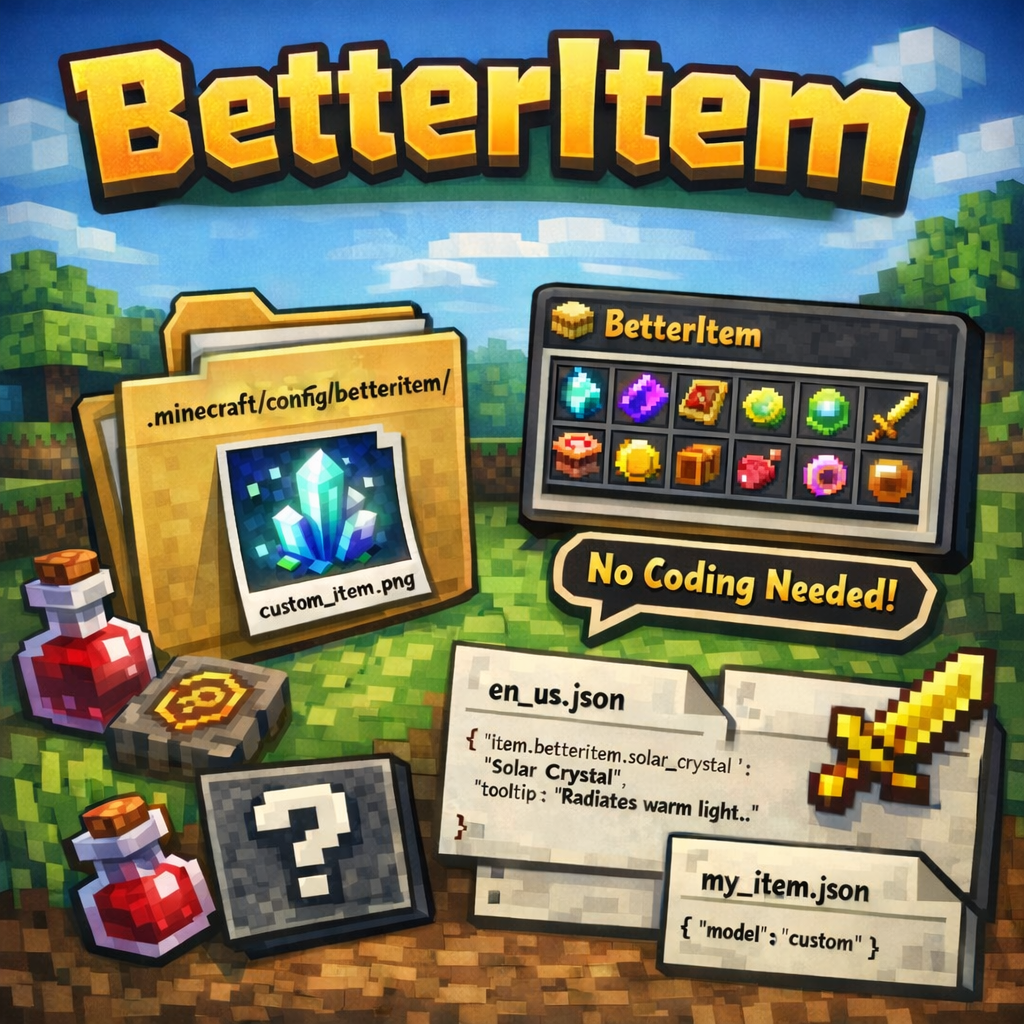
CurseForge · Minecraft mod
BetterItem
Add custom items to Minecraft without coding — just drop a PNG into the config folder and restart. Supports names, tooltips, animated textures, and custom models. Works on servers with automatic client sync.
Choose a version Pick your version below, then grab the matching file.
Quick answer
Which BetterItem release should I use?
Latest stable file BetterItem-1.0.jar
Game version 1.20.1
Loader Forge
BetterItem-1.0.jar targets 1.20.1 with Forge. The project page does not say whether this file belongs on the client, dedicated server, or both. No extra mods listed for this file.
Where it goes
Is BetterItem required on the client, server, or both?
The project page does not say whether this file belongs on the client, dedicated server, or both.
Client Source doesn’t say
Dedicated server Source doesn’t say
Loader for this release Forge
Required install it here Optional supported, not mandatory Not supported do not install here Source doesn’t say do not assume
The source does not explicitly classify this release as client-only or server-only.
What else does BetterItem-1.0.jar need?
BetterItem-1.0.jar. Change the file and its required mods may change too.
This file does not list any required mods. Do not add a library just because a different file uses it.
This file does not list any required or optional mods.
Before you install it
Add BetterItem without breaking your instance.
Built for BetterItem-1.0.jar. Pick another file and the loader, install side or required mods may change.
- 01
Stick to this file
Use BetterItem-1.0.jar. It targets 1.20.1 with Forge; another release may have different loader, side or dependency requirements.
- 02
Bring the mods it needs
This file does not list any required mods. Do not add a library just because a different file uses it.
- 03
Put it on the correct side
The project page does not say whether this file belongs on the client, dedicated server, or both.
- 04
Pick the file you checked
Use the “Get this file” button beside BetterItem-1.0.jar. It opens that exact file at the source.
About this project
What does BetterItem add?
BetterItem
BetterItem is a Minecraft Forge mod for Minecraft 1.20.1 that lets you add custom items to the game without writing a single line of code - just drop texture files into a config folder and launch the game.
All items are registered dynamically at startup, appear in a dedicated BetterItem creative tab, and support custom display names and tooltips via standard language files.
How It Works
On every game launch BetterItem scans the folder
.minecraft/config/betteritem/textures/
Every .png file found there becomes a registered item. The item's registry name is derived directly from the file name (lowercased, special characters replaced with _).
If the textures folder is empty on the first launch, a placeholder dummy item is created automatically so the mod can start without errors.
Config Folder Structure
.minecraft/
└── config/
    └── betteritem/
        ├── textures/          ← item textures (required)
        │   ├── my_item.png
        │   └── my_item.png.mcmeta   ← optional animation metadata
        ├── models/            ← optional custom item models
        │   └── my_item.json
        └── lang/              ← optional display names & tooltips
            ├── en_us.json
            └── ru_ru.json
Supported Files
textures/ - Item Textures (required)
| File | Description |
|---|---|
<item_name>.png |
The item texture. The file name (without .png) becomes the item's registry ID. |
<item_name>.png.mcmeta |
(Optional) Animation metadata for animated textures (standard Minecraft .mcmeta format). |
Rules for file names:
- Only lowercase Latin letters, digits,
.,_,/, and-are allowed.- Other characters are automatically replaced with
_.- File names must be unique - duplicate names (after sanitisation) will cause a startup error.
models/ - Item Models (optional)
| File | Description |
|---|---|
<item_name>.json |
A custom item model JSON. If absent, a standard item/generated model is generated automatically, using the texture from textures/. |
Auto-generated model (used when no .json is provided):
{
  "parent": "minecraft:item/generated",
  "textures": {
    "layer0": "betteritem:item/<item_name>"
  }
}
lang/ - Translations (optional)
| File | Description |
|---|---|
en_us.json |
English display names and tooltips. |
ru_ru.json |
Russian display names and tooltips (or any other locale). |
Format:
{
  "item.betteritem.<item_name>": "Display Name",
  "tooltip.item.betteritem.<item_name>": "Tooltip text shown on hover"
}
Minecraft color/formatting codes (§c, §6, §7, etc.) are supported inside the strings.
Example:
{
  "item.betteritem.ancient_rune": "§6Ancient Rune",
  "tooltip.item.betteritem.ancient_rune": "§7Older than time itself..."
}
If no translation is provided for an item, Minecraft displays the raw translation key as a fallback.
Adding a New Item - Step by Step
Prepare a texture - create a PNG image (recommended
16×16or32×32pixels).Name the file using only lowercase letters, digits, and underscores, e.g.
solar_crystal.png.Place the texture in:
.minecraft/config/betteritem/textures/solar_crystal.png
- (Optional) Add a custom model to:
.minecraft/config/betteritem/models/solar_crystal.json
Skip this step to use the auto-generated flat 2D model.
- (Optional) Add display names and a tooltip to the appropriate language file(s):
.minecraft/config/betteritem/lang/en_us.json
   {
     "item.betteritem.solar_crystal": "Solar Crystal",
     "tooltip.item.betteritem.solar_crystal": "§7Radiates warm light."
   }
- (Optional) Add animation - place an
.mcmetafile next to the texture:
.minecraft/config/betteritem/textures/solar_crystal.png.mcmeta
   {
     "animation": {
       "frametime": 4
     }
   }
- Launch (or restart) Minecraft. The item will appear in the BetterItem creative tab.
Multiplayer / Server
BetterItem synchronises item lists between the server and the client on login. Both sides must have identical textures, otherwise the connection is rejected with a detailed mismatch message listing exactly which items are missing on the client or the server.
Notes
- Items are display-only by default - they have no special functionality beyond appearing in inventories and being obtainable via creative mode or commands (
/give @s betteritem:<item_name>). - The mod creates the
textures/folder automatically on first launch if it does not exist. - Removing a texture file and restarting the game will unregister that item.
Project description from CurseForge.
Pick your setup
BetterItem by Minecraft version and loader
Choose the version and loader you play, then open the matching release.
Check the dependencies, then try the file in a copied instance before changing a world you care about.
Recent files
BetterItem versions and loaders
BetterItem-1.0.jar
26 Feb 2026
Client Source doesn’t say Server Source doesn’t say Dependencies No extras listed Listed on Release listing
Check the 1.20.1 · Forge setup 1.20.1Forge release
Looking for an older file? The official CurseForge project page is in Resources.
 mod
mod CurseForge + Modrinth · Minecraft
Cores
a core library
 mod
mod CurseForge + Modrinth · Minecraft
RiftLibrary
RiftLibrary is a fork of GeckoLib, which adds some new features in addition to GeckoLib's already-present features.
 mod
mod CurseForge + Modrinth · Minecraft
Yori3o's Grappling Hooks
Adds vanilla-like and physically realistic grappling hooks.