Mod Menu Optional for UniLink Fabric 1.20 v1.1.1
optionalMatching file found Matched file: v11.0.4 for 1.21
CurseForge · Minecraft mod
Allows you to use resources from other directories.
Quick answer
UniLink Fabric 1.20 v1.1.1 targets 1.21, 1.20.2, 1.20.5 with Fabric, Quilt. The project page does not say whether this file belongs on the client, dedicated server, or both. No extra mods listed for this file.
Where it goes
The project page does not say whether this file belongs on the client, dedicated server, or both.
The source does not explicitly classify this release as client-only or server-only.
UniLink Fabric 1.20 v1.1.1. Change the file and its required mods may change too.
This file does not list any required mods. Do not add a library just because a different file uses it.
2 extra mods were pulled in by other dependencies. Indented rows show who needs each one. We only count dependency files that match this setup. A file for another loader does not fill the gap.
Before you install it
Built for UniLink Fabric 1.20 v1.1.1. Pick another file and the loader, install side or required mods may change.
Use UniLink Fabric 1.20 v1.1.1. It targets 1.21, 1.20.2, 1.20.5 with Fabric, Quilt; another release may have different loader, side or dependency requirements.
This file does not list any required mods. Do not add a library just because a different file uses it.
The project page does not say whether this file belongs on the client, dedicated server, or both.
Use the “Get this file” button beside UniLink Fabric 1.20 v1.1.1. It opens that exact file at the source.
About this project
A mod that allows you to use resources from other directories
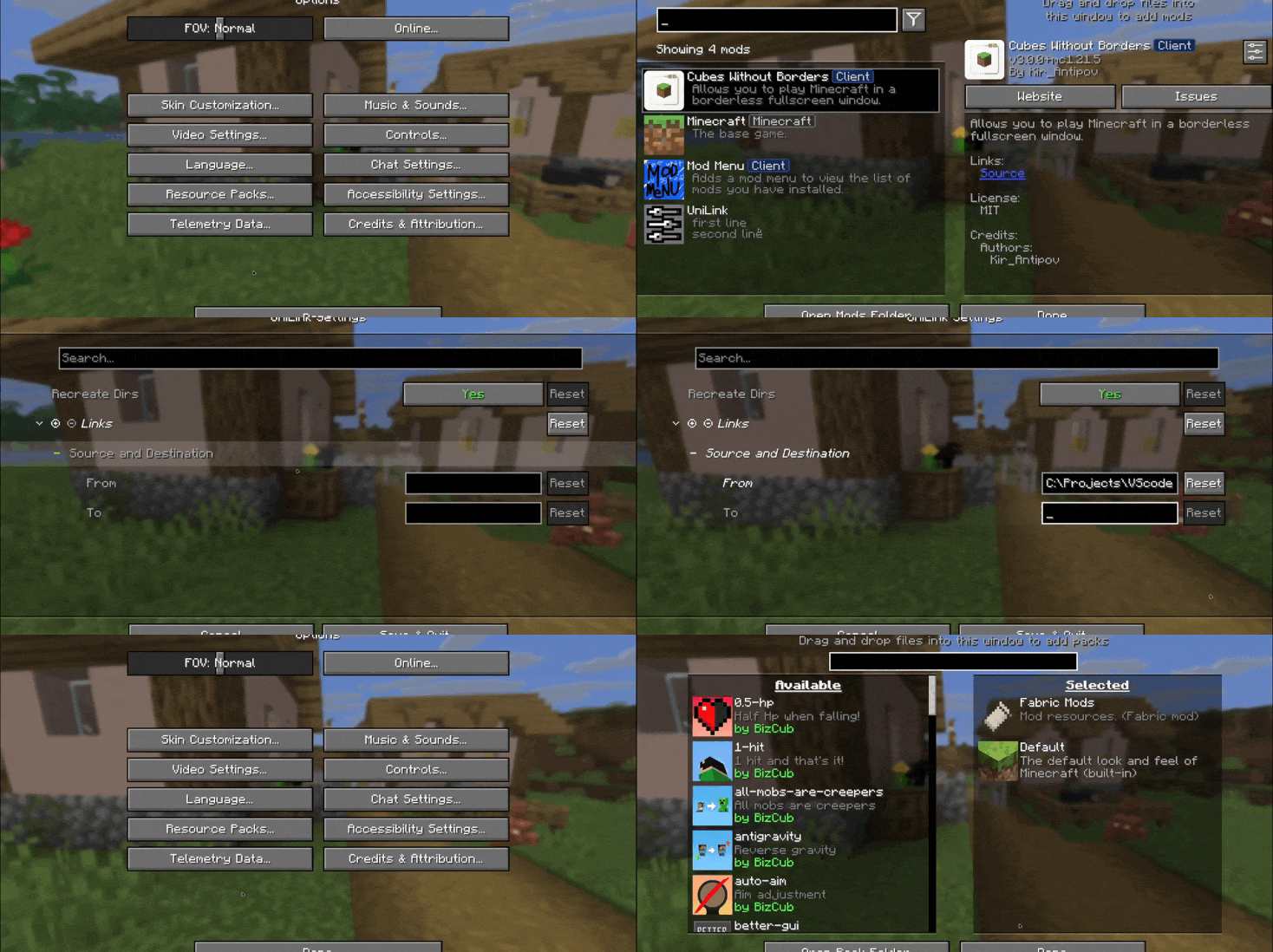
This mod works using symbolic links, which can be used like a folder but don't require reusing (copying) resources. Some launchers also use symbolic links, but the mod works independently of them. It's a configuration file. The first field specifies the path to the directory to use, and the second field specifies the path to the folder where the symbolic link should be placed. The final path can be absolute (e.g., C:\...\.minecraft\saves) or abbreviated (saves).

If you change the directory used for worlds and then revert the change, the game may freeze while searching for and failing to find the required folder. For this purpose, the configuration file has an option to recreate the folders used by the game.
By default, the mod does nothing. However, you can add data to the configuration to create a link: the path from which resources will be used and the path where the symbolic link will be created.
After changing the configuration, new links will be added. Therefore, old, unused links will be deleted.
Since Minecraft creates some folders, the mod will have to delete the existing folder before creating the link. However, since the mod deletes folders without asking, it has a limitation on deleting directories with files inside. This means that if a folder contains any files, it won't be deleted and the link won't be created.
Creating symbolic links requires certain permissions. Therefore, some launchers that don't have them won't be able to create links. Solution: Run the launcher as administrator.

Project description from CurseForge.
Pick your setup
Choose the version and loader you play, then open the matching release.
Showing the newest 12 of 35 game versions. Older files are in the list below.
Check the dependencies, then try the file in a copied instance before changing a world you care about.
Recent files
unilink-1.1.1-fabric+1.20.jar
31 Aug 2026
unilink-1.1.1-forge+1.20-srg.jar
31 Aug 2026
unilink-1.1.1-neoforge+1.21.2.jar
31 Aug 2026
unilink-1.1.1-fabric+1.21.2.jar
31 Aug 2026
unilink-1.1.1-forge+1.21.2.jar
31 Aug 2026
unilink-1.1.1-forge+26.1.jar
31 Aug 2026
unilink-1.1.1-neoforge+1.21.jar
31 Aug 2026
unilink-1.1.1-neoforge+26.1.jar
31 Aug 2026
unilink-1.1.1-fabric+26.1.jar
31 Aug 2026
unilink-1.1-neoforge+26.1.jar
25 Aug 2026
unilink-1.1-fabric+1.21.2.jar
25 Aug 2026
unilink-1.1-fabric+1.20.jar
25 Aug 2026
Looking for an older file? The official CurseForge project page is in Resources.
 mod
modReduce MSPT spikes and server freezes caused by chunk generation and speed it up.
 mod
modA mod about curses and the like.
 mod
modCobbleGacha Expanded is a Cobblemon gacha mod featuring rotating limited banners, rate-up Pokémon, pity and 50/50 guarantees, pull history, and configurable server-side banner management.