Minecraft version
Back to mods 
CurseForge · Minecraft mod
toows
Basic tools for convenient building and editing the world.
Choose a version Pick your version below, then grab the matching file.
Quick answer
Which toows release should I use?
Latest stable file toows-1.0.jar
Game version 1.12.2
Loader Forge
toows-1.0.jar targets 1.12.2 with Forge. The project page does not say whether this file belongs on the client, dedicated server, or both. No extra mods listed for this file.
Where it goes
Is toows required on the client, server, or both?
The project page does not say whether this file belongs on the client, dedicated server, or both.
Client Source doesn’t say
Dedicated server Source doesn’t say
Loader for this release Forge
Required install it here Optional supported, not mandatory Not supported do not install here Source doesn’t say do not assume
The source does not explicitly classify this release as client-only or server-only.
What else does toows-1.0.jar need?
toows-1.0.jar. Change the file and its required mods may change too.
This file does not list any required mods. Do not add a library just because a different file uses it.
This file does not list any required or optional mods.
Before you install it
Add toows without breaking your instance.
Built for toows-1.0.jar. Pick another file and the loader, install side or required mods may change.
- 01
Stick to this file
Use toows-1.0.jar. It targets 1.12.2 with Forge; another release may have different loader, side or dependency requirements.
- 02
Bring the mods it needs
This file does not list any required mods. Do not add a library just because a different file uses it.
- 03
Put it on the correct side
The project page does not say whether this file belongs on the client, dedicated server, or both.
- 04
Pick the file you checked
Use the “Get this file” button beside toows-1.0.jar. It opens that exact file at the source.
About this project
What does toows add?

Toows is a modification for Minecraft 1.12.2 (Forge) that adds tools for convenient construction and editing structures. With this mod, you can easily move, copy and stack blocks, as well as extrude areas without having to place them manually.
Hold down TAB to open the tools menu.
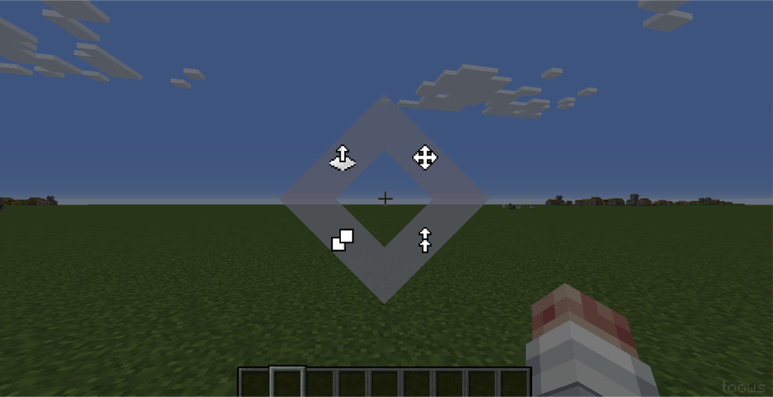
Move Tool:
Left Mouse Button: Mark the first corner of the area.
Right Mouse Button: Mark the second corner, defining the block cuboid.
Mouse Wheel: Adjust the offset (where to move the area).
Right Mouse Button (Apply): Confirm the move.
Stack Tool:
Left Mouse Button: Mark the first corner of the area.
Right Mouse Button: Mark the second corner
Mouse Wheel: Determine the number of copies and direction.
Right Mouse Button (Apply): Create the specified number of copies in a row.
Clone Tool:
Similar to "Move," but the original is not deleted.
Left Mouse Button: Mark the first corner of the area.
Right Mouse Button: Mark the second corner, defining the block cuboid..
Mouse Wheel: Set the offset for the copy.
Right Mouse Button (Apply): Create a copy. You can right-click multiple times to create multiple copies.
Extrude Tool:
Hover the cursor over a block or its face. The face's direction determines the extrusion axis.
Left Mouse Button: Shrink (compress the area, removing a layer in the direction away from you).
Right Mouse Button: Extrude (add a layer of blocks in the direction away from you).
Undo and Redo:
Ctrl+Z: Undo the last action.
Ctrl+X: Redo the undone action.
The /toows help command: Displays a brief instruction on using the mod in chat.
The mod is under development.
Project description from CurseForge.
Pick your setup
toows by Minecraft version and loader
Choose the version and loader you play, then open the matching release.
Check the dependencies, then try the file in a copied instance before changing a world you care about.
Recent files
toows versions and loaders
toows-1.0.jar
1 Mar 2026
Client Source doesn’t say Server Source doesn’t say Dependencies No extras listed Listed on Release listing
Check the 1.12.2 · Forge setup Forge1.12.2 release
Looking for an older file? The official CurseForge project page is in Resources.
 mod
mod CurseForge · Minecraft
More Difficult Wither Storm
A mod for players who want to try defeating Wither Storm under challenging conditions
 mod
mod CurseForge · Minecraft
Create: Voided
Turn your factories into a money making empire by selling to The Void.
 mod
mod CurseForge · Minecraft
Point Blank Addon: Expanded
Miscellaneous additions and improvements for Vic's Point Blank.