Minecraft version
Back to mods 
CurseForge · Minecraft mod
TheZenithSword
Adding the Zenith Sword to Minecraft, use it to attack groups of enemies from a distance.
Choose a version Pick your version below, then grab the matching file.
Quick answer
Which TheZenithSword release should I use?
Latest stable file the_zenith_sword-2.0.2-1.20.1.jar
Game version 1.20.1
Loader Forge
TheZenithSword the_zenith_sword-2.0.2-1.20.1.jar targets 1.20.1 with Forge. The project page does not say whether this file belongs on the client, dedicated server, or both. No extra mods listed for this file.
Where it goes
Is TheZenithSword required on the client, server, or both?
The project page does not say whether this file belongs on the client, dedicated server, or both.
Client Source doesn’t say
Dedicated server Source doesn’t say
Loader for this release Forge
Required install it here Optional supported, not mandatory Not supported do not install here Source doesn’t say do not assume
The source does not explicitly classify this release as client-only or server-only.
What else does TheZenithSword the_zenith_sword-2.0.2-1.20.1.jar need?
the_zenith_sword-2.0.2-1.20.1.jar. Change the file and its required mods may change too.
This file does not list any required mods. Do not add a library just because a different file uses it.
This file does not list any required or optional mods.
Before you install it
Add TheZenithSword without breaking your instance.
Built for TheZenithSword the_zenith_sword-2.0.2-1.20.1.jar. Pick another file and the loader, install side or required mods may change.
- 01
Stick to this file
Use the_zenith_sword-2.0.2-1.20.1.jar. It targets 1.20.1 with Forge; another release may have different loader, side or dependency requirements.
- 02
Bring the mods it needs
This file does not list any required mods. Do not add a library just because a different file uses it.
- 03
Put it on the correct side
The project page does not say whether this file belongs on the client, dedicated server, or both.
- 04
Pick the file you checked
Use the “Get this file” button beside the_zenith_sword-2.0.2-1.20.1.jar. It opens that exact file at the source.
About this project
What does TheZenithSword add?
Overview
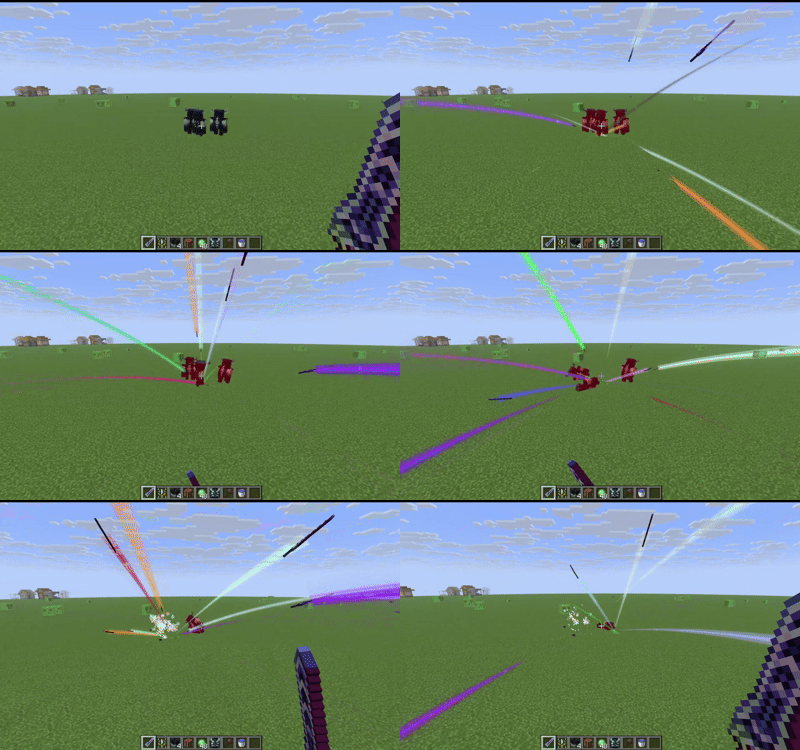
The Zenith Sword is a high-powered combat weapon built around sword projections and ranged slash attacks. It combines strong melee damage with a right-click attack that fires curved sword projections, striking targets in front of the player multiple times.
After using the upgrade item, the player unlocks the Ghost Zenith Sword, allowing attacks without physically holding the sword, with independent targeting range and attack mode settings.
The mod also includes entity blacklists, minimum damage handling, death/drop behavior options, and extensive configuration for modpack balance and compatibility.
Items
Zenith Sword
- Epic rarity
- Fire resistant
- Single stack
- Enchantable, with high enchantability
- Default attack damage: 8, configurable
Attacks:
- Normal melee attacks
- Hold right-click to continuously fire Zenith attacks
- Each attack launches three sword projections
- Deals direct damage to targets in the player’s line of sight
- Projectiles travel along curved paths and strike targets along the way
- Short cooldown between attacks
Zenith Sword Upgrade
- Epic rarity
- Fire resistant
- Single stack
On use:
- Unlocks the Ghost Zenith Sword
- Consumes one upgrade item
- Not consumed in creative mode
- Cannot be used again once unlocked
Recipes
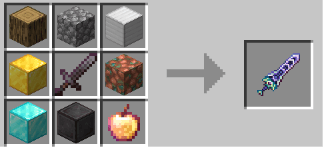
Zenith Sword
Oak Log          Cobblestone      Iron Block
Gold Block       Netherite Sword  Raw Copper Block
Diamond Block    Netherite Block  Enchanted Golden Apple
Zenith Sword Upgrade
Gold Block       Nether Star      Gold Block
Netherite Ingot  Zenith Sword     Diamond
Gold Block       Echo Shard       Gold Block
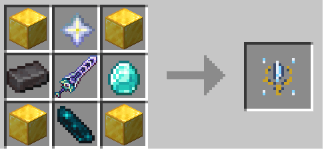
Both recipes are shaped 3×3 crafting recipes. And there might be some diferrence between different minecraft versions.
Usage and Effects
Right-Click Sword Projectiles
While holding the Zenith Sword and holding right-click:
- The player continuously attacks
- Each attack creates 3 sword projections
- The first projectile launches immediately
- The second launches after 2 ticks
- The third launches after 4 ticks
- Attacks have a 4-tick interval
The projections:
- Fly along curved trajectories
- Damage targets along their path
- Respect the configured attack mode and range
- Are affected by the ranged damage factor
Attack Modes
| Mode | Name | Behavior |
|---|---|---|
| 0 | Mobs Only | Only attacks living mobs |
| 1 | Attackable Entities | Attacks all attackable entities |
| 2 | All Entities | Includes non-living entities, armor stands, etc. |
In the inventory:
- Right-click the Zenith Sword to change its default targeting range
- Ctrl + Right-click the Zenith Sword to change its attack mode
Targeting Range
- Default: 20
- Configurable: 20 to 100
- Uses the item’s current range when no target is found
- Can select the farthest or nearest valid target distance, depending on configuration
Ghost Zenith Sword
Unlocked by using the Zenith Sword Upgrade.
Default keys:
| Key | Action |
|---|---|
K |
Draw / sheathe the Ghost Zenith Sword |
J |
Open Ghost Zenith Sword settings |
The Ghost Zenith Sword:
- Does not require holding the actual Zenith Sword
- Can perform right-click projectile attacks directly
- Has its own targeting range
- Has its own attack mode
- Serves as a ranged combat form
Entity Blacklist
Default keys:
| Key | Action |
|---|---|
V |
Add / remove the entity under the crosshair from the attack blacklist |
Shift + V |
Add / remove the entity type from the attack blacklist |
Commands:
/zenithblacklist entity add <target>
/zenithblacklist entity remove <target>
/zenithblacklist type add <entity_type>
/zenithblacklist type remove <entity_type>
/zenithblacklist type addfrom <target>
/zenithblacklist type removefrom <target>
Blacklisted entities are ignored by Zenith Sword attacks.
Configuration
Server Configuration
Typical location:
world/serverconfig/the_zenith_sword-server.toml
| Option | Default | Description |
|---|---|---|
ensured_damage_for_non_player |
0.2 | Minimum damage ratio against non-player entities |
ensured_damage_for_player |
0.1 | Minimum damage ratio against players |
default_damage |
8 | Default Zenith Sword attack damage |
ranged_damage_factor |
0.1 | Ranged/projectile damage relative to melee damage |
sort_farest |
true | Prefer the farthest valid target |
disable_knockback |
true | Disable Zenith Sword knockback |
enable_bypass_invulnerable |
false | Use damage that bypasses most damage reduction |
enable_attack_item |
false | Allow attacking items and XP orbs in “All Entities” mode |
enable_terra_damage_modifier |
true | Enable the damage bonus when Confluence: Otherworld is installed |
percentage_damage_factor |
0.01 | Bonus damage based on the target’s maximum health |
invalid_damage_action |
DELAYED | Behavior when fallback damage is ineffective |
invalid_damage_action values:
| Value | Meaning |
|---|---|
NONE |
Do nothing |
REMOVE |
Remove the entity directly |
DELAYED |
Store the missing damage and settle it later |
Client Configuration
Typical location:
config/the_zenith_sword-client.toml
| Option | Default | Description |
|---|---|---|
render_offset |
true | Lower the first-person trail by one block to emphasize the curve |
trail_angle |
120.0 | Trail arc angle, range 80–200; 360 means a full circle |
block_interaction |
true | Prevent right-click block interactions while holding the Zenith Sword |
Compatibility and Balance
- Minimum damage guarantees prevent high-defense targets from completely negating hits
- Ranged projectile damage is lower than melee damage by default
- Server settings control damage, percentage damage, targeting range, and blacklist behavior
Project description from CurseForge.
Pick your setup
TheZenithSword by Minecraft version and loader
Choose the version and loader you play, then open the matching release.
Minecraft version
26.2
1 loader buildMinecraft version
26.1.2
1 loader buildMinecraft version
26.1.1
1 loader buildMinecraft version
26.1
1 loader buildMinecraft version
1.21.1
1 loader buildMinecraft version
1.20.1
2 loader buildsCheck the dependencies, then try the file in a copied instance before changing a world you care about.
Recent files
TheZenithSword versions and loaders
the_zenith_sword-2.0.2-1.20.1.jar
13 Nov 2026
Client Source doesn’t say Server Source doesn’t say Dependencies No extras listed Listed on Release listing
Check the 1.20.1 · Forge setup 1.20.1Forge release
the_zenith_sword-2.0.2-1.21.1.jar
13 Nov 2026
Client Source doesn’t say Server Source doesn’t say Dependencies No extras listed Listed on Release listing
Check the 1.21.1 · NeoForge setup 1.21.1NeoForge release
the_zenith_sword-2.0.2-26.1.2.jar
13 Nov 2026
Client Source doesn’t say Server Source doesn’t say Dependencies No extras listed Listed on Release listing
Check the 26.1.2 · NeoForge setup NeoForge26.1.2 release
the_zenith_sword-2.0.2-26.3.jar
13 Nov 2026
Client Source doesn’t say Server Source doesn’t say Dependencies No extras listed Listed on Release listing
Check the 26.3 · NeoForge setup NeoForge26.3 release
the_zenith_sword-2.0.1-1.20.1.jar
12 Nov 2026
Client Source doesn’t say Server Source doesn’t say Dependencies No extras listed Listed on Release listing
Check the 1.20.1 · Forge setup 1.20.1Forge beta
the_zenith_sword-2.0.1-1.21.1.jar
12 Nov 2026
Client Source doesn’t say Server Source doesn’t say Dependencies No extras listed Listed on Release listing
Check the 1.21.1 · NeoForge setup 1.21.1NeoForge beta
the_zenith_sword-2.0.1-26.1.2.jar
12 Nov 2026
Client Source doesn’t say Server Source doesn’t say Dependencies No extras listed Listed on Release listing
Check the 26.1.2 · NeoForge setup NeoForge26.1.2 beta
the_zenith_sword-2.0.1-26.3.jar
12 Nov 2026
Client Source doesn’t say Server Source doesn’t say Dependencies No extras listed Listed on Release listing
Check the 26.3 · NeoForge setup NeoForge26.3 beta
the_zenith_sword-2.0.0-26.3.jar
11 Nov 2026
Client Source doesn’t say Server Source doesn’t say Dependencies No extras listed Listed on Release listing
Check the 26.3 · NeoForge setup NeoForge26.3 beta
the_zenith_sword-2.0.0-26.1.2.jar
11 Nov 2026
Client Source doesn’t say Server Source doesn’t say Dependencies No extras listed Listed on Release listing
Check the 26.1.2 · NeoForge setup NeoForge26.1.2 beta
the_zenith_sword-2.0.0-1.21.1.jar
11 Nov 2026
Client Source doesn’t say Server Source doesn’t say Dependencies No extras listed Listed on Release listing
Check the 1.21.1 · NeoForge setup 1.21.1NeoForge beta
the_zenith_sword-2.0.0-1.20.1.jar
11 Nov 2026
Client Source doesn’t say Server Source doesn’t say Dependencies No extras listed Listed on Release listing
Check the 1.20.1 · Forge setup 1.20.1Forge beta
Looking for an older file? The official CurseForge project page is in Resources.
 mod
CurseForge + Modrinth · Minecraft
HeavySpear
Add heavy spear for minecraft 1.21.1Neoforge.
 mod
CurseForge · Minecraft
Re:XrayAndSuperTools(X光与超级工具:重生)
This is a mod with overpowered equipment and tools, or rather, a "salty fish" mod. It is inspired by the classic old mod Super Tools.(这是一个带有超模装备与工具的模组,或者说咸鱼模组。灵感来自经典老模组Super Tools。)
 mod
CurseForge · Minecraft
tacz point shop
An addon for Timeless and Classics Zero (TaCZ) that introduces an in-game currency, allowing players to earn points by defeating zombies,skeleton,creeperts and spiders and spend them at dedicated shop interfaces for guns and ammo.