Minecraft version
Back to mods 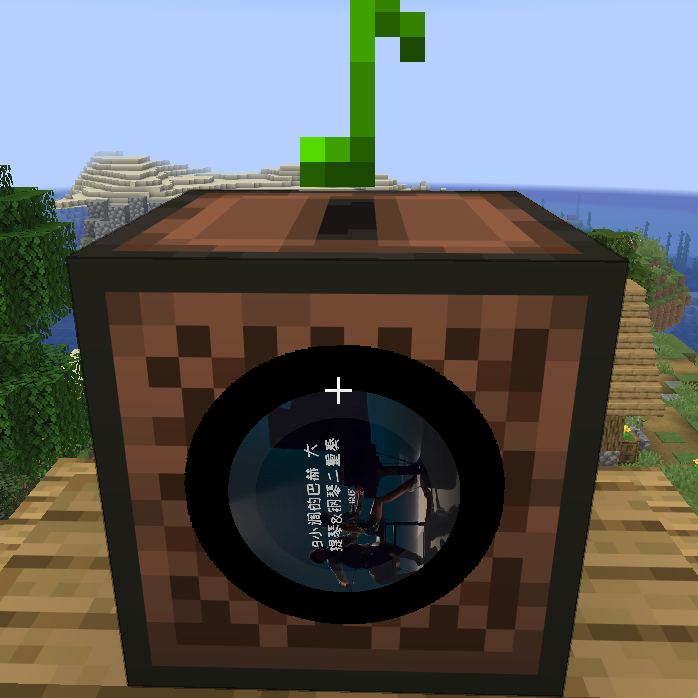
CurseForge · Minecraft mod
Custom Music Player
It provides NetEase Cloud Music search, song requests, shared queue playback, playlist playback, custom music discs, and URL-based jukebox playback.
Choose a version Pick your version below, then grab the matching file.
Quick answer
Which Custom Music Player release should I use?
Latest stable file minecraft-music-player-2.2.3-fabricmc1.14.4.jar
Game version 1.14.4
Loader Fabric
Custom Music Player minecraft-music-player-2.2.3-fabricmc1.14.4.jar targets 1.14.4 with Fabric. The project page does not say whether this file belongs on the client, dedicated server, or both. No extra mods listed for this file.
Where it goes
Is Custom Music Player required on the client, server, or both?
The project page does not say whether this file belongs on the client, dedicated server, or both.
Client Source doesn’t say
Dedicated server Source doesn’t say
Loader for this release Fabric
Required install it here Optional supported, not mandatory Not supported do not install here Source doesn’t say do not assume
The source does not explicitly classify this release as client-only or server-only.
What else does Custom Music Player minecraft-music-player-2.2.3-fabricmc1.14.4.jar need?
minecraft-music-player-2.2.3-fabricmc1.14.4.jar. Change the file and its required mods may change too.
This file does not list any required mods. Do not add a library just because a different file uses it.
This file does not list any required or optional mods.
Before you install it
Add Custom Music Player without breaking your instance.
Built for Custom Music Player minecraft-music-player-2.2.3-fabricmc1.14.4.jar. Pick another file and the loader, install side or required mods may change.
- 01
Stick to this file
Use minecraft-music-player-2.2.3-fabricmc1.14.4.jar. It targets 1.14.4 with Fabric; another release may have different loader, side or dependency requirements.
- 02
Bring the mods it needs
This file does not list any required mods. Do not add a library just because a different file uses it.
- 03
Put it on the correct side
The project page does not say whether this file belongs on the client, dedicated server, or both.
- 04
Pick the file you checked
Use the “Get this file” button beside minecraft-music-player-2.2.3-fabricmc1.14.4.jar. It opens that exact file at the source.
About this project
What does Custom Music Player add?
Minecraft Music Player
Minecraft Music Player is a Fabric music mod for Minecraft 1.21.11. It provides NetEase Cloud Music search, song requests, shared queue playback, playlist playback, custom music discs, and URL-based jukebox playback.
The server handles commands, queue logic, search requests, sync, random loot disc injection, and jukebox control. The client handles actual audio download, playback, and jukebox cover rendering. This is a dual-side mod, not a pure server-side audio mod.





Features
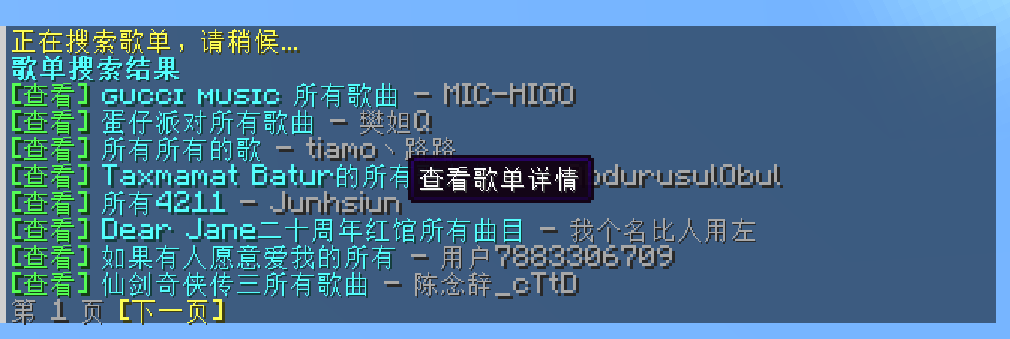
- Search songs, artists, playlists, and users
- View artist top songs, playlist details, and user playlists
- Unified paging and clickable navigation for all major list pages
- Clickable actions for request, burn, detail view, and download
- Shared song requests, queue playback, auto-advance, and vote skip
- Duplicate request deduplication and move-queued-track-to-next support
- Server-side queue prefetching to reduce delay between tracks
- Burn songs into vanilla music discs and play URL-based music from jukeboxes
/music randomgenerates 10 random hot songs each time- All loot-table-backed containers can spawn random hot music discs based on admin settings
How It Works
- The server handles command execution, search requests, playback queue, loot disc generation, and jukebox synchronization
- The client handles actual audio playback and jukebox cover rendering
- If only the server installs the mod, commands and queue logic work, but clients cannot hear music
- Players who want to hear music must install the mod on the client
Recommended setup:
- Install
Minecraft Music Playeron the server - Install
Minecraft Music Playeron clients that should hear music - Make sure the server or clients can access a working music API endpoint
Requirements
- Minecraft
1.21.11 - Fabric Loader
0.18.4or newer - Fabric API
0.141.3+1.21.11or a compatible version - Java
21 - A reachable NetEase-related music API service, defaulting to
https://mycelis.dpdns.org/
Installation
Server
Put the mod jar and Fabric API into the server mods folder.
Client
Put the mod jar and Fabric API into the client mods folder.
Default API Address
Default configuration uses:
https://mycelis.dpdns.org/
Admins can override it by command and restore the default later.
Music Discs
Burn flow
- Hold any vanilla music disc in the main hand
- Run
/music burn song <song_id> - Or click
[Burn]in supported list pages - Receive a custom music disc storing the track metadata and URLs
Disc metadata
A burned disc stores:
- song ID
- song title
- artist name
- artist ID
- cover URL
- duration
- available source URLs
Jukebox playback
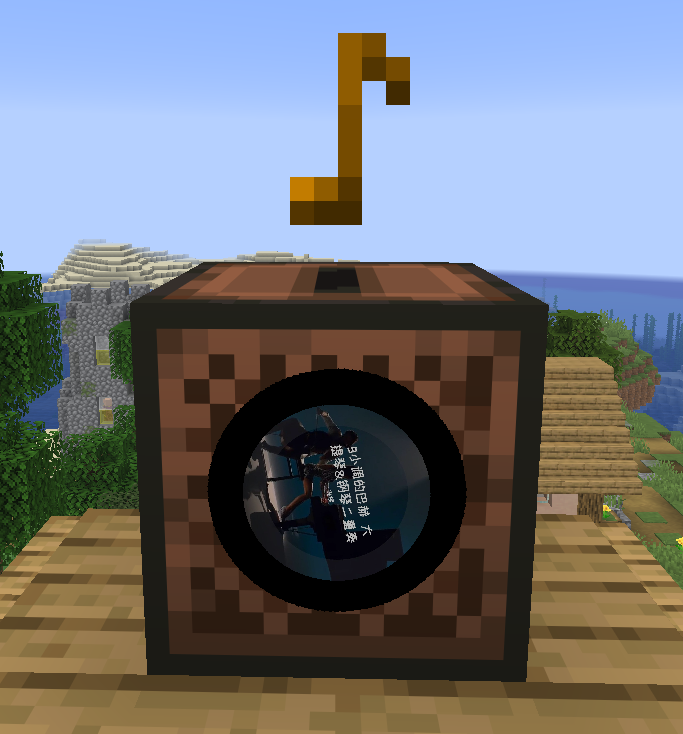
- Inserting a burned disc into a jukebox automatically plays the stored URL music
- Playback is spatialized around the jukebox instead of acting like a global background track
- The four sides of the jukebox render a rotating disc-style cover effect
- Playback stops when the disc is ejected, replaced, the jukebox is broken, the chunk unloads, or the player leaves audible range
- Pending placeholder discs cannot be inserted into jukeboxes and will do nothing if used on one
Burn entry points
When the player holds a burnable disc in the main hand, a [Burn] action is shown automatically in these views:
/music now/music queue/music random/music search song .../music view playlist .../music view artist .../music view author ...
Random Hot Music
Use:
/music random
Behavior:
- Generates 10 random hot songs each time
- The source is hot playlists selected from hot playlist categories
- Each refresh produces a different list
- Every entry supports:
- request song
- burn to disc
- view artist details
- open the direct download URL
Loot Container Random Music Discs
The mod can inject random hot music discs into all loot-table-backed containers when they are opened for the first time.
Behavior:
- Applies to both block containers and entity containers backed by loot tables
- Each container is decided only once
- On first open, a temporary "generating" placeholder disc is inserted first and the real disc is resolved asynchronously in the background
- If the player takes the placeholder disc out early, it will still resolve later inside the player's inventory or the currently open container
- The original vanilla disc item type is preserved after resolution, so the color and appearance do not change
- Generated discs come from random hot songs selected from hot playlists
- Admins can configure whether this is enabled, the generation chance, and how many discs may be generated per container
Player Commands
| Command | Description |
|---|---|
/music |
Show help |
/music now |
Show the current track with a clickable download entry |
/music queue [page] |
Show the current queue |
/music queue next <song_id> |
Move a queued song to the next position |
/music join |
Join current playback |
/music leave |
Leave current playback |
/music mute once |
Stop receiving only the current song |
/music vote next |
Vote to skip to the next track |
/music play song <song_id> |
Request a single song |
/music play playlist <playlist_id> |
Switch into playlist playback mode |
/music burn song <song_id> |
Burn the held disc into a music disc |
/music random |
Generate 10 random hot songs |
/music random refresh |
Generate another random hot song list |
/music search song <keyword> |
Search songs |
/music search song page <page> <keyword> |
View a specific page of song search results |
/music search artist <keyword> |
Search artists |
/music search artist page <page> <keyword> |
View a specific page of artist search results |
/music search author <keyword> |
Alias of artist |
/music search playlist <keyword> |
Search playlists |
/music search playlist page <page> <keyword> |
View a specific page of playlist search results |
/music search user <keyword> |
Search users |
/music search user page <page> <keyword> |
View a specific page of user search results |
/music view artist <artist_id> |
View artist top songs |
/music view artist page <page> <artist_id> |
View a specific page of artist details |
/music view author <artist_id> |
Alias of artist |
/music view playlist <playlist_id> |
View playlist details |
/music view playlist page <page> <playlist_id> |
View a specific page of playlist details |
/music view user <user_id> |
View user playlists |
/music view user page <page> <user_id> |
View a specific page of user playlists |
Admin Commands
| Command | Description |
|---|---|
/music admin reload |
Reload config |
/music admin status |
Show current config status |
/music admin clearqueue |
Clear queued tracks |
/music next |
Skip immediately to the next track |
/music stop |
Stop playback |
/music admin set baseUrl <url> |
Set the music API base URL, or use default to restore the default |
/music admin set allowCustomServer <true|false> |
Allow custom API URL or not |
/music admin set allowSongRequest <true|false> |
Allow song requests or not |
/music admin set allowPlaylistRequest <true|false> |
Allow playlist import or not |
/music admin set autoAdvance <true|false> |
Enable auto-advance or not |
/music admin set announceQueueChanges <true|false> |
Broadcast queue changes or not |
/music admin set showLoadingHints <true|false> |
Show search and resolve hints or not |
/music admin set useSystemProxy <true|false> |
Enable system proxy discovery or not |
/music admin set preferIpv4 <true|false> |
Prefer IPv4 or not |
/music admin set proxy <host:port> |
Set HTTP proxy |
/music admin set proxy none |
Clear proxy |
/music admin set connectTimeoutSeconds <3-60> |
Set connect timeout |
/music admin set readTimeoutSeconds <3-120> |
Set read timeout |
/music admin set searchLimit <3-20> |
Set list page size |
/music admin set maxQueueSize <1-200> |
Set queue size limit |
/music admin set playlistQueueLimit <1-100> |
Set maximum imported songs per playlist |
/music admin set queueCacheSize <0-20> |
Set server-side queue prefetch size |
/music admin set enableLootMusicDiscs <true|false> |
Enable random music discs in loot containers |
/music admin set lootMusicDiscChance <0.0-1.0> |
Set the generation chance for random loot music discs |
/music admin set lootMusicDiscCount <0-5> |
Set how many random music discs a loot container may generate |
/music admin set voteSkipPercent <0.1-1.0> |
Set vote skip ratio |
Configuration
Configuration file path:
config/minecraft-music-player.json
Default config example:
{
  "neteaseBaseUrl": "https://mycelis.dpdns.org/",
  "proxy": "",
  "useSystemProxy": true,
  "preferIpv4": true,
  "allowCustomServer": true,
  "allowSongRequest": true,
  "allowPlaylistRequest": true,
  "autoAdvance": true,
  "announceQueueChanges": true,
  "showLoadingHints": true,
  "connectTimeoutSeconds": 10,
  "readTimeoutSeconds": 20,
  "searchLimit": 8,
  "maxQueueSize": 40,
  "playlistQueueLimit": 20,
  "queueCacheSize": 3,
  "enableLootMusicDiscs": true,
  "lootMusicDiscChance": 0.3,
  "lootMusicDiscCount": 1,
  "voteSkipPercent": 0.6
}
Project description from CurseForge.
Pick your setup
Custom Music Player by Minecraft version and loader
Choose the version and loader you play, then open the matching release.
Minecraft version
26.2
1 loader buildMinecraft version
1.21.11
1 loader buildMinecraft version
1.15.2
1 loader buildMinecraft version
1.14.4
1 loader buildCheck the dependencies, then try the file in a copied instance before changing a world you care about.
Recent files
Custom Music Player versions and loaders
minecraft-music-player-2.2.3-fabricmc1.14.4.jar
11 Oct 2026
Client Source doesn’t say Server Source doesn’t say Dependencies No extras listed Listed on Release listing
Check the 1.14.4 · Fabric setup Fabric1.14.4 release
minecraft-music-player-2.2.3-fabricmc1.15.2.jar
11 Oct 2026
Client Source doesn’t say Server Source doesn’t say Dependencies No extras listed Listed on Release listing
Check the 1.15.2 · Fabric setup Fabric1.15.2 release
minecraft-music-player-2.2.3-fabricmc26.3.jar
10 Oct 2026
Client Source doesn’t say Server Source doesn’t say Dependencies No extras listed Listed on Release listing
Check the 26.3 · Fabric setup Fabric26.3 release
minecraft-music-player-2.1.3-fabricmc26.2.jar
15 Jul 2026
Client Source doesn’t say Server Source doesn’t say Dependencies No extras listed Listed on Release listing
Check the 26.2 · Fabric setup Fabric26.2 release
minecraft-music-player-2.0.6-fabricmc1.21.11.jar
9 Mar 2026
Client Source doesn’t say Server Source doesn’t say Dependencies No extras listed Listed on Release listing
Check the 1.21.11 · Fabric setup Fabric1.21.11 release
custom-music-player-2.0.5-fabricmc1.21.11.jar
minecraft-music-player-2.0.5-fabricmc1.21.11.jar
9 Mar 2026
Client Source doesn’t say Server Source doesn’t say Dependencies No extras listed Listed on Release listing
Check the 1.21.11 · Fabric setup Fabric1.21.11 release
Looking for an older file? The official CurseForge project page is in Resources.
 mod
mod CurseForge · Minecraft
TpSetHome
Add /sethome, /home and /delhome commands.
 mod
mod CurseForge · Minecraft
AI Chatgame Solver
AI ChatGame Solver — a client-side Fabric mod that detects server chat games (unscrambles, trivia, first-to-type) and uses AI to type the correct answer before anyone else can.
 mod
mod CurseForge + Modrinth · Minecraft
CatVision
A minecraft mod which gives you Night Vision, even if you aren't a server operator. Inspired by CatEyes by Tee6! :)