Simple Chat Disabler Optional for Bulletin Board bulletin-board-1.2.1-1.21.1.jar
optionalNo matching file

CurseForge · Minecraft mod
The mod adds a notice board where players can leave their notes for other players to read or take with them.
Quick answer
Bulletin Board bulletin-board-1.2.1-1.21.1.jar targets 1.21.1 with Fabric. The project page does not say whether this file belongs on the client, dedicated server, or both. All 1 required mods have matching files.
Where it goes
The project page does not say whether this file belongs on the client, dedicated server, or both.
The source does not explicitly classify this release as client-only or server-only.
bulletin-board-1.2.1-1.21.1.jar. Change the file and its required mods may change too.
Install Fabric API first. We found matching files for this game-version and loader setup.
We only count dependency files that match this setup. A file for another loader does not fill the gap.
Before you install it
Built for Bulletin Board bulletin-board-1.2.1-1.21.1.jar. Pick another file and the loader, install side or required mods may change.
Use bulletin-board-1.2.1-1.21.1.jar. It targets 1.21.1 with Fabric; another release may have different loader, side or dependency requirements.
Install Fabric API first. We found matching files for this game-version and loader setup.
The project page does not say whether this file belongs on the client, dedicated server, or both.
Use the “Get this file” button beside bulletin-board-1.2.1-1.21.1.jar. It opens that exact file at the source.
About this project
Adds bulletin boards for exchanging announcements, notes or orders between players. Who might this mod be for? Players who want to create a special atmosphere on their server, exchange messages without using chat (for example, if it's disabled), leave notes for offline players (so they can read them even when you're not in the game), make announcements to players, and place orders. This mod is not intended for single-player play (at least for now), except perhaps for some decorative purposes. The mod is also well suited for players who create their own maps, modpacks, or maps with story-driven progression.
The game now features a craftable notice board that can be placed on the wall. Starting with version 1.2, the board actually has five slots: one large one (which can only hold a full-size note) and four small slots, each suitable for smaller notes. However, two small slots can be combined into one full-size slot by placing a full-size note there. When hovering over an empty slot with a signed note in hand, the slot will be outlined with a green border, indicating that the note can be placed there. If hovering over a slot with an existing note, the slot will be outlined with a red border, indicating that you cannot place your own note there. When hovering over a note with an empty hand, it will be outlined with a yellow border, indicating that it can be interacted with: right-clicking opens a graphical window containing the note's title, text, and author (unless the note was written anonymously – see "Note" below). The player has two options when reading a note: close the window, leaving the note in place, or take the note, after which it is placed in the player's inventory and the space on the board is freed up.
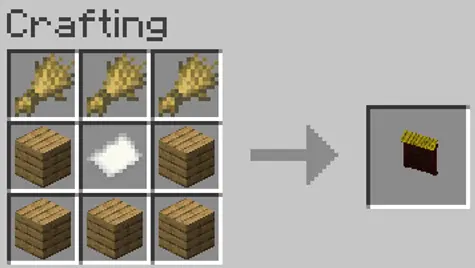
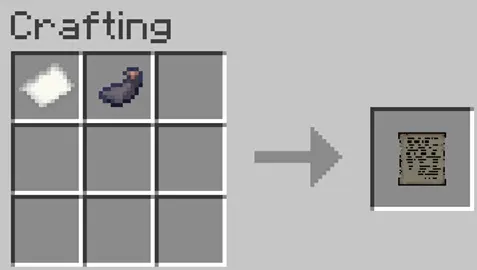
Full-size note
A note is made from paper and an ink sac. Initially, it is blank, with no text or anything else. It cannot be placed, nor can it be stamped (see "Seal" below). Right-clicking with a note in hand opens the note editor, where the player can enter the note's title and text, as well as check the anonymity box (checking this box changes the note's nickname to "Anonymous"). Once a note is signed, it cannot be rewritten. A signed note can be viewed by right-clicking or posted on the board.
Small note
Two small notes are made from one full-size note. The functionality of the small note is identical to that of the full-size note, with a couple of exceptions. First, the character count is halved, reaching 256 characters. Second, more small notes can be posted on the board, as two full-size slots equal four slots for small notes.
Time Update
After the 1.1.1 "Time Update" update, notes without a seal will disappear an hour after they were posted.
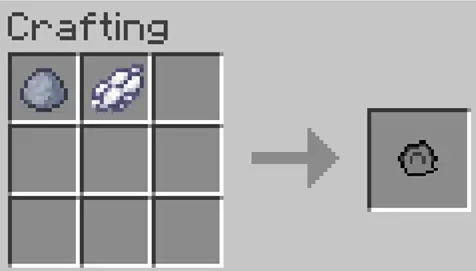
A seal is merely a decorative element and is not required for creating and attaching a note. However, it makes it easier to identify the player who created it (if players have agreed on the colors for the notes) or to attract attention. To apply a seal to a note, equip the note in your off-hand, equip a seal of the desired color in your main hand, and right-click. The seal will then disappear from the player's inventory, and the note will receive its own seal (it won't appear in the inventory, but a signature is added when you hover over the note). Once the note is placed on the board, the seal will be visible.
Time Update
After the 1.1 "Time Update", the presence of a seal ensures that the note will remain on the board until the note is removed by a player or until the notice board is destroyed.
In the future, we plan to expand the mod's functionality:
v1.0 - Release ✅
v1.1 - Time Update ✅
v1.2 - Compact Notes✅
1.21.1 port✅
v1.3 - Living World📌
Forge port 📌
v1.4 - Quest Update
v1.5 - Polish (QoL improvements)
This mod works even better with gameplay that limits players' communication methods. For example, you can add this mod, any voice chat mod, or a mod that disables the ability to write in-game chat (Simple Chat Disabler), which somewhat undermines the social aspect of some of the game's original designs.
Project description from CurseForge.
Pick your setup
Choose the version and loader you play, then open the matching release.
Check the dependencies, then try the file in a copied instance before changing a world you care about.
Recent files
22 Jul 2026
22 Jul 2026
23 Apr 2026
17 Mar 2026
15 Mar 2026
15 Mar 2026
12 Mar 2026
12 Mar 2026
Looking for an older file? The official CurseForge project page is in Resources.
 mod
A psychological horror Minecraft mod where entities observe, learn, and adapt to your behavior. Every discovery leads deeper into the unknown.
 mod
Tempest Almanac brings magic weather to the Overworld. Eleven phenomena follow the seasons, from auroras and an eclipse to a sirocco and rainbows, with astralite gear, ley pylons and a book of its own.
 mod
Fourteen gems with anime-scale powers and filmed ultimates, 66 gem fusions, bosses fought by their own rules, a new dimension, and villages that live, build, trade and go to war without you.