Minecraft version
Back to mods 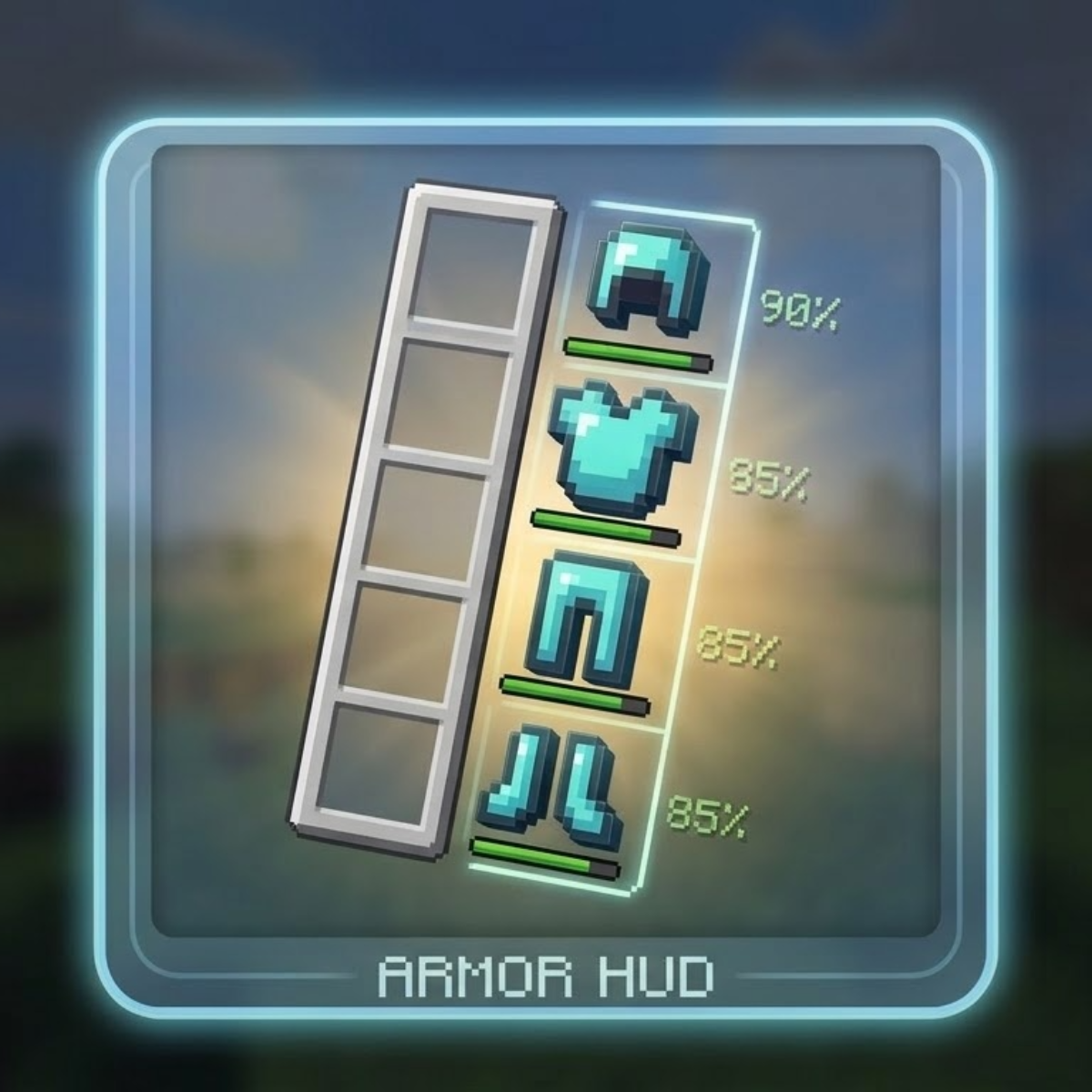
CurseForge · Minecraft mod
Armor Glance
A compact, customizable armor display mod that shows your equipped gear with durability percentages and progress bars next to the hotbar — fully configurable via Mod Menu.
Choose a version Pick your version below, then grab the matching file.
Quick answer
Which Armor Glance release should I use?
Latest stable file Armor Glance 2.8.0 (Fabric 26.3)
Game version 26.3
Loader Fabric
Armor Glance 2.8.0 (Fabric 26.3) targets 26.3 with Fabric. The project page does not say whether this file belongs on the client, dedicated server, or both. No extra mods listed for this file.
Where it goes
Is Armor Glance required on the client, server, or both?
The project page does not say whether this file belongs on the client, dedicated server, or both.
Client Source doesn’t say
Dedicated server Source doesn’t say
Loader for this release Fabric
Required install it here Optional supported, not mandatory Not supported do not install here Source doesn’t say do not assume
The source does not explicitly classify this release as client-only or server-only.
What else does Armor Glance 2.8.0 (Fabric 26.3) need?
Armor Glance 2.8.0 (Fabric 26.3). Change the file and its required mods may change too.
This file does not list any required mods. Do not add a library just because a different file uses it.
This file does not list any required or optional mods.
Before you install it
Add Armor Glance without breaking your instance.
Built for Armor Glance 2.8.0 (Fabric 26.3). Pick another file and the loader, install side or required mods may change.
- 01
Stick to this file
Use Armor Glance 2.8.0 (Fabric 26.3). It targets 26.3 with Fabric; another release may have different loader, side or dependency requirements.
- 02
Bring the mods it needs
This file does not list any required mods. Do not add a library just because a different file uses it.
- 03
Put it on the correct side
The project page does not say whether this file belongs on the client, dedicated server, or both.
- 04
Pick the file you checked
Use the “Get this file” button beside Armor Glance 2.8.0 (Fabric 26.3). It opens that exact file at the source.
About this project
What does Armor Glance add?
Armor Glance adds a compact armor display next to your hotbar, showing all four equipped armor pieces with durability bars and optional percentage or raw number readouts.
Features:
- Displays helmet, chestplate, leggings, and boots with durability indicators
- Toggle between percentage (%) or raw durability numbers
- Switch between vertical and horizontal layout
- Adjustable position, spacing, and slot box transparency
- Fully configurable via Mod Menu
Lightweight, minimal, and built for players who want to keep an eye on their gear without the clutter.
Project description from CurseForge.
Pick your setup
Armor Glance by Minecraft version and loader
Choose the version and loader you play, then open the matching release.
Minecraft version
26.2
3 loader buildsMinecraft version
26.1.2
3 loader buildsMinecraft version
26.1.1
1 loader buildMinecraft version
26.1
1 loader buildMinecraft version
1.21.11
3 loader buildsMinecraft version
1.21.10
3 loader buildsMinecraft version
1.21.9
3 loader buildsMinecraft version
1.21.1
3 loader buildsMinecraft version
1.21
3 loader buildsCheck the dependencies, then try the file in a copied instance before changing a world you care about.
Recent files
Armor Glance versions and loaders
Armor Glance 2.8.0 (Fabric 26.3)
ArmorGlance-mc26.3-v2.8.0-fabric.jar
16 Oct 2026
Client Source doesn’t say Server Source doesn’t say Dependencies No extras listed Listed on Release listing
Check the 26.3 · Fabric setup Fabric26.3 release
Armor Glance 2.8.0 (Forge 26.3)
ArmorGlance-mc26.3-v2.8.0-forge.jar
16 Oct 2026
Client Source doesn’t say Server Source doesn’t say Dependencies No extras listed Listed on Release listing
Check the 26.3 · Forge setup Forge26.3 release
Armor Glance 2.8.0 (NeoForge 26.3)
ArmorGlance-mc26.3-v2.8.0-neoforge.jar
16 Oct 2026
Client Source doesn’t say Server Source doesn’t say Dependencies No extras listed Listed on Release listing
Check the 26.3 · NeoForge setup NeoForge26.3 release
ArmorGlance-mc26.2-v2.7.0-fabric.jar
2 Jul 2026
Client Source doesn’t say Server Source doesn’t say Dependencies No extras listed Listed on Release listing
Check the 26.2 · Fabric setup Fabric26.2 release
ArmorGlance-mc26.2-v2.7.0-forge.jar
2 Jul 2026
Client Source doesn’t say Server Source doesn’t say Dependencies No extras listed Listed on Release listing
Check the 26.2 · Forge setup Forge26.2 release
ArmorGlance-mc26.2-v2.7.0-neoforge.jar
2 Jul 2026
Client Source doesn’t say Server Source doesn’t say Dependencies No extras listed Listed on Release listing
Check the 26.2 · NeoForge setup NeoForge26.2 release
ArmorGlance-Fabric-2.5.0-mc-1.21.9-1.21.10.jar
18 May 2026
Client Source doesn’t say Server Source doesn’t say Dependencies No extras listed Listed on Release listing
Check the 1.21.10 · Fabric setup Fabric1.21.91.21.10 release
ArmorGlance-Forge-2.5.0-mc-1.21.9-1.21.10.jar
18 May 2026
Client Source doesn’t say Server Source doesn’t say Dependencies No extras listed Listed on Release listing
Check the 1.21.10 · Forge setup Forge1.21.91.21.10 release
ArmorGlance-NeoForge-2.5.0-mc-1.21.9-1.21.10.jar
18 May 2026
Client Source doesn’t say Server Source doesn’t say Dependencies No extras listed Listed on Release listing
Check the 1.21.10 · NeoForge setup NeoForge1.21.91.21.10 release
ArmorGlance-Fabric-2.6.0-mc-1.21.11.jar
18 May 2026
Client Source doesn’t say Server Source doesn’t say Dependencies No extras listed Listed on Release listing
Check the 1.21.11 · Fabric setup Fabric1.21.11 release
ArmorGlance-Forge-2.6.0-mc-1.21.11.jar
18 May 2026
Client Source doesn’t say Server Source doesn’t say Dependencies No extras listed Listed on Release listing
Check the 1.21.11 · Forge setup Forge1.21.11 release
ArmorGlance-NeoForge-2.6.0-mc-1.21.11.jar
18 May 2026
Client Source doesn’t say Server Source doesn’t say Dependencies No extras listed Listed on Release listing
Check the 1.21.11 · NeoForge setup NeoForge1.21.11 release
Looking for an older file? The official CurseForge project page is in Resources.
 mod
CurseForge + Modrinth · Minecraft
LOD Server Support
Unofficial multiplayer support for Voxy: servers send distant terrain and far-away players to clients. Also fills Xaero's World Map and JourneyMap, and works with Distant Horizons servers. The same mod as Voxy Server Side.
 mod
CurseForge + Modrinth · Minecraft
Snowy Spirit
Sleds, winter/ christmas themed blocks and villagers behaviors, gingerbread golems
 mod
CurseForge · Minecraft
TownTopia: Additions
Extra tools for TownTopia villages: a village menu, villager and building finder, homeless-villager help, census book, hunger and raid alerts, regenerating mines.