Minecraft version
Back to mods 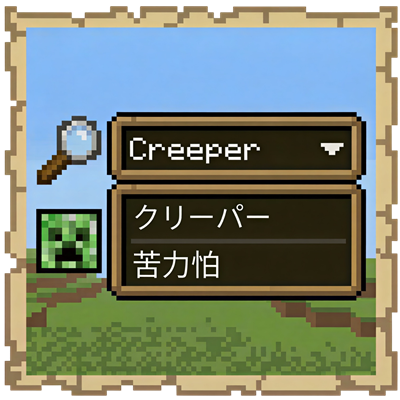
CurseForge · Minecraft mod
PolyglotTooltip (Multi Language Search)
Adds extra translated name lines to tooltips and improves cross-language search in supported mod UIs.
Choose a version Pick your version below, then grab the matching file.
Quick answer
Which PolyglotTooltip (Multi Language Search) release matches 26.1.2?
Best match for your filters polyglottooltip-26.1.2-1.6.0.jar
Game version 26.1.2
Loader NeoForge
PolyglotTooltip (Multi Language Search) polyglottooltip-26.1.2-1.6.0.jar targets 26.1.2 with NeoForge. The project page does not say whether this file belongs on the client, dedicated server, or both. No extra mods listed for this file.
Where it goes
Is PolyglotTooltip (Multi Language Search) required on the client, server, or both?
The project page does not say whether this file belongs on the client, dedicated server, or both.
Client Source doesn’t say
Dedicated server Source doesn’t say
Loader for this release NeoForge
Required install it here Optional supported, not mandatory Not supported do not install here Source doesn’t say do not assume
The source does not explicitly classify this release as client-only or server-only.
What else does PolyglotTooltip (Multi Language Search) polyglottooltip-26.1.2-1.6.0.jar need?
polyglottooltip-26.1.2-1.6.0.jar on 26.1.2. Every mod below is checked against that same setup.
This file does not list any required mods. Do not add a library just because a different file uses it.
This file does not list any required or optional mods.
Before you install it
Add PolyglotTooltip (Multi Language Search) without breaking your instance.
Built for PolyglotTooltip (Multi Language Search) polyglottooltip-26.1.2-1.6.0.jar on 26.1.2. Pick another file and the loader, install side or required mods may change.
- 01
Stick to this file
Use polyglottooltip-26.1.2-1.6.0.jar. It targets 26.1.2 with NeoForge; another release may have different loader, side or dependency requirements.
- 02
Bring the mods it needs
This file does not list any required mods. Do not add a library just because a different file uses it.
- 03
Put it on the correct side
The project page does not say whether this file belongs on the client, dedicated server, or both.
- 04
Pick the file you checked
Use the “Get this file” button beside polyglottooltip-26.1.2-1.6.0.jar. It opens that exact file at the source.
About this project
What does PolyglotTooltip (Multi Language Search) add?
PolyglotTooltip
See more. Search smarter. Play in your language.
PolyglotTooltip is a client-side mod that shows item names in multiple languages directly in tooltips.

Not just for items, either.
Fluids, chemicals, enchanted books, and even bees can all benefit from multilingual names.
And the best part?
These names are not only displayed in tooltips, they can also be searched directly in supported mod UI.
No more guessing.
No more switching input methods back and forth.
Just search with the language you know best.
Features
- Show multilingual names directly in tooltips
- Search those names in supported modded UI
- Supports items, fluids, chemicals, and more
- Enchantment names on enchanted books are also displayed in multiple languages
- Chinese search can match both Simplified and Traditional Chinese at the same time (disabled by default)
Mod Integrations
Jade
- Show multilingual names for blocks and fluids in the overlay

JEI / EMI
- Search content using multilingual names

AE2
- Search items, fluids, and chemicals in the Terminal using multiple languages
- Search unnamed Pattern Provider and Pattern outputs in the Pattern Access Terminal

Extended AE
- Search unnamed Pattern Provider and Pattern inputs/outputs in the Extended Pattern Access Terminal

RS2
- Search items, fluids, and chemicals in the Grid using multiple languages
- Search Pattern inputs/outputs in the Pattern Grid

Occultism
- Search items directly in the Dimensional Storage Actuator using multiple languages

Productive Bees
- Search bee ingredients in JEI using multiple languages

Why Use PolyglotTooltip?
If you play with multiple languages,
if you search a lot in storage systems,
or if you are simply tired of language barriers in modded Minecraft,
PolyglotTooltip makes everything feel more natural.
Small mod.
Big quality-of-life upgrade.
Credits
PolyglotTooltip bundles Opencc4j for Simplified/Traditional Chinese conversion used by cross-search matching.
License
Project description from CurseForge.
Pick your setup
PolyglotTooltip (Multi Language Search) by Minecraft version and loader
Choose the version and loader you play, then open the matching release.
Minecraft version
26.1.1
1 loader buildMinecraft version
1.21.1
1 loader buildMinecraft version
1.20.1
1 loader buildMinecraft version
1.7.10
1 loader buildCheck the dependencies, then try the file in a copied instance before changing a world you care about.
Recent files
PolyglotTooltip (Multi Language Search) versions and loaders
polyglottooltip-26.1.2-1.6.0.jar
3 Aug 2026
Client Source doesn’t say Server Source doesn’t say Dependencies No extras listed Listed on Release listing
Check the 26.1.2 · NeoForge setup NeoForge26.1.2 release
polyglottooltip-26.1.2-1.5.1.jar
29 Jun 2026
Client Source doesn’t say Server Source doesn’t say Dependencies No extras listed Listed on Release listing
Check the 26.1.2 · NeoForge setup NeoForge26.1.2 release
polyglottooltip-26.1.2-1.5.0.jar
25 Apr 2026
Client Source doesn’t say Server Source doesn’t say Dependencies No extras listed Listed on Release listing
Check the 26.1.2 · NeoForge setup NeoForge26.1.2 release
polyglottooltip-26.1.2-1.4.0.jar
19 Apr 2026
Client Source doesn’t say Server Source doesn’t say Dependencies No extras listed Listed on Release listing
Check the 26.1.2 · NeoForge setup NeoForge26.1.2 release
Looking for an older file? The official CurseForge project page is in Resources.
 mod
CurseForge · Minecraft
Shield Bash Lite
Shield Bash Lite adds a perfect-block mechanic that briefly stuns melee attackers when you raise your shield at the right moment
 mod
CurseForge · Minecraft
Healthify - Health Bars & Damage Numbers
Clean RPG-style health bars and damage numbers, with support for Dynamic Difficulty, Dungeon Difficulty, L2 Hostility and Champions.
 mod
CurseForge · Minecraft
Banner Claims
Easy land claims and anti-grief protection: sneak-place a banner to protect a 33x33 area. No menus or wands. Server-side.