Minecraft version
Back to mods 
CurseForge · Minecraft mod
Fast Pot
Fast Pots is a client-side Fabric mod that lets you quickly move splash and lingering potions into your hotbar with a simple key press. No more dragging – just hold shift and hover over the potions you want, and they'll automatically fill the hotbar slots
Choose a version Pick your version below, then grab the matching file.
Quick answer
Which Fast Pot release should I use?
Latest stable file Fast Pots 1.21.8
Game version 1.21.8
Loader Fabric
Fast Pots 1.21.8 targets 1.21.8 with Fabric. The project page does not say whether this file belongs on the client, dedicated server, or both. No extra mods listed for this file.
Where it goes
Is Fast Pot required on the client, server, or both?
The project page does not say whether this file belongs on the client, dedicated server, or both.
Client Source doesn’t say
Dedicated server Source doesn’t say
Loader for this release Fabric
Required install it here Optional supported, not mandatory Not supported do not install here Source doesn’t say do not assume
The source does not explicitly classify this release as client-only or server-only.
What else does Fast Pots 1.21.8 need?
Fast Pots 1.21.8. Change the file and its required mods may change too.
This file does not list any required mods. Do not add a library just because a different file uses it.
This file does not list any required or optional mods.
Before you install it
Add Fast Pot without breaking your instance.
Built for Fast Pots 1.21.8. Pick another file and the loader, install side or required mods may change.
- 01
Stick to this file
Use Fast Pots 1.21.8. It targets 1.21.8 with Fabric; another release may have different loader, side or dependency requirements.
- 02
Bring the mods it needs
This file does not list any required mods. Do not add a library just because a different file uses it.
- 03
Put it on the correct side
The project page does not say whether this file belongs on the client, dedicated server, or both.
- 04
Pick the file you checked
Use the “Get this file” button beside Fast Pots 1.21.8. It opens that exact file at the source.
About this project
What does Fast Pot add?
✨ Fast Pots Features
Select which hotbar slots – Choose exactly which slots (1‑9) should receive potions. Customize it to your playstyle.
Filter by potion type – Pick between healing potions, buffs (Speed, Fire Resistance, Regeneration, Strength), or both. Only the potions you want will be moved.
Auto‑replace items – If a configured hotbar slot contains a non‑potion item, Fast Pots can automatically replace it with a potion from your inventory (optional, toggleable).
Simple activation – Just hold Shift and hover over any potion in your inventory. It will instantly move to the next available hotbar slot you've selected.
Adjustable delay – Set a delay between moves (10‑100 ms) to prevent accidental rapid transfers.
Visual configuration screen – Uses Minecraft's native textures to display a grid of your hotbar and inventory. Click or drag to select slots and tweak the delay – all with a clean, intuitive interface.
Persistent config – Your settings are saved in a JSON file and reloaded automatically.
📸 Screenshots
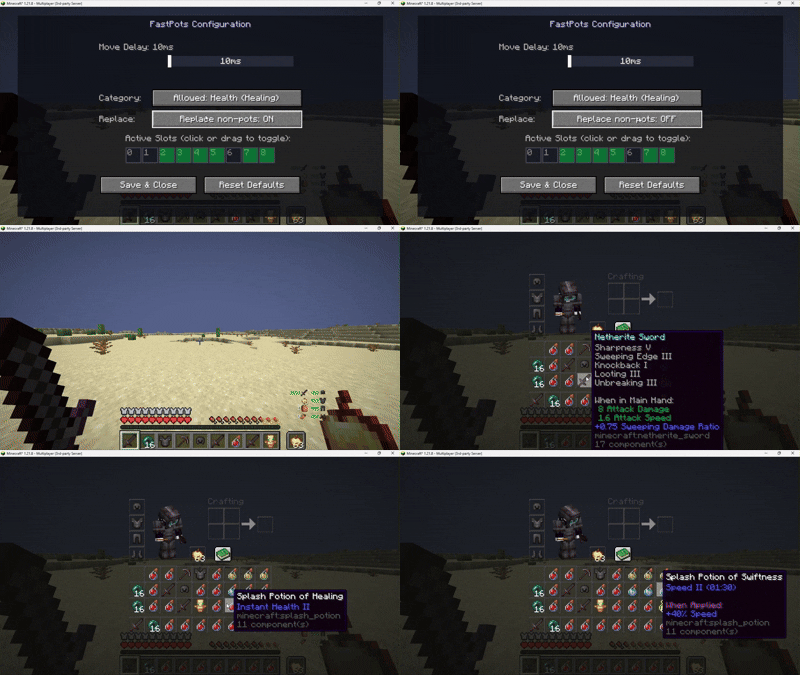
Config screen – Hotbar grid with green overlays for selected slots, delay slider, potion type toggles.
In‑game – Moving potions by shift‑hovering, with auto‑replace active.
🔧 Requirements
Fabric Loader ≥0.18.4
Fabric API
Java 21
🎮 How to use
Install the mod and launch Minecraft.
Open the config screen with F6 (default key, changeable in Controls).
Select the hotbar slots where you want potions to go (click or drag).
Choose the potion types you want to move: Healing, Buffs, or Both.
Optionally enable "Replace non‑potion items" to automatically overwrite unwanted items in your configured hotbar slots.
Adjust the delay if needed.
In‑game, hold Shift and hover over any eligible potion in your inventory – it will instantly move to the next free hotbar slot you've selected.
⚠️ Disclaimer
This mod is client-side only and does not modify game files or network packets. However, some servers may consider automated inventory management (such as quick potion moving) as an unfair advantage and therefore forbidden by their rules.
Use this mod at your own risk. I am not responsible for any bans or other sanctions applied by server administrators. Always check the rules of the servers you play on before using any client-side modifications.
🐛 Bug reports & suggestions
Send me dm discord:
marcellesa
Project description from CurseForge.
Pick your setup
Fast Pot by Minecraft version and loader
Choose the version and loader you play, then open the matching release.
Minecraft version
1.21.8
1 loader buildMinecraft version
1.21.4
1 loader buildMinecraft version
1.21.3
1 loader buildMinecraft version
1.21.2
1 loader buildMinecraft version
1.21.1
1 loader buildCheck the dependencies, then try the file in a copied instance before changing a world you care about.
Recent files
Fast Pot versions and loaders
Fast Pots 1.21.8
fastpots-1.0.0 1.21.8.jar
14 Mar 2026
Client Source doesn’t say Server Source doesn’t say Dependencies No extras listed Listed on Release listing
Check the 1.21.8 · Fabric setup Fabric1.21.8 release
Fast Pots 1.21.11
fastpots-1.0.0 1.21.11.jar
14 Mar 2026
Client Source doesn’t say Server Source doesn’t say Dependencies No extras listed Listed on Release listing
Check the 1.21.11 · Fabric setup Fabric1.21.11 release
Fasto Pot 1.21.3
fastpots-1.0.0 1.21.3.jar
14 Mar 2026
Client Source doesn’t say Server Source doesn’t say Dependencies No extras listed Listed on Release listing
Check the 1.21.4 · Fabric setup Fabric1.21.41.21.11.21.3 release
Looking for an older file? The official CurseForge project page is in Resources.
 mod
CurseForge · Minecraft
Zelda: Hyrule Terrors
Zelda-inspired Armor, Weapons, Mobs, and iconic gear from BOTW and TOTK!
 mod
CurseForge · Minecraft
Range's Mining and Equipment and cave generation.
Changes cave generation, removes vanilla ores and replaces with new Metal based ores that spawn in veins, adds equipment for these items Armor customization system to change how equipment looks..
 mod
CurseForge · Minecraft
Lucky block X
(?????????????????) You were searching through the mod page until you found this.. cool item