Minecraft version
Back to mods 
CurseForge · Minecraft mod
LagLess: Server Optimizer
A server-side utility mod designed to optimize performance and manage RAM efficiently through smart automated cleanups and manual commands.
Choose a version Pick your version below, then grab the matching file.
Quick answer
Which LagLess: Server Optimizer release should I use?
Latest stable file LagLess: Servers-1.0.0.jar
Game version 1.20.1
Loader Forge
LagLess: Server Optimizer LagLess: Servers-1.0.0.jar targets 1.20.1 with Forge. The project page does not say whether this file belongs on the client, dedicated server, or both. No extra mods listed for this file.
Where it goes
Is LagLess: Server Optimizer required on the client, server, or both?
The project page does not say whether this file belongs on the client, dedicated server, or both.
Client Source doesn’t say
Dedicated server Source doesn’t say
Loader for this release Forge
Required install it here Optional supported, not mandatory Not supported do not install here Source doesn’t say do not assume
The source does not explicitly classify this release as client-only or server-only.
What else does LagLess: Server Optimizer LagLess: Servers-1.0.0.jar need?
LagLess: Servers-1.0.0.jar. Change the file and its required mods may change too.
This file does not list any required mods. Do not add a library just because a different file uses it.
This file does not list any required or optional mods.
Before you install it
Add LagLess: Server Optimizer without breaking your instance.
Built for LagLess: Server Optimizer LagLess: Servers-1.0.0.jar. Pick another file and the loader, install side or required mods may change.
- 01
Stick to this file
Use LagLess: Servers-1.0.0.jar. It targets 1.20.1 with Forge; another release may have different loader, side or dependency requirements.
- 02
Bring the mods it needs
This file does not list any required mods. Do not add a library just because a different file uses it.
- 03
Put it on the correct side
The project page does not say whether this file belongs on the client, dedicated server, or both.
- 04
Pick the file you checked
Use the “Get this file” button beside LagLess: Servers-1.0.0.jar. It opens that exact file at the source.
About this project
What does LagLess: Server Optimizer add?
🚀 Lagless: Servers
Lagless: Servers is a lightweight, high-efficiency utility mod designed to optimize RAM usage and keep your Minecraft 1.20.1 server running smoothly. By intelligently monitoring memory consumption, it helps prevent lag spikes and crashes caused by memory exhaustion.
🌟 Key Features
Smart Automated Cleanup: The mod periodically checks your server's RAM usage. If it exceeds a predefined threshold, it automatically frees up memory and clears unneeded temporary objects.
Server-Side First: You only need to install this mod on your server. Players do not need to have it installed on their clients to join! (Note: It can also be used in single-player for local optimization).
Zero Lag Impact: The verification system is designed to be lightweight, running seamlessly in the background without freezing the main server thread.
📊 Performance Benchmarks:
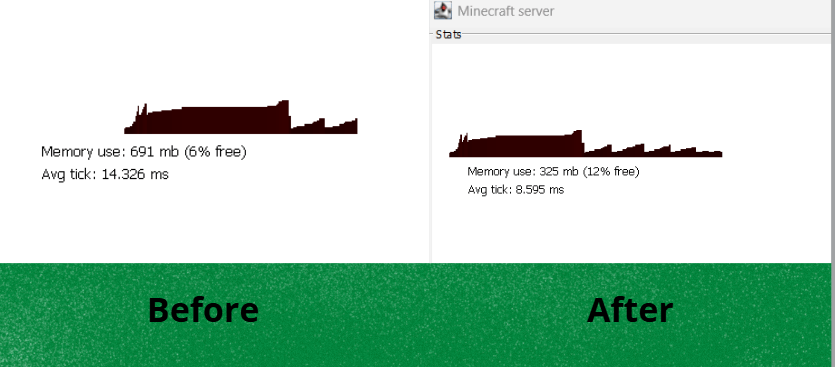
During local server tests (IntelliJ IDEA environment), the mod achieved a memory reduction of 366MB (6%). In other heavier scenarios, the cleanup process successfully freed up to 14% of the total RAM in use.
⚙️ Commands
/forcecleanup
Manually forces an immediate memory cleanup.
Displays exactly how much RAM was freed, along with the "Before" and "After" usage stats.
🔧 Configuration
The mod generates a lagless-server.toml file in your config folder, allowing you to fully customize its behavior:
autoCleanup (Default: true): Enable or disable the automatic memory management system.
cleanupInterval (Default: 300): How often (in seconds) the mod checks the RAM usage.
memoryThreshold (Default: 80): The RAM usage percentage that will trigger the automatic cleanup.
💡 Need a Client-Side mod? If you are looking for local FPS improvements instead of server management, I recommend using:
📦 Installation
Download the latest .jar file for Minecraft 1.20.1.
Drop it into your server's mods folder.
Start the server and enjoy a lag-free experience!
Project description from CurseForge.
Pick your setup
LagLess: Server Optimizer by Minecraft version and loader
Choose the version and loader you play, then open the matching release.
Check the dependencies, then try the file in a copied instance before changing a world you care about.
Recent files
LagLess: Server Optimizer versions and loaders
LagLess: Servers-1.0.0.jar
lagless-1.0.0.jar
14 Mar 2026
Client Source doesn’t say Server Source doesn’t say Dependencies No extras listed Listed on Release listing
Check the 1.20.1 · Forge setup 1.20.1Forge release
Looking for an older file? The official CurseForge project page is in Resources.
 mod
mod CurseForge · Minecraft
mzycBetterMTR
「MTR优化模组」平滑扶梯、扶梯音效与提示音、直梯提示音、屏蔽门报站,石斧右键全部可设置。 | MTR enhancement: smooth escalators, escalator SFX & chimes, lift chimes, PSD announcements — all configurable by stone-axe right-click.
 mod
mod CurseForge + Modrinth · Minecraft
Knight Lib
A library that serves as a bridge between mods.
 mod
mod CurseForge · Minecraft
buildertools
Client-side building toolkit: select areas, save and load .schem, .litematic and .nbt schematics, and build from ghost-block placements with a material checker.