Minecraft version
Back to mods 
CurseForge · Minecraft mod
JAW Lab
Some laboratory stuff: decorations, key doors, code doors e.t.c
Choose a version Pick your version below, then grab the matching file.
Quick answer
Which JAW Lab release should I use?
Latest stable file lab-0.7.4-1.20.4
Game version 1.20.5, 1.20.4
Loader Forge
JAW Lab lab-0.7.4-1.20.4 targets 1.20.5, 1.20.4 with Forge. The project page does not say whether this file belongs on the client, dedicated server, or both. No extra mods listed for this file.
Where it goes
Is JAW Lab required on the client, server, or both?
The project page does not say whether this file belongs on the client, dedicated server, or both.
Client Source doesn’t say
Dedicated server Source doesn’t say
Loader for this release Forge
Required install it here Optional supported, not mandatory Not supported do not install here Source doesn’t say do not assume
The source does not explicitly classify this release as client-only or server-only.
What else does JAW Lab lab-0.7.4-1.20.4 need?
lab-0.7.4-1.20.4. Change the file and its required mods may change too.
This file does not list any required mods. Do not add a library just because a different file uses it.
This file does not list any required or optional mods.
Before you install it
Add JAW Lab without breaking your instance.
Built for JAW Lab lab-0.7.4-1.20.4. Pick another file and the loader, install side or required mods may change.
- 01
Stick to this file
Use lab-0.7.4-1.20.4. It targets 1.20.5, 1.20.4 with Forge; another release may have different loader, side or dependency requirements.
- 02
Bring the mods it needs
This file does not list any required mods. Do not add a library just because a different file uses it.
- 03
Put it on the correct side
The project page does not say whether this file belongs on the client, dedicated server, or both.
- 04
Pick the file you checked
Use the “Get this file” button beside lab-0.7.4-1.20.4. It opens that exact file at the source.
About this project
What does JAW Lab add?
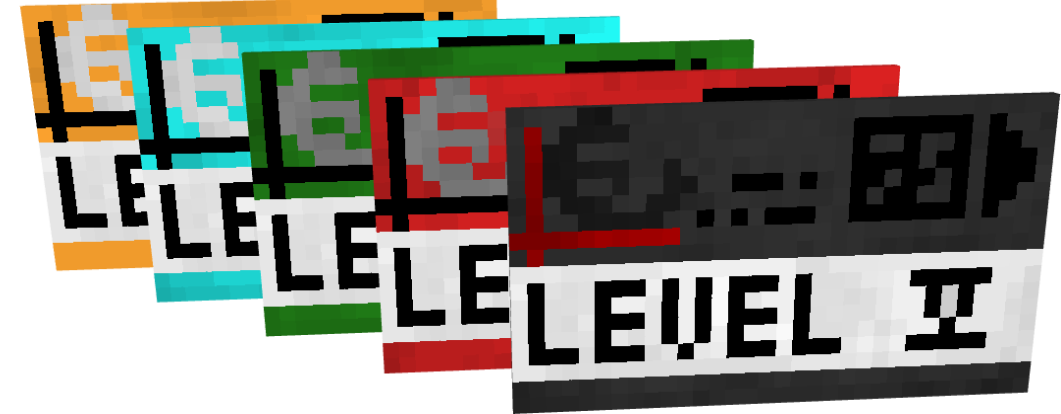
This mod adds a key door system with a keycards system verificated via networks with security systems that gives ability to create multiple facilities with different networks in single world. Also mod adds many functional and decorative blocks
Networks
Networks gives ability to create many autonomic facilities with diffirent keycards.
Features:
- Roles
- Access levels
- UUID verification
Roles allows to do specific actions: adding users, configurate keydoors, manage keycards level e.t.c
Roles:
- Founder
- Admin
- Moderator
- User
Keycards
Keycards activates different mechanisms: key doors or keycard interfaces. Keycard level is not binded to it's actual texture. You can set any level Features:
- Individual name
- UUID verification (coming in 0.8)
- Access level
- Network
Doors
Mod adds key doors and code doors. Key doors can be opened via keycards, code doors can be only open by providing password. All the doors closes after a small delay but this can be disabled in door settings
To the key doors you can set any level: from 0 to billiards Code doors password cannot be longer than 9 symbols
Decorations
Currently there aren't many decoration block, more will be added in future updates Want to suggest an idea? Leave it in discord server!
P.S if you are a designer - dm me in discord to improve visual. I'm bad at this…
Usage
To set up door you first need to create network. Use keycard programmator.
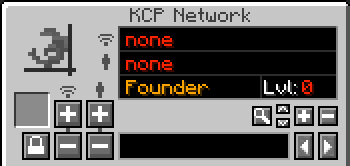
First you see a network name

Currently selected user

But how to add Network and User? Type Network Name at the bottom box to set a name

Then click add button at the left Minus button deletes network

Now your menu changed and you will see something like this
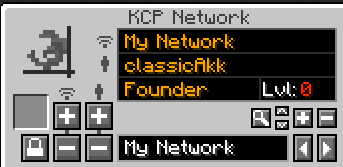
To add user you need to type a username at box below (replace your network name) and then click one of these buttons as like network management above

Now you can view this user settings: his role and access level. But how do you manage it?
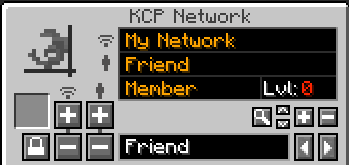
There are a few buttons on the right

Arrows changes user role: member / moderator / admin / founder Plus and minus buttons manages user level
Magnifying glass button used to find players. For example if you want to chage someones properties you can type his name at box below and click this button. System will found this user in selected network
But why do we need user level and roles? Now let's move to Keycard menu
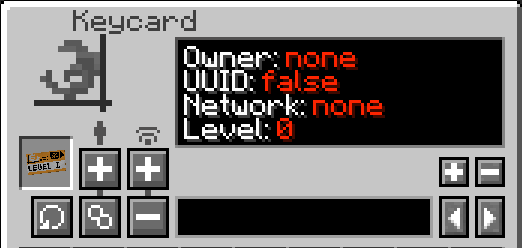
Here you can view keycard's properties. First of all you need to bind your keycard to network. To do this you need a role at least moderator. Adding networks is similar to the network creation we did before
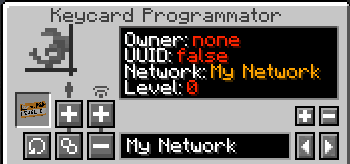
Now you can change keycard properties. To set level you have a buttons on the right. Level can be changed only by moderators and higher. But moderators can modify level in case their user level we changed in network configuration is higher. For example: User level: 5; User Role: Moderator; That means this user can set keycard level up to 5; Admins and Founder has no restrictions in management.
You propably noticed these buttons. They are manages first two parameters of keycard.

Final variant of the keycard configuration
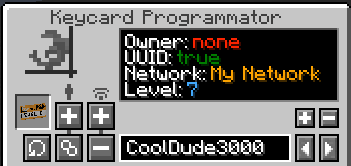
How to add keydoors?
You need Door Programmator
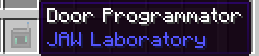
First of all set it's configuration as well as your keycards
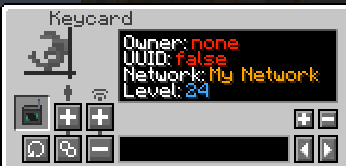
Then click on KeyDoor and manage it's configuration
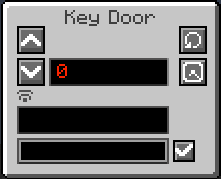
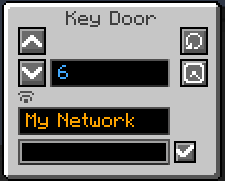
!! Warning !! After setting network you need to re-open GUI
This button sets auto closing. By default keydoor closes in few seconds. But if you switch it's mode it will kept opened untill you click it with hand.

Most of the assets belongs to [Nazzy] (also mod inspired from one of his project)(https://www.youtube.com/channel/UCQ2L7O1KDK7ze75dSe1C-yg)
Project description from CurseForge.
Pick your setup
JAW Lab by Minecraft version and loader
Choose the version and loader you play, then open the matching release.
Minecraft version
1.20.6
2 loader buildsMinecraft version
1.20.5
2 loader buildsMinecraft version
1.20.4
2 loader buildsMinecraft version
1.20.3
2 loader buildsMinecraft version
1.20.2
2 loader buildsMinecraft version
1.20.1
2 loader buildsMinecraft version
1.20
2 loader buildsCheck the dependencies, then try the file in a copied instance before changing a world you care about.
Recent files
JAW Lab versions and loaders
lab-0.7.4-1.20.4
lab-0.7.4-1.20.4.jar
10 Sept 2026
Client Source doesn’t say Server Source doesn’t say Dependencies No extras listed Listed on Release listing
Check the 1.20.5 · Forge setup 1.20.5Forge1.20.4 release
lab-0.7.3-1.20.4
lab-0.7.3-1.20.4.jar
10 Sept 2026
Client Source doesn’t say Server Source doesn’t say Dependencies No extras listed Listed on Release listing
Check the 1.20.5 · Forge setup 1.20.5Forge1.20.4 release
lab-0.7.2-1.20.4
lab-0.7.2-1.20.4.jar
9 Sept 2026
Client Source doesn’t say Server Source doesn’t say Dependencies No extras listed Listed on Release listing
Check the 1.20.5 · Forge setup 1.20.5Forge1.20.4 alpha
lab-0.8-1.21.1
lab-0.8-1.21.1.jar
25 May 2026
Client Source doesn’t say Server Source doesn’t say Dependencies No extras listed Listed on Release listing
Check the 1.21.1 · NeoForge setup 1.21.1NeoForge release
lab-0.7.1-1.20.1
lab-0.7.1-1.20.1.jar
25 May 2026
Client Source doesn’t say Server Source doesn’t say Dependencies No extras listed Listed on Release listing
Check the 1.20.6 · Forge setup 1.20.21.20.51.20.1Forge beta
lab-0.7-1.20.1
lab-0.7-1.20.1.jar
15 Mar 2026
Client Source doesn’t say Server Source doesn’t say Dependencies No extras listed Listed on Release listing
Check the 1.20.6 · Forge setup 1.20.21.20.51.20.1Forge alpha
Looking for an older file? The official CurseForge project page is in Resources.
 mod
mod CurseForge · Minecraft
Tars Okey
Turkish Okey and Tavla on real tables: the Rummikub-style tile game with 106 tiles and istaka racks, plus backgammon with 30 checkers and dice. AI uncles, live stakes, a turn clock, nargile and cay.
 mod
mod Modrinth · Minecraft
Elomod
An expensive survival & tech mod adding cameras, monitors, thermal vision, new ores, and more !
 mod
mod Modrinth · Minecraft
TNT extension
Adds some new explosive things