Fabric API Needed by Slots Checker 2.1.2 for Fabric 1.18
requiredMatching file found Matched file: [1.18.1] Fabric API 0.46.6+1.18

CurseForge · Minecraft mod
This mod provides a command to view and modify any player's inventory, hotbar, ender chest, armor, and offhand slots (requires level 4 admin privileges).
Quick answer
Slots Checker 2.1.2 for Fabric 1.18 targets 1.18.1, 1.18, 1.18.2 with Fabric. The project page does not say whether this file belongs on the client, dedicated server, or both. All 1 required mods have matching files.
Where it goes
The project page does not say whether this file belongs on the client, dedicated server, or both.
The source does not explicitly classify this release as client-only or server-only.
Slots Checker 2.1.2 for Fabric 1.18. Change the file and its required mods may change too.
Install Fabric API first. We found matching files for this game-version and loader setup.
We only count dependency files that match this setup. A file for another loader does not fill the gap.
Before you install it
Built for Slots Checker 2.1.2 for Fabric 1.18. Pick another file and the loader, install side or required mods may change.
Use Slots Checker 2.1.2 for Fabric 1.18. It targets 1.18.1, 1.18, 1.18.2 with Fabric; another release may have different loader, side or dependency requirements.
Install Fabric API first. We found matching files for this game-version and loader setup.
The project page does not say whether this file belongs on the client, dedicated server, or both.
Use the “Get this file” button beside Slots Checker 2.1.2 for Fabric 1.18. It opens that exact file at the source.
About this project
This mod provides a command to view and modify any player's inventory, hotbar, ender chest, armor, and offhand slots (requires level 4 admin privileges).
When installed on the client, it provides in-game interface translations.
Supports en_us, zh_cn, zh_hk, and zh_tw languages.
Important:
/slots-checker inventory <player>
Open the player's inventory interface.

/slots-checker hotbar <player>
Open the player's hotbar interface.

/slots-checker ender <player>
Open the player's ender chest interface.

/slots-checker armor <player>
Open the player's armor interface.
The first four columns are in sequence: helmets, chestplates, leggings, and boots. The last five fields are invalid.
This interface has no item restrictions. Any item can be directly placed in the armor slot.

/slots-checker offhand <player>
Open the player's offhand interface.
The last 8 fields are invalid.
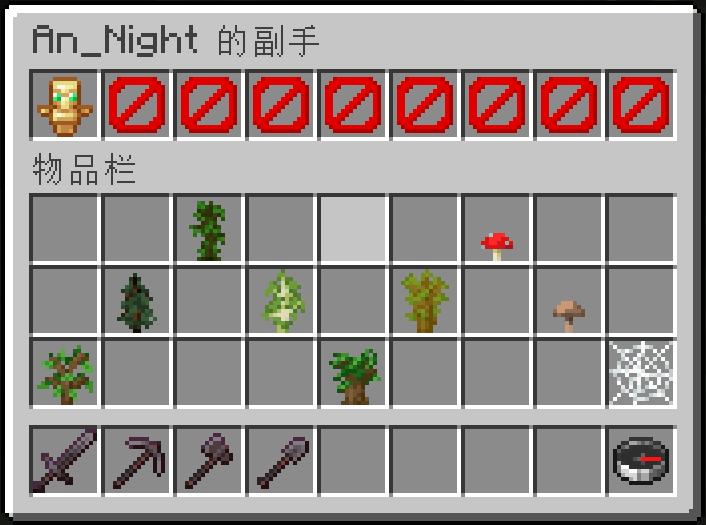
Project description from CurseForge.
Pick your setup
Choose the version and loader you play, then open the matching release.
Showing the newest 12 of 32 game versions. Older files are in the list below.
Check the dependencies, then try the file in a copied instance before changing a world you care about.
Recent files
slots-checker-fabric-2.1.2-mc1.18.jar
17 Nov 2026
slots-checker-fabric-2.1.2-mc26.2.jar
8 Oct 2026
slots-checker-fabric-2.1.2-mc26.1.jar
12 Apr 2026
slots-checker-fabric-2.1.2-mc1.21.11.jar
12 Apr 2026
slots-checker-fabric-2.1.2-mc1.19.jar
12 Apr 2026
slots-checker-fabric-2.1.1-mc26.1.jar
7 Apr 2026
slots-checker-fabric-2.1.1-mc1.21.11.jar
7 Apr 2026
slots-checker-fabric-2.1.1-mc1.19.jar
7 Apr 2026
slots-checker-fabric-2.1.1-mc1.18.jar
7 Apr 2026
slots-checker-fabric-2.1.0-mc1.21.11.jar
18 Mar 2026
slots-checker-fabric-2.1.0-mc1.19.jar
18 Mar 2026
slots-checker-fabric-2.1.0-mc1.18.jar
18 Mar 2026
Looking for an older file? The official CurseForge project page is in Resources.
 mod
Euphoria Patches is an add-on for Complementary Shaders, extending it with more optional features and settings.
 mod
In-game advancement editing and improvements to the advancement screen!
 mod
A vanilla enhancing mod that aims to expand the food system with dynamic meals, while also adding stamina.