Shoulder Surfing Reloaded Optional for SL Library SL-Library-1.7-1.21.1+[NeoForge].jar
optionalMatching file found Matched file: ShoulderSurfing-NeoForge-1.21.1-5.2.0
CurseForge · Minecraft mod
Adds various base utilities, synchronization help, policy, packet sending and data driven
Quick answer
SL Library SL-Library-1.7-1.21.1+[NeoForge].jar targets 1.21.1 with NeoForge. The project page does not say whether this file belongs on the client, dedicated server, or both. No extra mods listed for this file.
Where it goes
The project page does not say whether this file belongs on the client, dedicated server, or both.
The source does not explicitly classify this release as client-only or server-only.
SL-Library-1.7-1.21.1+[NeoForge].jar. Change the file and its required mods may change too.
This file does not list any required mods. Do not add a library just because a different file uses it.
We only count dependency files that match this setup. A file for another loader does not fill the gap.
Before you install it
Built for SL Library SL-Library-1.7-1.21.1+[NeoForge].jar. Pick another file and the loader, install side or required mods may change.
Use SL-Library-1.7-1.21.1+[NeoForge].jar. It targets 1.21.1 with NeoForge; another release may have different loader, side or dependency requirements.
This file does not list any required mods. Do not add a library just because a different file uses it.
The project page does not say whether this file belongs on the client, dedicated server, or both.
Use the “Get this file” button beside SL-Library-1.7-1.21.1+[NeoForge].jar. It opens that exact file at the source.
About this project
SL Library includes a internal library designed to support mod features such as synchronization, event handling, logic execution, and client-side rendering utilities.
The internal library is composed of multiple utility modules that handle:
Includes a complete packet-based synchronization layer:
Provides a wide range of events for gameplay interaction:
A flexible logic framework built around reusable "statements":
Includes a custom particle engine with advanced features:
Additional systems included:
Extends data reading, whether for resource packs, data packs via external folders, or early internal In-Jar reads
SL Data-Driven provides two special global directories inside your .minecraft folder:
.minecraft/data_driven/resourcepacks
.minecraft/data_driven/datapacks
Anything placed inside these folders behaves as if it were built directly into the game or a mod.
The key advantage:
Path:
.minecraft/data_driven/resourcepacks
Resourcepack example: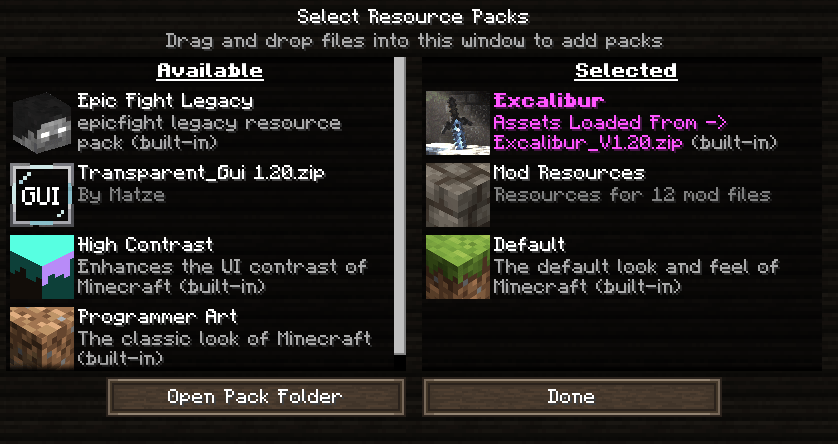
Path:
.minecraft/data_driven/datapacks
Datapacks example:
SL Data-Driven introduces a dependency system that allows other mods to automatically add content using structured files (such as JSON) directly inside their .jar.
This makes it easy to create extensions, compatibility layers, and data-driven features without modifying the base mod.
The system is fully automatic:
Declare the dependency
Your mod must depend on "sl_data_driven" in its META-INF descriptor.
Folder structure
Inside your mod, create the following path:
/data_driven/<your_mod_id>/
Add your files
Place any files you want SL Data-Driven to process (JSON, configs, etc.) inside that folder.
Automatic loading
On startup, SL Data-Driven
This allows collecting and reading files, but it does not add a base read; all file reading must be designed.
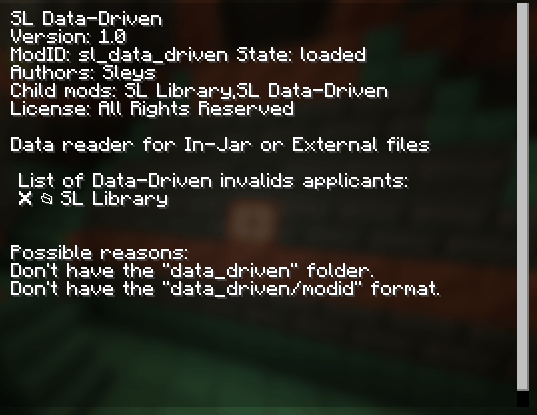
One way to confirm that it works is, for example, to check that your modid is listed here, in this case I added the mod (SL Library) to the Data-Driven
When valid:
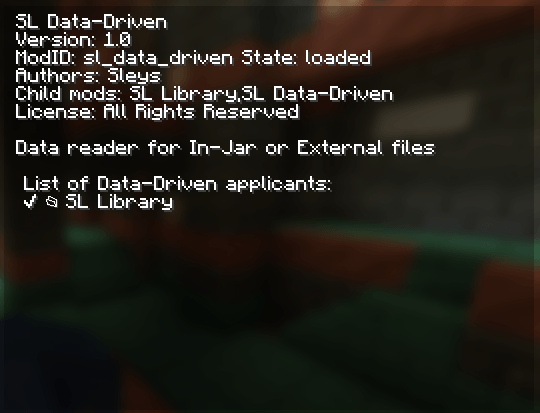
When it is invalid:
For your .jar to be recognized as a valid mod:
modLoader="lowcodefml"
modLoader="lowcodefml"
loaderVersion="[47,)"
license="All Rights Reserved"
[[mods]]
modId="your_modid"
displayName="Your Mod Name"
version="1.0"
authors="you"
[[dependencies.your_modid]]
modId="sl_data_driven"
mandatory=true
versionRange="*"
ordering="AFTER"
side="BOTH"
Project description from CurseForge.
Pick your setup
Choose the version and loader you play, then open the matching release.
Check the dependencies, then try the file in a copied instance before changing a world you care about.
Recent files
10 Oct 2026
10 Oct 2026
1 Oct 2026
1 Oct 2026
23 Sept 2026
23 Sept 2026
11 Sept 2026
9 Sept 2026
19 Aug 2026
19 Aug 2026
17 Aug 2026
17 Aug 2026
Looking for an older file? The official CurseForge project page is in Resources.