CurseForge · Minecraft mod
Shulker View
Open a shulker box directly from inventory. No equipping, no placing.
Quick answer
Which Shulker View release should I use?
Shulker View shulkerview-quilt-26.3-3.0.0.jar targets 26.3 with Quilt. The project page does not say whether this file belongs on the client, dedicated server, or both. No extra mods listed for this file.
Where it goes
Is Shulker View required on the client, server, or both?
The project page does not say whether this file belongs on the client, dedicated server, or both.
The source does not explicitly classify this release as client-only or server-only.
What else does Shulker View shulkerview-quilt-26.3-3.0.0.jar need?
shulkerview-quilt-26.3-3.0.0.jar. Change the file and its required mods may change too.
This file does not list any required mods. Do not add a library just because a different file uses it.
This file does not list any required or optional mods.
Before you install it
Add Shulker View without breaking your instance.
Built for Shulker View shulkerview-quilt-26.3-3.0.0.jar. Pick another file and the loader, install side or required mods may change.
- 01
Stick to this file
Use shulkerview-quilt-26.3-3.0.0.jar. It targets 26.3 with Quilt; another release may have different loader, side or dependency requirements.
- 02
Bring the mods it needs
This file does not list any required mods. Do not add a library just because a different file uses it.
- 03
Put it on the correct side
The project page does not say whether this file belongs on the client, dedicated server, or both.
- 04
Pick the file you checked
Use the “Get this file” button beside shulkerview-quilt-26.3-3.0.0.jar. It opens that exact file at the source.
About this project
What does Shulker View add?
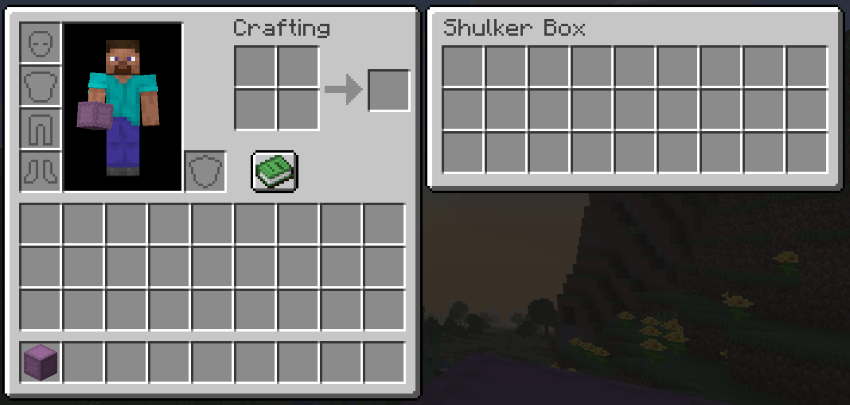
Using shulker boxes gets annoying when you have to repeatedly drag them from your inventory, to your hotbar, exit the inventory, place down the box, open it, transfer items, exit box, break box, pick up box, open inventory, transfer box from hotbar to inventory, and finally finish. Shulker View elimantes all the hassle.
✨ Features ✨
View any shulker box contents directly from your inventory
Dual-panel GUI: inventory on one side, shulker contents on the other
Works with all 16 shulker box colors
Curios integration: shows your equipped Curios slots
Compatible with Elytra Slot
Works in multiplayer
🖱️ How to Use 🖱️
Open your inventory — a panel appears automatically showing the shulker contents when you hover over a shulker box. If you have Curios API installed, your Curios slots also appear in a side panel.
❓ FAQ ❓
Does it work with modded shulker boxes?
Yes — any item using the standard shulker container.
Do I need Curios?
No — fully optional. The Curios panel only appears if Curios API is installed.
Can I add this to my modpack?
Yes — freely, no credit required.
🐛 Bugs & Support 🐛
Report issues on the GitHub issue tracker. Please include your NeoForge version and latest.log
Project description from CurseForge.

Pick your setup
Shulker View by Minecraft version and loader
Choose the version and loader you play, then open the matching release.
26.2
2 loader builds26.1.2
2 loader builds1.21.11
1 loader buildCheck the dependencies, then try the file in a copied instance before changing a world you care about.
Recent files
Shulker View versions and loaders
shulkerview-quilt-26.3-3.0.0.jar
5 Oct 2026
shulkerview-neoforge-26.3-3.0.0.jar
5 Oct 2026
shulkerview-forge-26.3-3.0.0.jar
5 Oct 2026
shulkerview-fabric-26.3-3.0.0.jar
5 Oct 2026
shulkerview-neoforge-2.0.0.jar
27 Jun 2026
shulkerview-fabric-2.0.0.jar
27 Jun 2026
shulkerview-neoforge-2.0.0.jar
27 Jun 2026
shulkerview-fabric-2.0.0.jar
27 Jun 2026
shulkerview-neoforge-2.0.0.jar
25 Jun 2026
shulkerview-fabric-2.0.0.jar
25 Jun 2026
shulkerview-neoforge-2.0.0.jar
1 May 2026
shulkerview-fabric-2.0.0.jar
30 Apr 2026
Looking for an older file? The official CurseForge project page is in Resources.
