Minecraft version
Back to mods 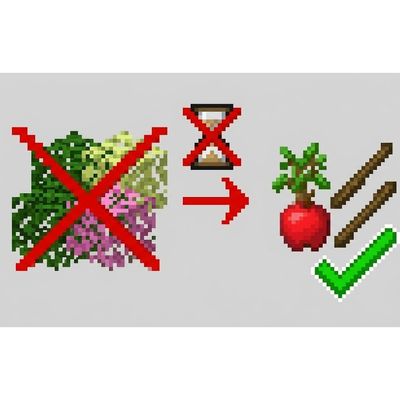
CurseForge · Minecraft mod
Shatter Leaves
ShatterLeaves instantly decays leaves when a tree is chopped . It fully supports modded trees, protects player placed leaves, and features a configurable decay delay via /gamerule . Say goodbye to floating trees!
Choose a version Pick your version below, then grab the matching file.
Quick answer
Which Shatter Leaves release should I use?
Latest stable file ShatterLeaves-Fabric-26.1.1.jar
Game version 26.1.1
Loader Fabric
Shatter Leaves ShatterLeaves-Fabric-26.1.1.jar targets 26.1.1 with Fabric. The project page does not say whether this file belongs on the client, dedicated server, or both. No extra mods listed for this file.
Where it goes
Is Shatter Leaves required on the client, server, or both?
The project page does not say whether this file belongs on the client, dedicated server, or both.
Client Source doesn’t say
Dedicated server Source doesn’t say
Loader for this release Fabric
Required install it here Optional supported, not mandatory Not supported do not install here Source doesn’t say do not assume
The source does not explicitly classify this release as client-only or server-only.
What else does Shatter Leaves ShatterLeaves-Fabric-26.1.1.jar need?
ShatterLeaves-Fabric-26.1.1.jar. Change the file and its required mods may change too.
This file does not list any required mods. Do not add a library just because a different file uses it.
This file does not list any required or optional mods.
Before you install it
Add Shatter Leaves without breaking your instance.
Built for Shatter Leaves ShatterLeaves-Fabric-26.1.1.jar. Pick another file and the loader, install side or required mods may change.
- 01
Stick to this file
Use ShatterLeaves-Fabric-26.1.1.jar. It targets 26.1.1 with Fabric; another release may have different loader, side or dependency requirements.
- 02
Bring the mods it needs
This file does not list any required mods. Do not add a library just because a different file uses it.
- 03
Put it on the correct side
The project page does not say whether this file belongs on the client, dedicated server, or both.
- 04
Pick the file you checked
Use the “Get this file” button beside ShatterLeaves-Fabric-26.1.1.jar. It opens that exact file at the source.
About this project
What does Shatter Leaves add?
🌿 ShatterLeaves : Instant Leaf Decay
Ever get annoyed waiting for leaves to disappear after cutting a tree?
ShatterLeaves fixes that. The moment leaves lose connection to logs, they decay almost instantly no more hanging around waiting for random ticks to do their thing.
It’s a small change, but it makes chopping trees feel way better.
⚡ Features
- Near-instant leaf decay (default: 1 tick)
- Configurable delay (1–20 ticks)
- Works with vanilla + most modded trees
- Respects player-placed (persistent) leaves
- Simple game rule configuration
- Safe for servers and modpacks
⚙️ Configuration
Uses game rules, so it’s super easy to tweak:
- ENABLED → turn the mod on/off
- DELAY → how fast leaves decay (1–20 ticks)
You can change these with commands using:
/gamerule instant_leaf_decay_delay (1-20)
/gamerule instant_leaf_decay_enabled (true/false)
🛠️ Technical Notes (for those who care)
- Hooks into leaf updates when they lose log connection
- Detects standard decay conditions (distance ≥ 7, not persistent)
- Schedules a controlled tick instead of relying on random ticks
- Drops items normally, then removes the block
No new content added just improves vanilla behavior.
📦 Compatibility
- Works in singleplayer and multiplayer
- Supports modded leaves that follow standard behavior
- Lightweight and safe for large modpacks
📜 License
MIT use it however you want in modpacks or projects.
👤 Author
Xeonz
Version 1.0.0
💬 Final Note
This is one of those mods you don’t really think about until you remove it and suddenly trees feel slow again.
Project description from CurseForge.
Pick your setup
Shatter Leaves by Minecraft version and loader
Choose the version and loader you play, then open the matching release.
Minecraft version
26.1
1 loader buildMinecraft version
1.21.11-snapshot
1 loader buildMinecraft version
1.21.11
1 loader buildCheck the dependencies, then try the file in a copied instance before changing a world you care about.
Recent files
Shatter Leaves versions and loaders
ShatterLeaves-Fabric-26.1.1.jar
3 Apr 2026
Client Source doesn’t say Server Source doesn’t say Dependencies No extras listed Listed on Release listing
Check the 26.1.1 · Fabric setup Fabric26.1.1 release
shatterleaves-fabric-21.6.jar
shatterleaves-1.0.0.jar
29 Mar 2026
Client Source doesn’t say Server Source doesn’t say Dependencies No extras listed Listed on Release listing
Check the 26.1 · Fabric setup Fabric26.1 release
shatterleaves_fabric_1.21.11.jar
shatterleaves-1.0.0.jar
29 Mar 2026
Client Source doesn’t say Server Source doesn’t say Dependencies No extras listed Listed on Release listing
Check the 1.21.11-snapshot · Fabric setup Fabric1.21.11-snapshot1.21.11 release
Looking for an older file? The official CurseForge project page is in Resources.
 mod
CurseForge · Minecraft
MrBertori DanceCraft
Add smooth motion-captured dance emotes to your Minecraft character through a simple in-game emote menu.
 mod
CurseForge · Minecraft
TAKOU TRADES
This mod adds a new system for trading in minecraft.
 mod
CurseForge · Minecraft
BeyondHIPU
Press the button, then take all items from the chest.