Minecraft version
Back to mods 
CurseForge · Minecraft mod
RetroRig: Builder
Brings the retro BuildCraft Builder and Filler blocks into modern Minecraft, using FE energy.
Choose a version Pick your version below, then grab the matching file.
Quick answer
Which RetroRig: Builder release should I use?
Latest stable file RetroRig_Builder-26.1.2-v0.0.1.jar
Game version 26.1.2
Loader NeoForge
RetroRig: Builder RetroRig_Builder-26.1.2-v0.0.1.jar targets 26.1.2 with NeoForge. The project page does not say whether this file belongs on the client, dedicated server, or both. No extra mods listed for this file.
Where it goes
Is RetroRig: Builder required on the client, server, or both?
The project page does not say whether this file belongs on the client, dedicated server, or both.
Client Source doesn’t say
Dedicated server Source doesn’t say
Loader for this release NeoForge
Required install it here Optional supported, not mandatory Not supported do not install here Source doesn’t say do not assume
The source does not explicitly classify this release as client-only or server-only.
What else does RetroRig: Builder RetroRig_Builder-26.1.2-v0.0.1.jar need?
RetroRig_Builder-26.1.2-v0.0.1.jar. Change the file and its required mods may change too.
This file does not list any required mods. Do not add a library just because a different file uses it.
This file does not list any required or optional mods.
Before you install it
Add RetroRig: Builder without breaking your instance.
Built for RetroRig: Builder RetroRig_Builder-26.1.2-v0.0.1.jar. Pick another file and the loader, install side or required mods may change.
- 01
Stick to this file
Use RetroRig_Builder-26.1.2-v0.0.1.jar. It targets 26.1.2 with NeoForge; another release may have different loader, side or dependency requirements.
- 02
Bring the mods it needs
This file does not list any required mods. Do not add a library just because a different file uses it.
- 03
Put it on the correct side
The project page does not say whether this file belongs on the client, dedicated server, or both.
- 04
Pick the file you checked
Use the “Get this file” button beside RetroRig_Builder-26.1.2-v0.0.1.jar. It opens that exact file at the source.
About this project
What does RetroRig: Builder add?
RetroRig: Builder is a standalone mod built around a simple idea: bring back the feel of the old BuildCraft Builder and Filler, but in a modern setup. (Part of the RetroRig mod suite)
The mod adds two machines:
- Builder, which reads a saved blueprint and places the structure for you.
- Filler, which can fill or erase a configurable area using a few preset shapes.
It also adds a Blueprint item for capturing structures directly in the world.
What It Does
The Blueprint lets you mark two corners, save the blocks inside that area, and keep that structure on the item. Once it has been written, you can name it so it is easier to sort through multiple builds later.
Put that blueprint into a Builder, load the machine with materials, give it FE power, and it will start placing the structure block by block. The preview can be rotated or shifted before you start, which makes lining things up much less annoying.
The Filler works a little differently. Instead of reading a captured structure, it generates a shape from its own settings. You can choose the mode, size, rotation, and offset, then either fill the area with the selected block or erase everything inside it.
Both machines render holographic previews before they do any work, support item and energy automation, and are built to survive chunk unloads, reloads, and normal world saves without losing their place.
Features
- Blueprint capture with naming support
- Builder machine for saved structures
- Filler machine for shaped fill and erase jobs
- Holographic placement previews
- Rotation and offset controls on both machines
- FE-powered operation with speed scaling
- Item and energy automation support for pipes and modded logistics
- Resume-safe machine progress across saves and reloads
Recipes
Builder recipe:
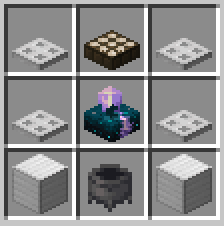
Filler recipe:
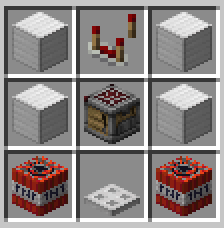
Blueprint recipe:
- 1 Paper
- 1 Lapis Lazuli
Notes
This mod is inspired by BuildCraft, but it is not trying to be a one-to-one remake. The goal is to keep the part that made those machines fun in the first place: setting up a job, watching the preview, feeding the machine materials and power, and letting it do the repetitive part for you.
If you liked old quarry-era automation mods and want a Builder/Filler style toolset in a current NeoForge pack, that is the whole reason this project exists.
Get Involved Suggestions, bug reports, and feedback happen over on the Discord: https://discord.gg/RJqPMHbUh3
Project description from CurseForge.
Pick your setup
RetroRig: Builder by Minecraft version and loader
Choose the version and loader you play, then open the matching release.
Minecraft version
1.21.1
1 loader buildCheck the dependencies, then try the file in a copied instance before changing a world you care about.
Recent files
RetroRig: Builder versions and loaders
RetroRig_Builder-26.1.2-v0.0.1.jar
24 Jun 2026
Client Source doesn’t say Server Source doesn’t say Dependencies No extras listed Listed on Release listing
Check the 26.1.2 · NeoForge setup NeoForge26.1.2 release
retrorig_builder-1.2.2.jar
23 Jun 2026
Client Source doesn’t say Server Source doesn’t say Dependencies No extras listed Listed on Release listing
Check the 1.21.1 · NeoForge setup 1.21.1NeoForge release
retrorig_builder-1.2.1.jar
5 Jun 2026
Client Source doesn’t say Server Source doesn’t say Dependencies No extras listed Listed on Release listing
Check the 1.21.1 · NeoForge setup 1.21.1NeoForge release
retrorig_builder-1.2.0.jar
9 Apr 2026
Client Source doesn’t say Server Source doesn’t say Dependencies No extras listed Listed on Release listing
Check the 1.21.1 · NeoForge setup 1.21.1NeoForge release
retrorig_builder-1.1.0.jar
8 Apr 2026
Client Source doesn’t say Server Source doesn’t say Dependencies No extras listed Listed on Release listing
Check the 1.21.1 · NeoForge setup 1.21.1NeoForge release
formforge-1.0.0.jar
30 Mar 2026
Client Source doesn’t say Server Source doesn’t say Dependencies No extras listed Listed on Release listing
Check the 1.21.1 · NeoForge setup 1.21.1NeoForge release
Looking for an older file? The official CurseForge project page is in Resources.
 mod
mod CurseForge · Minecraft
Sky Gases– A Create Aeronautics Addon
An addon for Create Aeronautics that adds gases, aircraft mechanics, warp travel, and new utility systems.
 mod
mod CurseForge · Minecraft
Immersive Aircraft
A set of vanilla style, customizable and upgradable aircraft, from biplanes to airships
 mod
mod CurseForge + Modrinth · Minecraft
Tiny Multiblock Lib
A Tiny Lib for easy creation of Multiblocks with a built-in ghost system. Made to be packaged with other mods