Minecraft version
Back to mods ![[MM] Structure Compass project artwork](https://media.forgecdn.net/avatars/1736/259/639105179166616959.png)
CurseForge · Minecraft mod
[MM] Structure Compass
Structure Compass helps you find structures—with one key advantage: it remembers where you’ve been. Turn on Skip Discovered Structures to automatically avoid visited spots, ensuring every search takes you somewhere new.
Choose a version Pick your version below, then grab the matching file.
Quick answer
Which [MM] Structure Compass release should I use?
beta file mm_structurecompass-26.1.1-beta2.jar
Game version 26.1.1
Loader NeoForge
[MM] Structure Compass mm_structurecompass-26.1.1-beta2.jar targets 26.1.1 with NeoForge. The project page does not say whether this file belongs on the client, dedicated server, or both. No extra mods listed for this file.
Where it goes
Is [MM] Structure Compass required on the client, server, or both?
The project page does not say whether this file belongs on the client, dedicated server, or both.
Client Source doesn’t say
Dedicated server Source doesn’t say
Loader for this release NeoForge
Required install it here Optional supported, not mandatory Not supported do not install here Source doesn’t say do not assume
The source does not explicitly classify this release as client-only or server-only.
What else does [MM] Structure Compass mm_structurecompass-26.1.1-beta2.jar need?
mm_structurecompass-26.1.1-beta2.jar. Change the file and its required mods may change too.
This file does not list any required mods. Do not add a library just because a different file uses it.
This file does not list any required or optional mods.
Before you install it
Add [MM] Structure Compass without breaking your instance.
Built for [MM] Structure Compass mm_structurecompass-26.1.1-beta2.jar. Pick another file and the loader, install side or required mods may change.
- 01
Stick to this file
Use mm_structurecompass-26.1.1-beta2.jar. It targets 26.1.1 with NeoForge; another release may have different loader, side or dependency requirements.
- 02
Bring the mods it needs
This file does not list any required mods. Do not add a library just because a different file uses it.
- 03
Put it on the correct side
The project page does not say whether this file belongs on the client, dedicated server, or both.
- 04
Pick the file you checked
Use the “Get this file” button beside mm_structurecompass-26.1.1-beta2.jar. It opens that exact file at the source.
About this project
What does [MM] Structure Compass add?
Description
Tired of the compass pointing you back to a village you already looted? Structure Compass solves that.
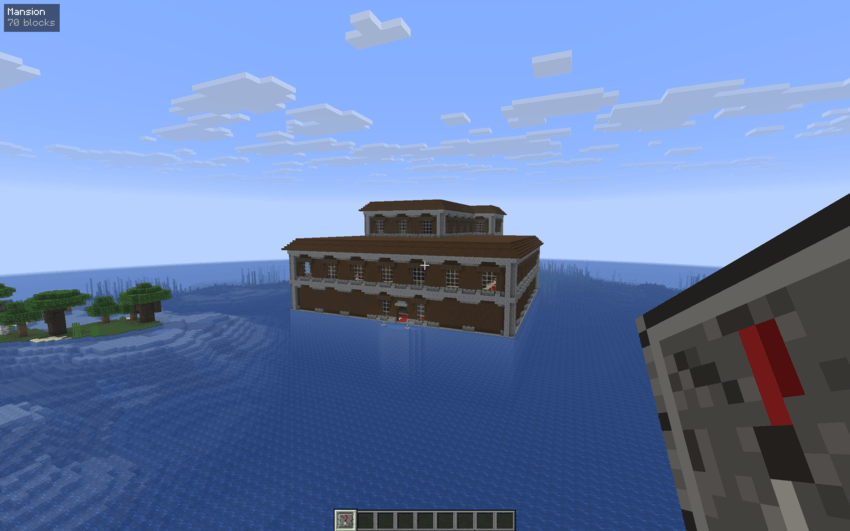
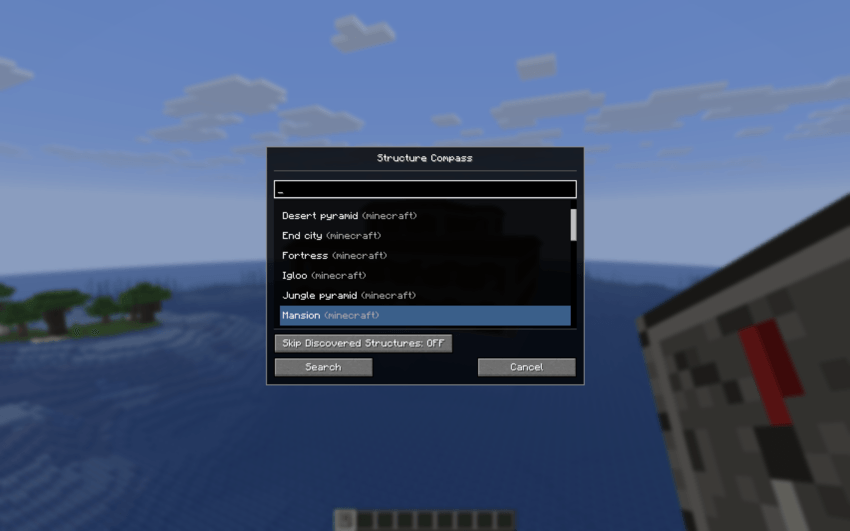
Right-click the compass to open a searchable list of every structure in the world — vanilla or modded. Select one, hit Search, and the compass needle spins to life, pointing you towards the nearest match. A small HUD overlay shows the structure name and distance in real time as you travel.
What makes Structure Compass special is its Skip Discovered Structures toggle. When enabled, the compass tracks every structure you visit and automatically excludes them from future searches. Your discoveries are saved persistently, so the compass stays smart across sessions and server restarts.
Searches run asynchronously on the server and use seed-based predictions to locate structures without loading chunks, keeping performance impact minimal even at large search radius.
Features
- Searchable structure list — filter by name or mod namespace to find exactly what you're looking for
- Skip Discovered Structures — toggle to automatically exclude previously visited structures from search results
- Persistent visit tracking — visited structures are remembered per player, across sessions and server restarts
- Real-time HUD overlay — shows structure name and distance while holding the compass
- Animated compass needle — spins while searching, points toward the target when locked on
- Async server-side search — searches run off-thread so the server never freezes
- Wide structure support — works with vanilla and modded structures via the server's structure registry
- Configurable search radius — adjust from 1 to 10,000 chunks (default: 100 chunks / ~1600 blocks)
- Multiplayer compatible — visit data is tracked per player
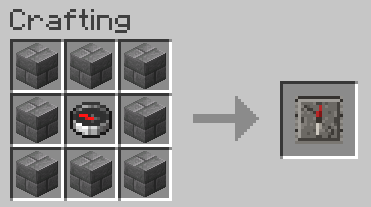
Crafting recipe
How It Works
Finding structures: When you start a search, the server scans for the nearest matching structure using seed-based predictions — no chunk loading required for most searches. It supports both random-spread structures (villages, temples, etc.) and concentric-ring structures (strongholds). For modded structures that use different placement logic, it falls back to Minecraft's built-in structure finder.
Skipping discovered structures: If Skip Discovered Structures is enabled and the nearest result has already been visited, the compass doesn't just stop there. It runs a search around you — then returns whichever unvisited result is closest to you. Visit detection uses a 64-block radius around structure positions and is stored per player.
Modpacks
Feel free to use this mod in your modpack.
Project description from CurseForge.
Pick your setup
[MM] Structure Compass by Minecraft version and loader
Choose the version and loader you play, then open the matching release.
Minecraft version
26.1
1 loader buildCheck the dependencies, then try the file in a copied instance before changing a world you care about.
Recent files
[MM] Structure Compass versions and loaders
mm_structurecompass-26.1.1-beta2.jar
7 Apr 2026
Client Source doesn’t say Server Source doesn’t say Dependencies No extras listed Listed on Release listing
Check the 26.1.1 · NeoForge setup NeoForge26.1.1 beta
mm_structurecompass-1.0.0-beta2.jar
31 Mar 2026
Client Source doesn’t say Server Source doesn’t say Dependencies No extras listed Listed on Release listing
Check the 26.1 · NeoForge setup NeoForge26.1 beta
mm_structurecompass-1.0.0-beta1.jar
31 Mar 2026
Client Source doesn’t say Server Source doesn’t say Dependencies No extras listed Listed on Release listing
Check the 26.1 · NeoForge setup NeoForge26.1 beta
Looking for an older file? The official CurseForge project page is in Resources.
 mod
mod CurseForge · Minecraft
AnvilCraft: TofusThinking
An Addon for AnvilCraft
 mod
mod CurseForge · Minecraft
Lantea: Stargates
A Stargate mod: build and dial working Stargates, fly a Puddle Jumper between worlds, and wake an Ancient outpost under the ice with Atlantis technology: control chair, drones and ZPMs.
 mod
mod CurseForge · Minecraft
Echofront
Call down the Skybreaker orbital cannon, a screen-shaking strike with a huge crater, plus a sci-fi research facility and the AUR-7 boss.