YetAnotherConfigLib Needed by Create: Armored Rails create_armored_rails-1.21.1-NeoForge-1.2.4.jar
requiredMatching file found Matched file: 3.8.2 for neoforge 1.21.1
CurseForge · Minecraft mod
Adds a full health, armor, and upgrade system to Create's trains — defend, repair, and customize your rolling stock.
Quick answer
Create: Armored Rails create_armored_rails-1.21.1-NeoForge-1.2.4.jar targets 1.21.1 with NeoForge. The project page does not say whether this file belongs on the client, dedicated server, or both. All 2 required mods have matching files.
Where it goes
The project page does not say whether this file belongs on the client, dedicated server, or both.
The source does not explicitly classify this release as client-only or server-only.
create_armored_rails-1.21.1-NeoForge-1.2.4.jar. Change the file and its required mods may change too.
Install YetAnotherConfigLib, Create first. We found matching files for this game-version and loader setup. 2 come through another mod in the chain.
2 extra mods were pulled in by other dependencies. Indented rows show who needs each one. We only count dependency files that match this setup. A file for another loader does not fill the gap.
Before you install it
Built for Create: Armored Rails create_armored_rails-1.21.1-NeoForge-1.2.4.jar. Pick another file and the loader, install side or required mods may change.
Use create_armored_rails-1.21.1-NeoForge-1.2.4.jar. It targets 1.21.1 with NeoForge; another release may have different loader, side or dependency requirements.
Install YetAnotherConfigLib, Create first. We found matching files for this game-version and loader setup. 2 come through another mod in the chain.
The project page does not say whether this file belongs on the client, dedicated server, or both.
Use the “Get this file” button beside create_armored_rails-1.21.1-NeoForge-1.2.4.jar. It opens that exact file at the source.
About this project
A Create addon that adds a full train health and armor system. Your trains can now take damage, be destroyed, and be defended.
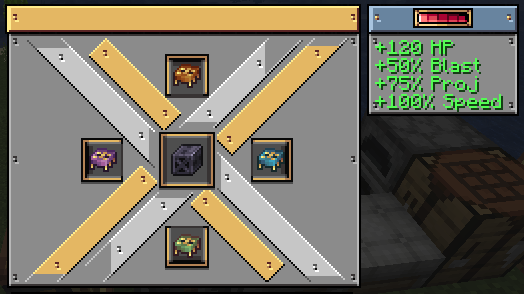
Attach a Hull Assembly block to your train to unlock the upgrade system. Without one, trains still have base HP, but with a hull, you get access to 9 tiers of hull frames and 9 unique modifiers.
All trains are vulnerable to damage from mobs, explosions, projectiles, and environmental hazards. Manage your train's health or face critical failure.
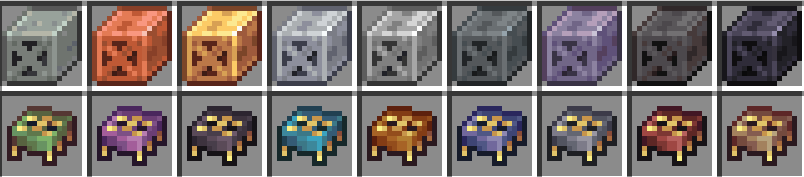
| Frame | HP | Special |
|---|---|---|
| Andesite | +15 | Cheap starter frame |
| Copper | +10 | Reduced critical threshold |
| Brass | +35 | Repair cost reduction, +1 modifier slot |
| Aluminium | +25 | +10% speed, slightly less durable |
| Iron | +50 | Blast & projectile protection, +1 slot |
| Steel | +60 | Heavy protection, +2 slots |
| Tungsten | +75 | Maximum protection, brittle trade-off, +2 slots |
| Netherite | +100 | Fire resistant, reduced speed penalty, +3 slots |
| Tungsten Alloy | +120 | Best-in-class everything, fire resistant, +4 slots |
All values are fully configurable.
Slot modifiers into your hull to customize your train's behavior:
All modifiers are craftable using Create's Mechanical Crafter. They can also be found in dungeon loot.
A new ore that spawns below Y=32. Full Create processing chain:
Mine > Crush > Wash/Smelt > Press into Sheets > Craft Hull Frames
Tungsten Alloy is created by superheated mixing tungsten + coal + netherite scrap.
This mod has deep Jade integration and we highly recommend installing it alongside. Look at any train to see:
Almost everything is configurable. Per-frame stats, per-modifier values, mob ranges, damage thresholds, temperature damage, explosion behavior, and more. Over 150 config options.
Support on Discord
If you'd like to support me and the development of my mods, I recommend trying out BisectHosting. Use code "project8gbderam" to get 25% off your first month of a gaming server for new customers. They offer 24/7 support and lightning-fast response times, ensuring you're in great hands and providing exceptional assistance for all your gaming needs. https://www.bisecthosting.com/project8gbderam

Project description from CurseForge.
Pick your setup
Choose the version and loader you play, then open the matching release.
Check the dependencies, then try the file in a copied instance before changing a world you care about.
Recent files
25 Apr 2026
25 Apr 2026
23 Apr 2026
22 Apr 2026
22 Apr 2026
13 Apr 2026
4 Apr 2026
2 Apr 2026
Looking for an older file? The official CurseForge project page is in Resources.
 mod
Add evil Hunter's mob! They hunt the animals while making a cheeky laugh...
 mod
Server-authoritative Plex movie and TV playback on synchronized player-built Minecraft screens.
 mod
A handheld radar. Choose a kind of block (iron ore, ancient debris, a modded ore) and the radar finds the nearest one