Minecraft version
Back to mods 
CurseForge · Minecraft mod
Gravity Artifacts
Gravity Artifacts is a Fabric mod that adds the Gravity Glove, Gravity Bracelet, Gravity Ore, and Gravity Shards, bringing smooth mob control, flight, and gravity-based abilities to Minecraft.
Choose a version Pick your version below, then grab the matching file.
Quick answer
Which Gravity Artifacts release matches 26.1.1 Fabric?
Best match for your filters gravity-artifacts-1.0.0.26.1.1.jar
Game version 26.1.1
Loader Fabric
Gravity Artifacts gravity-artifacts-1.0.0.26.1.1.jar targets 26.1.1 with Fabric. The project page does not say whether this file belongs on the client, dedicated server, or both. No extra mods listed for this file.
Where it goes
Is Gravity Artifacts required on the client, server, or both?
The project page does not say whether this file belongs on the client, dedicated server, or both.
Client Source doesn’t say
Dedicated server Source doesn’t say
Loader for this release Fabric
Required install it here Optional supported, not mandatory Not supported do not install here Source doesn’t say do not assume
The source does not explicitly classify this release as client-only or server-only.
What else does Gravity Artifacts gravity-artifacts-1.0.0.26.1.1.jar need?
gravity-artifacts-1.0.0.26.1.1.jar on 26.1.1 Fabric. Every mod below is checked against that same setup.
This file does not list any required mods. Do not add a library just because a different file uses it.
This file does not list any required or optional mods.
Before you install it
Add Gravity Artifacts without breaking your instance.
Built for Gravity Artifacts gravity-artifacts-1.0.0.26.1.1.jar on 26.1.1 Fabric. Pick another file and the loader, install side or required mods may change.
- 01
Stick to this file
Use gravity-artifacts-1.0.0.26.1.1.jar. It targets 26.1.1 with Fabric; another release may have different loader, side or dependency requirements.
- 02
Bring the mods it needs
This file does not list any required mods. Do not add a library just because a different file uses it.
- 03
Put it on the correct side
The project page does not say whether this file belongs on the client, dedicated server, or both.
- 04
Pick the file you checked
Use the “Get this file” button beside gravity-artifacts-1.0.0.26.1.1.jar. It opens that exact file at the source.
About this project
What does Gravity Artifacts add?
Gravity Artifacts is a Fabric mod for Minecraft that adds gravity-powered items with unique movement and mob-control abilities.
How to use
Gravity Glove
Hold the glove and aim at a mob, then hold right click to lift and move it smoothly through the air. The mob will follow the place you are aiming at, as if it has no gravity. This works on both passive mobs and hostile mobs. The glove can be used for up to 10 seconds, then it goes on a 5 second cooldown.
Gravity Bracelet
Hold the bracelet in your hand to gain the ability to fly. While holding it, right click to release a gravity pulse that sends nearby mobs flying away from you. This ability has a 10 second cooldown.
Gravity Ore
Gravity Ore can be found underground and must be mined with an iron pickaxe or better. Breaking it gives Gravity Shards, which are used to craft the gravity items.
Features
Smooth mob lifting and movement
Works on both peaceful and hostile mobs
Flight while holding the bracelet
Gravity pulse ability for crowd control!!
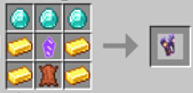
[Glove Recipe]
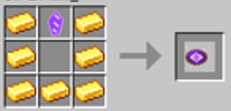
[Bracelet Recipe]
Requirements
Minecraft
Fabric Loader
Fabric API
Project description from CurseForge.
Pick your setup
Gravity Artifacts by Minecraft version and loader
Choose the version and loader you play, then open the matching release.
Minecraft version
1.21.11
1 loader buildCheck the dependencies, then try the file in a copied instance before changing a world you care about.
Recent files
Gravity Artifacts versions and loaders
gravity-artifacts-1.0.0.26.1.1.jar
3 Apr 2026
Client Source doesn’t say Server Source doesn’t say Dependencies No extras listed Listed on Release listing
Check the 26.1.1 · Fabric setup Fabric26.1.1 release
Looking for an older file? The official CurseForge project page is in Resources.
 mod
CurseForge · Minecraft
Easy Mob Spawn Control
Quickly adjust spawn rate, ban bad mobs, change mob limit and more with in-game menu
 mod
Modrinth · Minecraft
Easy Mob Spawn Control
Quickly adjust spawn rate, ban bad mobs, change mob limit and more with in-game menu
 mod
CurseForge · Minecraft
Arcane: Anime Magic & Morph
Fast-paced anime magic spells, 3D morphing (Bird flight, Giant, Tiny), and hide-and-seek camouflage with zero mana limits!