Minecraft version
Back to mods 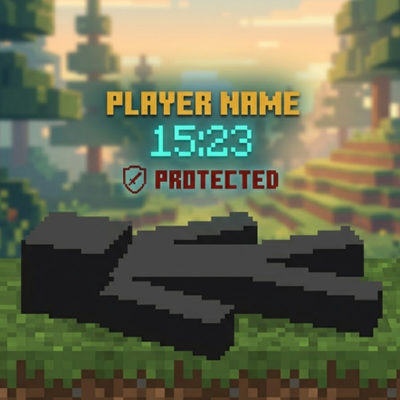
CurseForge · Minecraft mod
Player Corpse
Never lose your loot! Spawns an owner-protected corpse with your player skin, floating hologram timers, and one-click quick retrieval.
Choose a version Pick your version below, then grab the matching file.
Quick answer
Which Player Corpse release should I use?
Latest stable file corpsegraves-1.1.0+26.2-neoforge.jar
Game version 26.2
Loader NeoForge
Player Corpse corpsegraves-1.1.0+26.2-neoforge.jar targets 26.2 with NeoForge. The project page does not say whether this file belongs on the client, dedicated server, or both. No extra mods listed for this file.
Where it goes
Is Player Corpse required on the client, server, or both?
The project page does not say whether this file belongs on the client, dedicated server, or both.
Client Source doesn’t say
Dedicated server Source doesn’t say
Loader for this release NeoForge
Required install it here Optional supported, not mandatory Not supported do not install here Source doesn’t say do not assume
The source does not explicitly classify this release as client-only or server-only.
What else does Player Corpse corpsegraves-1.1.0+26.2-neoforge.jar need?
corpsegraves-1.1.0+26.2-neoforge.jar. Change the file and its required mods may change too.
This file does not list any required mods. Do not add a library just because a different file uses it.
This file does not list any required or optional mods.
Before you install it
Add Player Corpse without breaking your instance.
Built for Player Corpse corpsegraves-1.1.0+26.2-neoforge.jar. Pick another file and the loader, install side or required mods may change.
- 01
Stick to this file
Use corpsegraves-1.1.0+26.2-neoforge.jar. It targets 26.2 with NeoForge; another release may have different loader, side or dependency requirements.
- 02
Bring the mods it needs
This file does not list any required mods. Do not add a library just because a different file uses it.
- 03
Put it on the correct side
The project page does not say whether this file belongs on the client, dedicated server, or both.
- 04
Pick the file you checked
Use the “Get this file” button beside corpsegraves-1.1.0+26.2-neoforge.jar. It opens that exact file at the source.
About this project
What does Player Corpse add?
🪦 Player Graves
Never lose your hard-earned loot again! When a player dies, their items are safely stored in a highly-detailed, protected corpse grave instead of despawning on the ground

✨ Key Features
👤 Player Skin Rendering: The grave isn't just a block; it accurately renders the fallen player's custom skin for true immersion.
🛡️ Advanced Owner Protection: Graves are protected for the owner by default. It includes a smart "Unlock Timer" that allows others to access the loot only after a configured amount of time passes.
🔮 Floating Hologram: A sleek, floating display above the grave shows crucial details at a glance: the player's name, the time left until it despawns, and the current protection status

- 🎒 Flexible Loot Retrieval: * GUI Mode: Right-click the grave to open a clean GUI and pick specific items.
- Quick Restore:
Shift + Right-clickto instantly restore all items to their original inventory slots.
- Quick Restore:
- ⏳ Smart Despawn System: No more rushing blindly. The grave intelligently stays in the world and won't despawn until the loot is fully handled.
⚙️ Configuration & Compatibility
- Deeply Customizable: Almost everything can be tweaked! Timers, hologram colors, exact corpse poses, XP recovery rates, and void rescue toggles.
💬 Support & Feedback
If you encounter any issues, have suggestions, or need help with the configuration, feel free to contact me
⚙️ Configuration Guide
You can customize the mod by editing the configuration file located at:
.minecraft/config/corpsegraves.json(or inside your server'sconfig/folder).> **Important:** Always stop your game or server before editing this file, then save and restart.
Default Config Example:
{
"enabled": true,
"despawnSeconds": 3600,
"unlockSeconds": 1800,
Project description from CurseForge.
Pick your setup
Player Corpse by Minecraft version and loader
Choose the version and loader you play, then open the matching release.
Minecraft version
26.3
3 loader buildsMinecraft version
26.2
3 loader buildsMinecraft version
26.1.2
3 loader buildsMinecraft version
26.1.1
2 loader buildsMinecraft version
26.1
2 loader buildsMinecraft version
1.21.11
1 loader buildMinecraft version
1.21.1
3 loader buildsMinecraft version
1.21
3 loader buildsMinecraft version
1.20.1
2 loader buildsMinecraft version
1.20
1 loader buildCheck the dependencies, then try the file in a copied instance before changing a world you care about.
Recent files
Player Corpse versions and loaders
corpsegraves-1.1.0+26.2-neoforge.jar
corpsegraves-1.1.0-26.2-neoforge.jar
1 Nov 2026
Client Source doesn’t say Server Source doesn’t say Dependencies No extras listed Listed on Release listing
Check the 26.2 · NeoForge setup NeoForge26.2 release
corpsegraves-1.1.0+26.1.2-neoforge.jar
corpsegraves-1.1.0-26.1.2-neoforge.jar
1 Nov 2026
Client Source doesn’t say Server Source doesn’t say Dependencies No extras listed Listed on Release listing
Check the 26.1.2 · NeoForge setup NeoForge26.1.2 release
corpsegraves-1.1.0+1.21-neoforge.jar
corpsegraves-1.1.0-1.21-neoforge.jar
1 Nov 2026
Client Source doesn’t say Server Source doesn’t say Dependencies No extras listed Listed on Release listing
Check the 1.21 · NeoForge setup 1.21NeoForge release
corpsegraves-1.1.0+1.21.1-forge.jar
corpsegraves-1.1.0-1.21.1-forge.jar
1 Nov 2026
Client Source doesn’t say Server Source doesn’t say Dependencies No extras listed Listed on Release listing
Check the 1.21.1 · Forge setup Forge1.21.1 release
corpsegraves-1.1.0+1.21-forge.jar
corpsegraves-1.1.0-1.21-forge.jar
1 Nov 2026
Client Source doesn’t say Server Source doesn’t say Dependencies No extras listed Listed on Release listing
Check the 1.21 · Forge setup 1.21Forge release
corpsegraves-1.1.0+26.3-forge.jar
corpsegraves-1.1.0-26.3-forge.jar
1 Nov 2026
Client Source doesn’t say Server Source doesn’t say Dependencies No extras listed Listed on Release listing
Check the 26.3 · Forge setup Forge26.3 release
corpsegraves-1.1.0+26.1-forge.jar
corpsegraves-1.1.0-26.1-forge.jar
1 Nov 2026
Client Source doesn’t say Server Source doesn’t say Dependencies No extras listed Listed on Release listing
Check the 26.1 · Forge setup Forge26.1 release
corpsegraves-1.1.0+26.1.1-forge.jar
corpsegraves-1.1.0-26.1.1-forge.jar
1 Nov 2026
Client Source doesn’t say Server Source doesn’t say Dependencies No extras listed Listed on Release listing
Check the 26.1.1 · Forge setup Forge26.1.1 release
corpsegraves-1.1.0+26.1.2-forge.jar
corpsegraves-1.1.0-26.1.2-forge.jar
1 Nov 2026
Client Source doesn’t say Server Source doesn’t say Dependencies No extras listed Listed on Release listing
Check the 26.1.2 · Forge setup Forge26.1.2 release
corpsegraves-1.1.0+26.2-forge.jar
corpsegraves-1.1.0-26.2-forge.jar
1 Nov 2026
Client Source doesn’t say Server Source doesn’t say Dependencies No extras listed Listed on Release listing
Check the 26.2 · Forge setup Forge26.2 release
corpsegraves-1.1.0+26.3-neoforge.jar
corpsegraves-1.1.0-26.3-neoforge.jar
1 Nov 2026
Client Source doesn’t say Server Source doesn’t say Dependencies No extras listed Listed on Release listing
Check the 26.3 · NeoForge setup NeoForge26.3 release
corpsegraves-1.1.0+1.21.1-neoforge.jar
corpsegraves-1.1.0-1.21.1-neoforge.jar
31 Oct 2026
Client Source doesn’t say Server Source doesn’t say Dependencies No extras listed Listed on Release listing
Check the 1.21.1 · NeoForge setup 1.21.1NeoForge release
Looking for an older file? The official CurseForge project page is in Resources.
 mod
mod CurseForge + Modrinth · Minecraft
Every Compat (Wood Good)
Universal Wood Compat: Quark, Twilight Forest, Twigs, Another Furniture, Farmers Delight, Macaw's, Valhelsia, Architects Palette, Deco Blocks, Crayfish FM
 mod
mod CurseForge + Modrinth · Minecraft
Glow Paste
Allows making any block emit light with Glow Paste!
 mod
mod CurseForge · Minecraft
Curses and Calamity
Jujutsu Kaisen Mod, Continuation of sorcery age