Back to mods
Simple Atlas project artwork

CurseForge · Minecraft mod

Simple Atlas

A no-nonsense Vanilla+ Atlas for all your mapping needs! Heavily inspired by Map Atlases by Pepperoni-Jabroni

Choose a version Pick your version below, then grab the matching file.

Quick answer

Which Simple Atlas release should I use?

Updated last month
Latest stable file 2.0.0 for 26.2
Game version 26.2
Loader Fabric

Simple Atlas 2.0.0 for 26.2 targets 26.2 with Fabric. The project page does not say whether this file belongs on the client, dedicated server, or both. All 3 required mods have matching files.

Where it goes

Is Simple Atlas required on the client, server, or both?

The project page does not say whether this file belongs on the client, dedicated server, or both.

Client Source doesn’t say
Dedicated server Source doesn’t say
Loader for this release Fabric
Required install it here Optional supported, not mandatory Not supported do not install here Source doesn’t say do not assume

The source does not explicitly classify this release as client-only or server-only.

What else does Simple Atlas 2.0.0 for 26.2 need?

2.0.0 for 26.2. Change the file and its required mods may change too.

All 3 required mods have matching files

Install Fabric API, Cloth Config API (Fabric/Forge/NeoForge), Cloth Config API first. We found matching files for this game-version and loader setup. 2 come through another mod in the chain.

5 listed on this file 2 pulled in by those mods
Mod Menu Optional for Simple Atlas 2.0.0 for 26.2
optional
Matching file found Matched file: v20.0.3 for 26.2
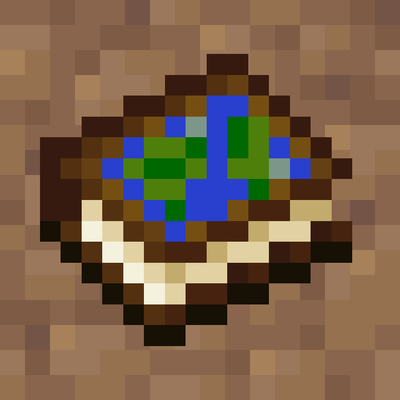
Fabric API Needed by Simple Atlas 2.0.0 for 26.2
required
Matching file found Matched file: [26.2] Fabric API 0.161.0+26.2
Cloth Config API Needed by Simple Atlas 2.0.0 for 26.2
required
Matching file found Matched file: 26.2.155+fabric
Mod Menu Optional for Simple Atlas 2.0.0 for 26.2
optional
Matching file found Matched file: 20.0.3
Text Placeholder API Needed by Mod Menu
pulled in
Matching file found Matched file: placeholder-api-3.1.0-beta.1+26.2.jar
Text Placeholder API Needed by Mod Menu
pulled in
Matching file found Matched file: 3.1.0-beta.1+26.2

2 extra mods were pulled in by other dependencies. Indented rows show who needs each one. We only count dependency files that match this setup. A file for another loader does not fill the gap.

Before you install it

Add Simple Atlas without breaking your instance.

Built for Simple Atlas 2.0.0 for 26.2. Pick another file and the loader, install side or required mods may change.

  1. 01

    Stick to this file

    Use 2.0.0 for 26.2. It targets 26.2 with Fabric; another release may have different loader, side or dependency requirements.

  2. 02

    Bring the mods it needs

    Install Fabric API, Cloth Config API (Fabric/Forge/NeoForge), Cloth Config API first. We found matching files for this game-version and loader setup. 2 come through another mod in the chain.

  3. 03

    Put it on the correct side

    The project page does not say whether this file belongs on the client, dedicated server, or both.

  4. 04

    Pick the file you checked

    Use the “Get this file” button beside 2.0.0 for 26.2. It opens that exact file at the source.

About this project

What does Simple Atlas add?

Simple Atlas

Carry your mapped world in one item.

Simple Atlas adds an Atlas item that stores multiple filled maps and opens into a single interactive view, so you can pan around your explored area without juggling lots of maps.

Features

Atlas item

  • Craft an Atlas and add filled maps through the cartography table
  • Atlas only accepts maps with the same scale as the first map inserted
  • Use a book at the cartography table to duplicate an atlas
  • Use paper at the cartography table to scale every atlas map up by one level
  • Merge two atlases of equal size at the cartography table to combine their maps and waypoints
  • Lower-scale maps can be integrated into an existing atlas through the cartography table

Interactive world map

  • Scroll to zoom
  • Left-drag to pan
  • Press R to reset zoom/pan to your current player position
  • Player marker is shown directly on the atlas
  • Dimension bookmark tabs separate Overworld, Nether, End, and other-dimension atlas tiles

Waypoints

  • Right-click on the atlas to create waypoints
  • Use an atlas on a banner to add a waypoint from the banner's color and name
  • Right-click existing waypoint markers for context actions
  • User can edit or delete waypoints
  • Waypoint and map-point context menus can copy coordinates
  • Waypoint names are capped to keep labels readable
  • Waypoints are saved in the atlas item itself
  • Right-clicking a mapped tile can remove that map from the atlas and return the filled map item

Navigation compass

  • Choose Locate on a waypoint to pin the waypoint to the locator bar
  • Choose Stop Locating to remove pin
  • Multiple waypoints can be pinned

Multiplayer-aware map syncing

  • While a player is holding an atlas, map data is synced live from the server
  • Atlas viewers are tracked server-side

How to use

  1. Craft an Atlas.
  2. Use the cartography table to add maps, duplicate atlases with books, scale atlases with paper, or merge equal-scale atlases.
  3. Hold the atlas in your main hand and use it to open the atlas screen.
  4. Scroll, drag, and switch dimension tabs to inspect your mapped area.
  5. Right-click map points or waypoints to manage waypoints, copy coordinates, remove maps, and optional navigation.

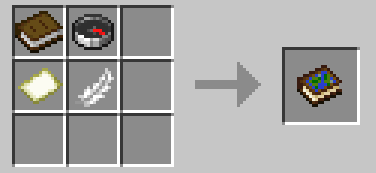
Recipe

Atlas crafting recipe

  • shapeless

Compatibility

  • Minecraft: 26.1.x
  • Loader: Fabric (fabric-loader >= 0.18.6)
  • Java: 25+
  • Fabric API: required

Notes

  • The atlas layout expects maps of the same scale and will scale up smaller maps, but larger ones will be rejected
  • Waypoint and navigation state is tied to each atlas item.
  • Teleport actions in the atlas UI use player commands and may require permission depending on the server.
  • Designed for both singleplayer and multiplayer survival workflows.

Issues/Feedback

Project description from CurseForge.

Pick your setup

Simple Atlas by Minecraft version and loader

Choose the version and loader you play, then open the matching release.

8 available setups

Check the dependencies, then try the file in a copied instance before changing a world you care about.

Recent files

Simple Atlas versions and loaders

10 of 10 releases match

Looking for an older file? The official CurseForge project page is in Resources.