Minecraft version
Back to mods 
CurseForge · Minecraft mod
BookPaste
Paste large texts into writable books and signs with automatic page splitting
Choose a version Pick your version below, then grab the matching file.
Quick answer
Which BookPaste release should I use?
Latest stable file 2.2-neo+1.21-1.21.1
Game version 1.21, 1.21.1
Loader NeoForge
BookPaste 2.2-neo+1.21-1.21.1 targets 1.21, 1.21.1 with NeoForge. The project page does not say whether this file belongs on the client, dedicated server, or both. No extra mods listed for this file.
Where it goes
Is BookPaste required on the client, server, or both?
The project page does not say whether this file belongs on the client, dedicated server, or both.
Client Source doesn’t say
Dedicated server Source doesn’t say
Loader for this release NeoForge
Required install it here Optional supported, not mandatory Not supported do not install here Source doesn’t say do not assume
The source does not explicitly classify this release as client-only or server-only.
What else does BookPaste 2.2-neo+1.21-1.21.1 need?
2.2-neo+1.21-1.21.1. Change the file and its required mods may change too.
This file does not list any required mods. Do not add a library just because a different file uses it.
This file does not list any required or optional mods.
Before you install it
Add BookPaste without breaking your instance.
Built for BookPaste 2.2-neo+1.21-1.21.1. Pick another file and the loader, install side or required mods may change.
- 01
Stick to this file
Use 2.2-neo+1.21-1.21.1. It targets 1.21, 1.21.1 with NeoForge; another release may have different loader, side or dependency requirements.
- 02
Bring the mods it needs
This file does not list any required mods. Do not add a library just because a different file uses it.
- 03
Put it on the correct side
The project page does not say whether this file belongs on the client, dedicated server, or both.
- 04
Pick the file you checked
Use the “Get this file” button beside 2.2-neo+1.21-1.21.1. It opens that exact file at the source.
About this project
What does BookPaste add?
Paste long texts into Minecraft books and signs with automatic formatting.
Features
- Splits pasted text across book pages and sign lines.
- Supports smart wrapping and whole-paragraph formatting.
- Keeps unfinished text in your clipboard when there is no more space.
- Shows notifications above the hotbar.
- Supports Scribble and Scholar.
- Includes settings and notifications in English, Русский, Українська, Deutsch, Español, Français, Português (Brasil), 日本語 and 简体中文.
Usage
Open a writable book or sign and press Ctrl+V.
Press F8 to switch formatting modes. Change the hotkey and other settings through Mod Menu.
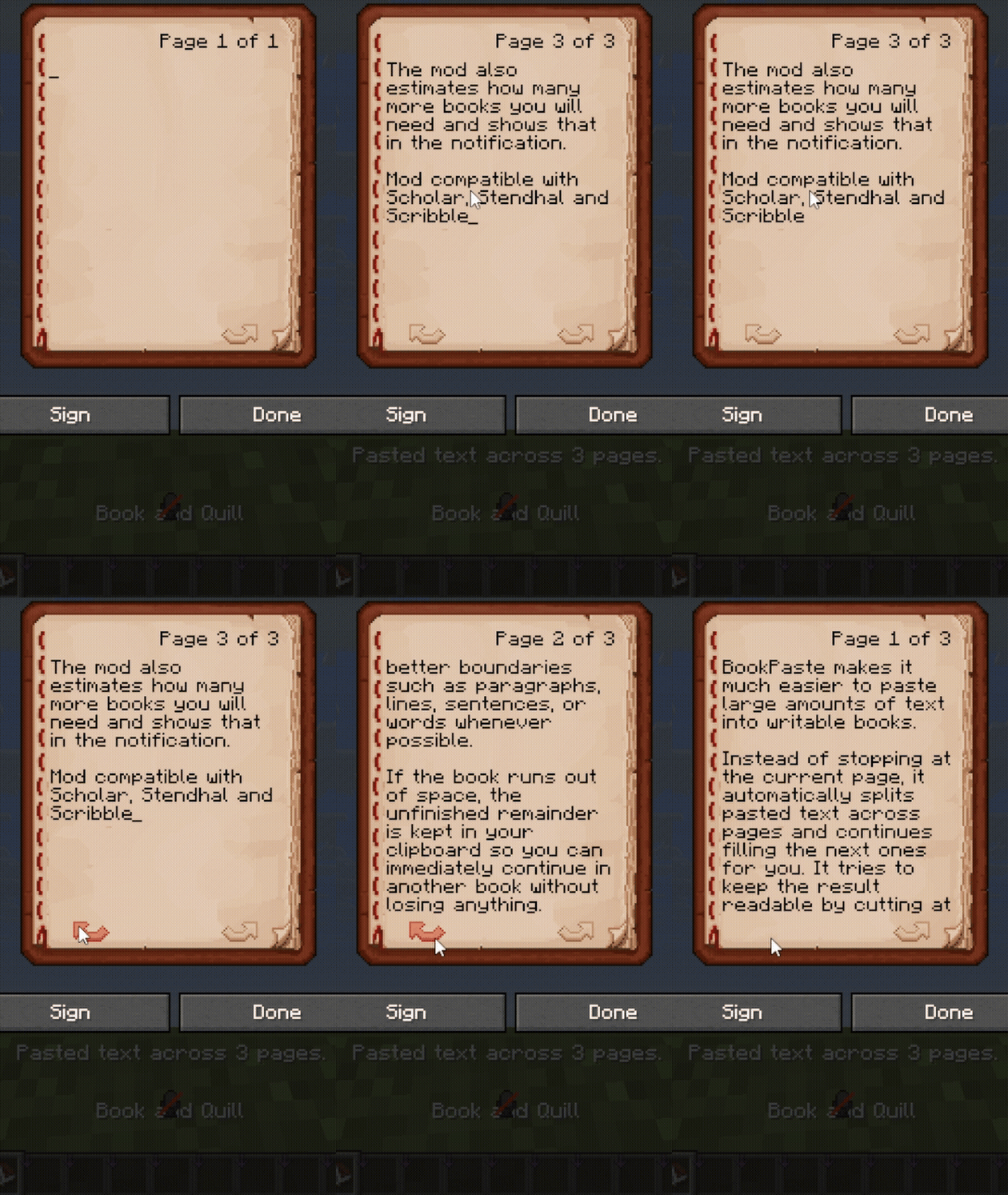
Custom page limits
Choose your own page limit in singleplayer.
For increased limits on multiplayer servers, install BookPaste on both the client and server. The server sets the limit, which appears in your settings menu.
Set the limit to 0 to remove BookPaste's page cap. Minecraft's data-size limits still apply.
Project description from CurseForge.
Pick your setup
BookPaste by Minecraft version and loader
Choose the version and loader you play, then open the matching release.
Minecraft version
26.2
1 loader buildMinecraft version
26.1.2
1 loader buildMinecraft version
26.1.1
1 loader buildMinecraft version
26.1
1 loader buildMinecraft version
1.21.11
1 loader buildMinecraft version
1.21.10
1 loader buildMinecraft version
1.21.9
1 loader buildMinecraft version
1.21.8
1 loader buildMinecraft version
1.21.7
1 loader buildMinecraft version
1.21.6
1 loader buildMinecraft version
1.21.5
1 loader buildShowing the newest 12 of 40 game versions. Older files are in the list below.
Check the dependencies, then try the file in a copied instance before changing a world you care about.
Recent files
BookPaste versions and loaders
2.2-neo+1.21-1.21.1
bookpaste-neo-2.2-1.21-1.21.1.jar
2 Nov 2026
Client Source doesn’t say Server Source doesn’t say Dependencies No extras listed Listed on Release listing
Check the 1.21.1 · NeoForge setup 1.211.21.1NeoForge release
2.2+26.3
bookpaste-fabric-2.2-26.3.jar
30 Oct 2026
Client Source doesn’t say Server Source doesn’t say Dependencies 2 required · 2 unchecked Listed on Release listing
Check the 26.3 · Fabric setup Fabric26.3 release
2.2+26.2
bookpaste-fabric-2.2-26.2.jar
30 Oct 2026
Client Source doesn’t say Server Source doesn’t say Dependencies 2 required · 2 unchecked Listed on Release listing
Check the 26.2 · Fabric setup Fabric26.2 release
2.2+26.1-26.1.2
bookpaste-fabric-2.2-26.1-26.1.2.jar
30 Oct 2026
Client Source doesn’t say Server Source doesn’t say Dependencies 2 required · 2 unchecked Listed on Release listing
Check the 26.1.2 · Fabric setup Fabric26.126.1.126.1.2 release
2.2+1.21.5-1.21.8
bookpaste-fabric-2.2-1.21.5-1.21.8.jar
30 Oct 2026
Client Source doesn’t say Server Source doesn’t say Dependencies 2 required · 2 unchecked Listed on Release listing
Check the 1.21.8 · Fabric setup Fabric1.21.81.21.51.21.6 release
2.2+1.21-1.21.4
bookpaste-fabric-2.2-1.21-1.21.4.jar
30 Oct 2026
Client Source doesn’t say Server Source doesn’t say Dependencies 2 required · 2 unchecked Listed on Release listing
Check the 1.21.4 · Fabric setup 1.21Fabric1.21.41.21.1 release
2.2+1.21.11
bookpaste-fabric-2.2-1.21.11.jar
30 Oct 2026
Client Source doesn’t say Server Source doesn’t say Dependencies 2 required · 2 unchecked Listed on Release listing
Check the 1.21.11 · Fabric setup Fabric1.21.11 release
2.2+1.21.9-1.21.10
bookpaste-fabric-2.2-1.21.9-1.21.10.jar
30 Oct 2026
Client Source doesn’t say Server Source doesn’t say Dependencies 2 required · 2 unchecked Listed on Release listing
Check the 1.21.10 · Fabric setup Fabric1.21.91.21.10 release
2.2+1.20.5-1.20.6
bookpaste-fabric-2.2-1.20.5-1.20.6.jar
30 Oct 2026
Client Source doesn’t say Server Source doesn’t say Dependencies 2 required · 2 unchecked Listed on Release listing
Check the 1.20.6 · Fabric setup Fabric1.20.51.20.6 release
2.2+1.20.2-1.20.4
bookpaste-fabric-2.2-1.20.2-1.20.4.jar
30 Oct 2026
Client Source doesn’t say Server Source doesn’t say Dependencies 2 required · 2 unchecked Listed on Release listing
Check the 1.20.4 · Fabric setup 1.20.2Fabric1.20.41.20.3 release
2.2+1.20-1.20.1
bookpaste-fabric-2.2-1.20-1.20.1.jar
30 Oct 2026
Client Source doesn’t say Server Source doesn’t say Dependencies 2 required · 2 unchecked Listed on Release listing
Check the 1.20.1 · Fabric setup Fabric1.20.11.20 release
2.2+1.19.4
bookpaste-fabric-2.2-1.19.4.jar
30 Oct 2026
Client Source doesn’t say Server Source doesn’t say Dependencies 2 required · 2 unchecked Listed on Release listing
Check the 1.19.4 · Fabric setup 1.19.4Fabric release
Looking for an older file? The official CurseForge project page is in Resources.
 mod
CurseForge + Modrinth · Minecraft
Drenched Wings
Blocks elytra use in liquids, applies environmental penalties, and enforces cooldowns. Fully configurable through server gamerules.
 mod
CurseForge + Modrinth · Minecraft
Dungeon Train: A Lore-Rich Roguelite RPG Adventure
Adventure time inspired dungeon crawler on a train. Procedurally generated carriages on a infinite sable physics train. Rich narrative, with custom made mods for a completely unique experience.
 mod
CurseForge + Modrinth · Minecraft
CarianStyle
An enchantment type mod based on the Elden Ring game