Minecraft version
Back to mods 
CurseForge · Minecraft mod
Key Filter
Manages keybinding visibility, input handling, and rebind protection
Choose a version Pick your version below, then grab the matching file.
Quick answer
Which Key Filter release should I use?
Latest stable file Key Filter 0.1.2 for NeoForge 26.3
Game version 26.3
Loader NeoForge
Key Filter 0.1.2 for NeoForge 26.3 targets 26.3 with NeoForge. The project page does not say whether this file belongs on the client, dedicated server, or both. No extra mods listed for this file.
Where it goes
Is Key Filter required on the client, server, or both?
The project page does not say whether this file belongs on the client, dedicated server, or both.
Client Source doesn’t say
Dedicated server Source doesn’t say
Loader for this release NeoForge
Required install it here Optional supported, not mandatory Not supported do not install here Source doesn’t say do not assume
The source does not explicitly classify this release as client-only or server-only.
What else does Key Filter 0.1.2 for NeoForge 26.3 need?
Key Filter 0.1.2 for NeoForge 26.3. Change the file and its required mods may change too.
This file does not list any required mods. Do not add a library just because a different file uses it.
This file does not list any required or optional mods.
Before you install it
Add Key Filter without breaking your instance.
Built for Key Filter 0.1.2 for NeoForge 26.3. Pick another file and the loader, install side or required mods may change.
- 01
Stick to this file
Use Key Filter 0.1.2 for NeoForge 26.3. It targets 26.3 with NeoForge; another release may have different loader, side or dependency requirements.
- 02
Bring the mods it needs
This file does not list any required mods. Do not add a library just because a different file uses it.
- 03
Put it on the correct side
The project page does not say whether this file belongs on the client, dedicated server, or both.
- 04
Pick the file you checked
Use the “Get this file” button beside Key Filter 0.1.2 for NeoForge 26.3. It opens that exact file at the source.
About this project
What does Key Filter add?
Key Filter
A client-side Minecraft mod that lets you lock, hide, and disable key bindings. Supports both Fabric and NeoForge.
Features
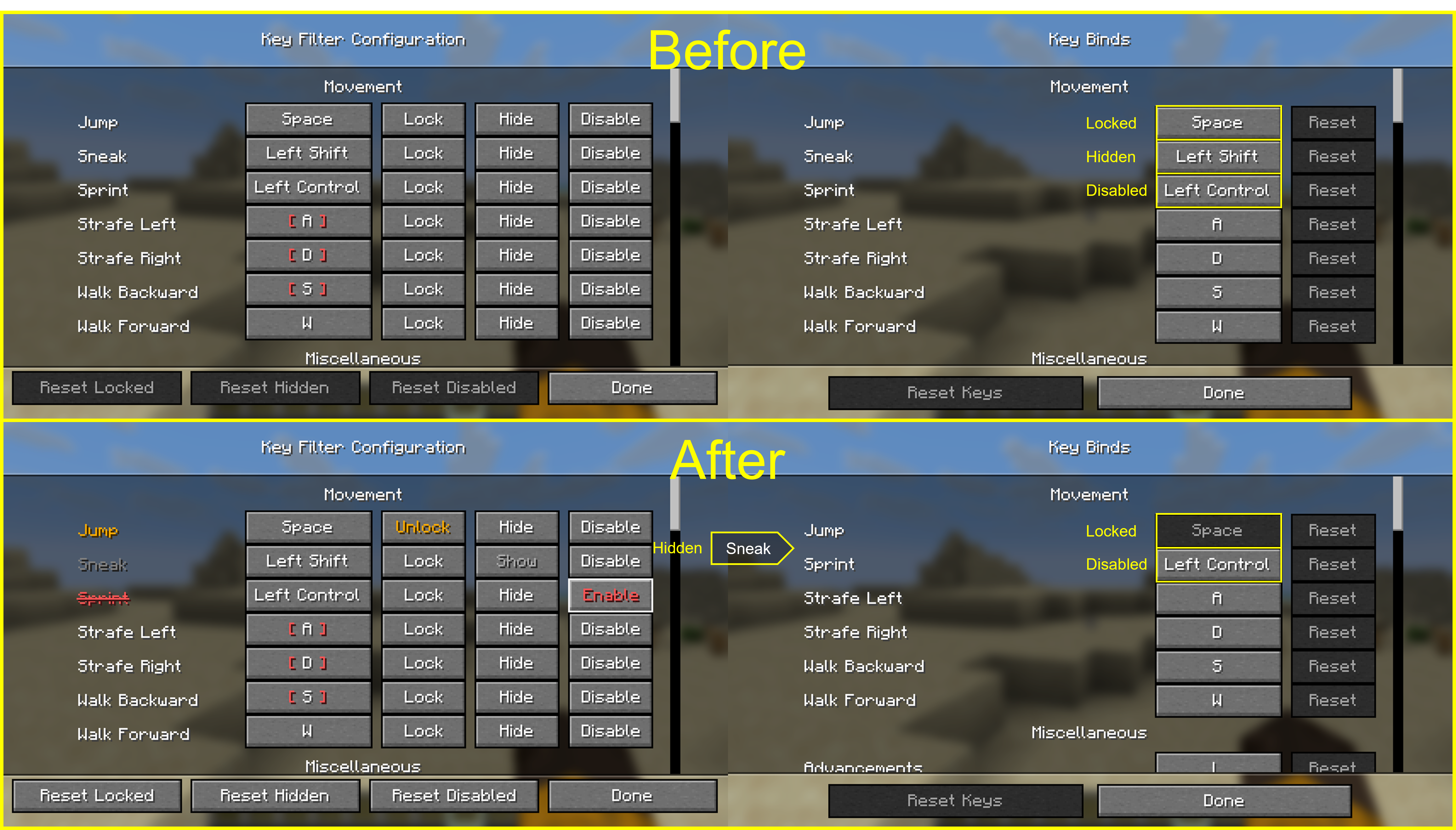
For every key binding you can toggle three independent states:
- Lock — prevents the binding from being changed, so you don't overwrite it by accident.
- Hide — hides the entry from the vanilla Controls screen to keep the list clean.
- Disable — makes the game ignore the key entirely, even if another mod or feature would normally consume it.
Usage
- Press F8 in-game to open the Key Filter config screen. (Default binding — it can be rebound from the vanilla Controls menu.)
- In the list, use the buttons next to each binding to toggle its state:
Lock/UnlockHide/ShowDisable/Enable
Settings are stored in config/keyfilter.json.
Project description from CurseForge.
Pick your setup
Key Filter by Minecraft version and loader
Choose the version and loader you play, then open the matching release.
Minecraft version
26.2
3 loader buildsMinecraft version
26.1.2
3 loader buildsMinecraft version
26.1.1
3 loader buildsMinecraft version
26.1
3 loader buildsCheck the dependencies, then try the file in a copied instance before changing a world you care about.
Recent files
Key Filter versions and loaders
Key Filter 0.1.2 for NeoForge 26.3
keyfilter-neoforge-0.1.2+mc26.3.jar
16 Sept 2026
Client Source doesn’t say Server Source doesn’t say Dependencies No extras listed Listed on Release listing
Check the 26.3 · NeoForge setup NeoForge26.3 release
Key Filter 0.1.2 for Fabric 26.3
keyfilter-fabric-0.1.2+mc26.3.jar
16 Sept 2026
Client Source doesn’t say Server Source doesn’t say Dependencies 2 required · 2 unchecked Listed on Release listing
Check the 26.3 · Fabric setup FabricQuilt26.3 release
Key Filter 0.1.1 for NeoForge 26.2
keyfilter-neoforge-0.1.1+mc26.2.jar
17 Jun 2026
Client Source doesn’t say Server Source doesn’t say Dependencies No extras listed Listed on Release listing
Check the 26.2 · NeoForge setup NeoForge26.2 release
Key Filter 0.1.1 for Fabric 26.2
keyfilter-fabric-0.1.1+mc26.2.jar
17 Jun 2026
Client Source doesn’t say Server Source doesn’t say Dependencies 1 required · 1 unchecked Listed on Release listing
Check the 26.2 · Fabric setup FabricQuilt26.2 release
Key Filter 0.1.1 for NeoForge 26.1.2
keyfilter-neoforge-0.1.1+mc26.1.2.jar
27 May 2026
Client Source doesn’t say Server Source doesn’t say Dependencies No extras listed Listed on Release listing
Check the 26.1.2 · NeoForge setup NeoForge26.126.1.126.1.2 release
Key Filter 0.1.1 for Fabric 26.1.2
keyfilter-fabric-0.1.1+mc26.1.2.jar
27 May 2026
Client Source doesn’t say Server Source doesn’t say Dependencies 2 required · 2 unchecked Listed on Release listing
Check the 26.1.2 · Fabric setup FabricQuilt26.126.1.1 release
Key Filter 0.1.0 for NeoForge 26.1.2
keyfilter-neoforge-0.1.0+mc26.1.2.jar
15 May 2026
Client Source doesn’t say Server Source doesn’t say Dependencies No extras listed Listed on Release listing
Check the 26.1.2 · NeoForge setup NeoForge26.126.1.126.1.2 release
Key Filter 0.1.0 for Fabric 26.1.2
keyfilter-fabric-0.1.0+mc26.1.2.jar
15 May 2026
Client Source doesn’t say Server Source doesn’t say Dependencies 2 required · 2 unchecked Listed on Release listing
Check the 26.1.2 · Fabric setup FabricQuilt26.126.1.1 release
Looking for an older file? The official CurseForge project page is in Resources.
 mod
CurseForge · Minecraft
Minemories
export 3D snapshot of your worlds and modded adventures
 mod
CurseForge · Minecraft
Better Item Overlay
Displays more information about some items on the item.
 mod
CurseForge · Minecraft
Do-Over: Quit Without Saving
Leave a singleplayer world without saving: undo everything that changed since you joined, TNT craters and all.