Minecraft version
Back to mods 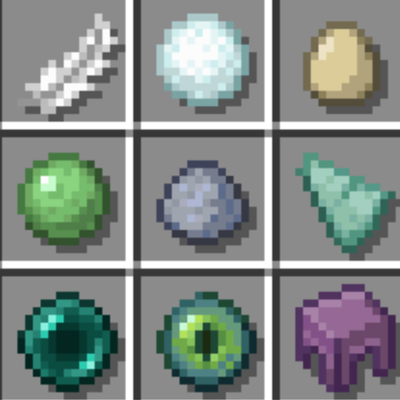
CurseForge · Minecraft mod
Item Shadow
Adds shadows to items and blocks in the inventory.
Choose a version Pick your version below, then grab the matching file.
Quick answer
Which Item Shadow release matches 26.1?
Best match for your filters itemshadow-26.1-NeoForge-1.0.0.jar
Game version 26.1
Loader NeoForge
Item Shadow itemshadow-26.1-NeoForge-1.0.0.jar targets 26.1 with NeoForge. The project page does not say whether this file belongs on the client, dedicated server, or both. No extra mods listed for this file.
Where it goes
Is Item Shadow required on the client, server, or both?
The project page does not say whether this file belongs on the client, dedicated server, or both.
Client Source doesn’t say
Dedicated server Source doesn’t say
Loader for this release NeoForge
Required install it here Optional supported, not mandatory Not supported do not install here Source doesn’t say do not assume
The source does not explicitly classify this release as client-only or server-only.
What else does Item Shadow itemshadow-26.1-NeoForge-1.0.0.jar need?
itemshadow-26.1-NeoForge-1.0.0.jar on 26.1. Every mod below is checked against that same setup.
This file does not list any required mods. Do not add a library just because a different file uses it.
This file does not list any required or optional mods.
Before you install it
Add Item Shadow without breaking your instance.
Built for Item Shadow itemshadow-26.1-NeoForge-1.0.0.jar on 26.1. Pick another file and the loader, install side or required mods may change.
- 01
Stick to this file
Use itemshadow-26.1-NeoForge-1.0.0.jar. It targets 26.1 with NeoForge; another release may have different loader, side or dependency requirements.
- 02
Bring the mods it needs
This file does not list any required mods. Do not add a library just because a different file uses it.
- 03
Put it on the correct side
The project page does not say whether this file belongs on the client, dedicated server, or both.
- 04
Pick the file you checked
Use the “Get this file” button beside itemshadow-26.1-NeoForge-1.0.0.jar. It opens that exact file at the source.
About this project
What does Item Shadow add?
Item Shadow
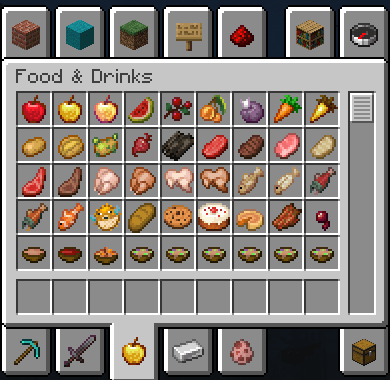
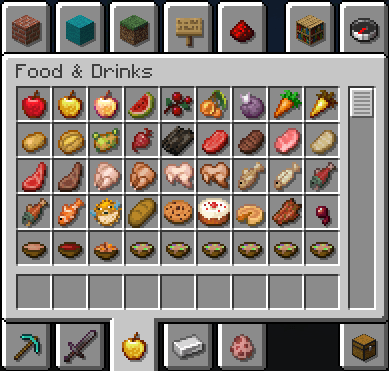
Adds a subtle drop shadow behind items in GUIs. Works on inventory slots, hotbar, and creative tab icons.
Before / After
Features
- Supports transparent and semi-transparent items
- Shadow cache built on load, no per-frame cost
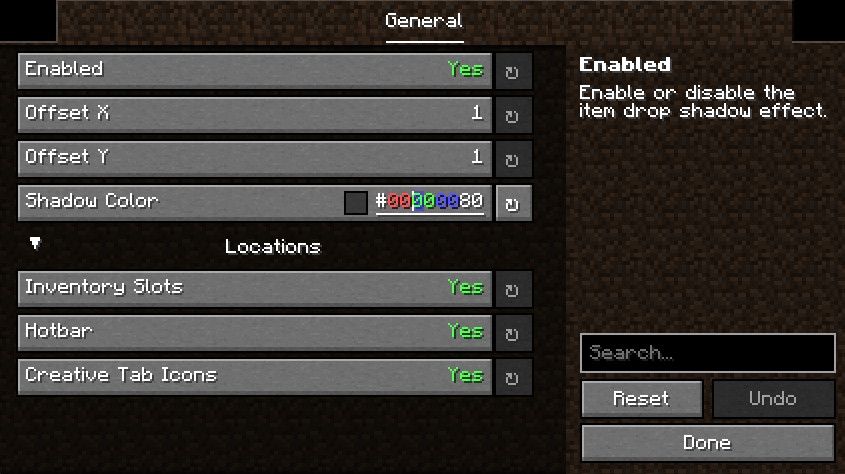
- Fully configurable via YACL:
- Enable/disable per location (inventory, hotbar, creative tabs)
- Shadow color and opacity
- X/Y offset
Supported Versions
- 1.20.1 (Fabric)
- 1.21.1 (Fabric)
- 26.1.1 (Fabric + NeoForge)
Dependencies
- YACL (required)
- Mod Menu (optional, Fabric only)
Inspired by Shadow Drop, i have decided to not release Forge & NeoForge 1.2x.1 versions to not overshadow their work.
If you'd like to support me and the development of my mods, I recommend trying out BisectHosting. Use code "project8gbderam" to get 25% off your first month of a gaming server for new customers. They offer 24/7 support and lightning-fast response times, ensuring you're in great hands and providing exceptional assistance for all your gaming needs.
https://www.bisecthosting.com/project8gbderam

Project description from CurseForge.
Pick your setup
Item Shadow by Minecraft version and loader
Choose the version and loader you play, then open the matching release.
Minecraft version
1.21.1
1 loader buildMinecraft version
1.20.1
1 loader buildCheck the dependencies, then try the file in a copied instance before changing a world you care about.
Recent files
Item Shadow versions and loaders
itemshadow-26.1-NeoForge-1.0.0.jar
10 Apr 2026
Client Source doesn’t say Server Source doesn’t say Dependencies No extras listed Listed on Release listing
Check the 26.1 · NeoForge setup NeoForge26.1 release
itemshadow-26.1-Fabric-1.0.0.jar
10 Apr 2026
Client Source doesn’t say Server Source doesn’t say Dependencies No extras listed Listed on Release listing
Check the 26.1 · Fabric setup Fabric26.1 release
Looking for an older file? The official CurseForge project page is in Resources.