Minecraft version
Back to mods 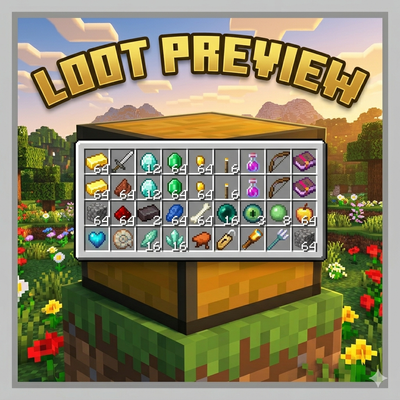
CurseForge · Minecraft mod
Loot Preview
A lightweight utility that lets you instantly view a container's contents in a vanilla-style grid.
Choose a version Pick your version below, then grab the matching file.
Quick answer
Which Loot Preview release should I use?
Latest stable file lootpreview-fabric-1.0.0.jar
Game version 26.1.2
Loader Fabric
Loot Preview lootpreview-fabric-1.0.0.jar targets 26.1.2 with Fabric. The project page does not say whether it belongs on the client. The project page does not say whether it belongs on the dedicated server. No extra mods listed for this file.
Where it goes
Is Loot Preview required on the client, server, or both?
The project page does not say whether it belongs on the client. The project page does not say whether it belongs on the dedicated server.
Client Source doesn’t say
Dedicated server Source doesn’t say
Loader for this release Fabric
Required install it here Optional supported, not mandatory Not supported do not install here Source doesn’t say do not assume
The source does not explicitly classify this release as client-only or server-only.
What else does Loot Preview lootpreview-fabric-1.0.0.jar need?
lootpreview-fabric-1.0.0.jar. Change the file and its required mods may change too.
This file does not list any required mods. Do not add a library just because a different file uses it.
This file does not list any required or optional mods.
Before you install it
Add Loot Preview without breaking your instance.
Built for Loot Preview lootpreview-fabric-1.0.0.jar. Pick another file and the loader, install side or required mods may change.
- 01
Stick to this file
Use lootpreview-fabric-1.0.0.jar. It targets 26.1.2 with Fabric; another release may have different loader, side or dependency requirements.
- 02
Bring the mods it needs
This file does not list any required mods. Do not add a library just because a different file uses it.
- 03
Put it on the correct side
The project page does not say whether it belongs on the client. The project page does not say whether it belongs on the dedicated server.
- 04
Pick the file you checked
Use the “Get this file” button beside lootpreview-fabric-1.0.0.jar. It opens that exact file at the source.
About this project
What does Loot Preview add?
Loot Preview adds a preview grid that instantly displays a container's contents when you look at it. Set your preview key in keybind menu!
- Instant 3x9 preview grid for chests, barrels, and shulker boxes
- Vanilla-accurate aesthetic that blends seamlessly
- No UI screen required — keep moving, keep your sword ready, and stay safe from mobs
- Optimized to remain lag-free, even in massive storage rooms
- Fully supports double chests, trapped chests, and ender chests
- Customizable settings for preview delay, size, and toggle keybindings
- Works out-of-the-box with most modded block-based containers
❓ FAQ ❓
Does this work on vanilla servers?
If installed client-side only, you can only preview containers you have already opened during that session. For the mod to work on unopened chests, it must be installed on the server as well.
Can I change how the preview looks?
Yes! You can adjust the scale, background opacity, and activation delay in the mod's configuration file.
Can I add this to my modpack?
Yes.
🐛 Bugs & Support 🐛
Report issues on the GitHub issue tracker. Please include your loader version, mod version, and a latest.log.
Project description from CurseForge.
Pick your setup
Loot Preview by Minecraft version and loader
Choose the version and loader you play, then open the matching release.
Check the dependencies, then try the file in a copied instance before changing a world you care about.
Recent files
Loot Preview versions and loaders
lootpreview-fabric-1.0.0.jar
10 Apr 2026
Client Source doesn’t say Server Source doesn’t say Dependencies No extras listed Listed on Release listing
Check the 26.1.2 · Fabric setup Fabric26.1.2 release
lootpreview-neoforge-1.0.0.jar
10 Apr 2026
Client Source doesn’t say Server Source doesn’t say Dependencies No extras listed Listed on Release listing
Check the 26.1.2 · NeoForge setup NeoForge26.1.2 release
Looking for an older file? The official CurseForge project page is in Resources.
 mod
mod CurseForge · Minecraft
CryonUtil
CryonUtil is a Minecraft 26.2 utility mod that adds automation, mobile mining, item transportation, lighting support, security systems, accessibility features, and special equipment for survival.
 mod
mod CurseForge · Minecraft
Tokimi's Toolshed
Tokimi's Toolshed adds a variety of new multi-block tools to enhance your mining and gathering experience!
 mod
mod CurseForge · Minecraft
Easy Villagers Manager : Show Jobsite & Teleport & clear job
Interact with job sites to locate or teleport villagers, or click on villagers to identify their current workplace,profession reset ,remove job,fire villager