Minecraft version
Back to mods 
CurseForge · Minecraft mod
Light Level Overlay
Renders light level overlays directly on block surfaces. Instantly identify mob-spawn areas.
Choose a version Pick your version below, then grab the matching file.
Quick answer
Which Light Level Overlay release should I use?
Latest stable file lightleveloverlay-quilt-26.2-1.0.0.jar
Game version 26.2
Loader Quilt
Light Level Overlay lightleveloverlay-quilt-26.2-1.0.0.jar targets 26.2 with Quilt. The project page does not say whether this file belongs on the client, dedicated server, or both. No extra mods listed for this file.
Where it goes
Is Light Level Overlay required on the client, server, or both?
The project page does not say whether this file belongs on the client, dedicated server, or both.
Client Source doesn’t say
Dedicated server Source doesn’t say
Loader for this release Quilt
Required install it here Optional supported, not mandatory Not supported do not install here Source doesn’t say do not assume
The source does not explicitly classify this release as client-only or server-only.
What else does Light Level Overlay lightleveloverlay-quilt-26.2-1.0.0.jar need?
lightleveloverlay-quilt-26.2-1.0.0.jar. Change the file and its required mods may change too.
This file does not list any required mods. Do not add a library just because a different file uses it.
This file does not list any required or optional mods.
Before you install it
Add Light Level Overlay without breaking your instance.
Built for Light Level Overlay lightleveloverlay-quilt-26.2-1.0.0.jar. Pick another file and the loader, install side or required mods may change.
- 01
Stick to this file
Use lightleveloverlay-quilt-26.2-1.0.0.jar. It targets 26.2 with Quilt; another release may have different loader, side or dependency requirements.
- 02
Bring the mods it needs
This file does not list any required mods. Do not add a library just because a different file uses it.
- 03
Put it on the correct side
The project page does not say whether this file belongs on the client, dedicated server, or both.
- 04
Pick the file you checked
Use the “Get this file” button beside lightleveloverlay-quilt-26.2-1.0.0.jar. It opens that exact file at the source.
About this project
What does Light Level Overlay add?
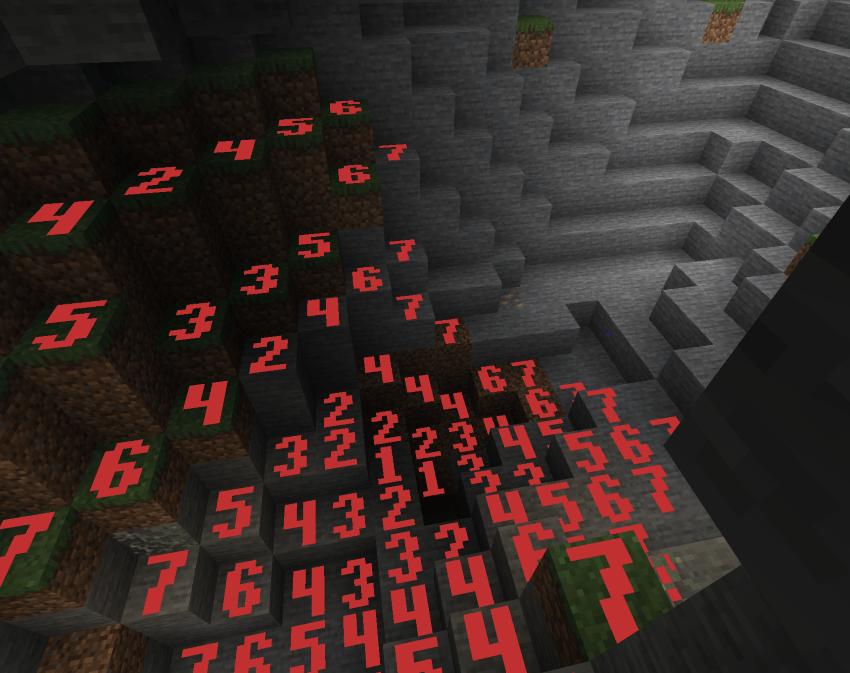
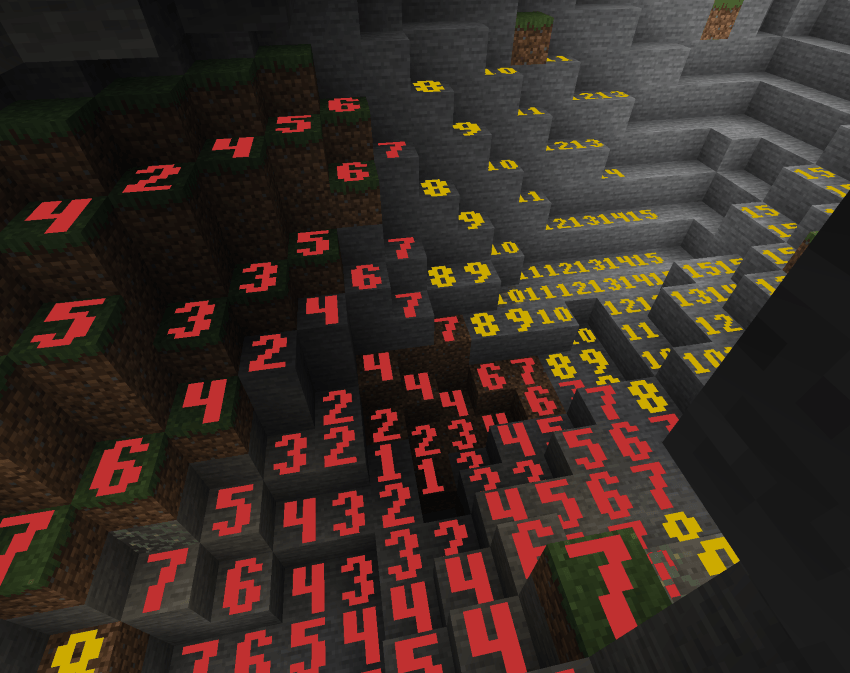
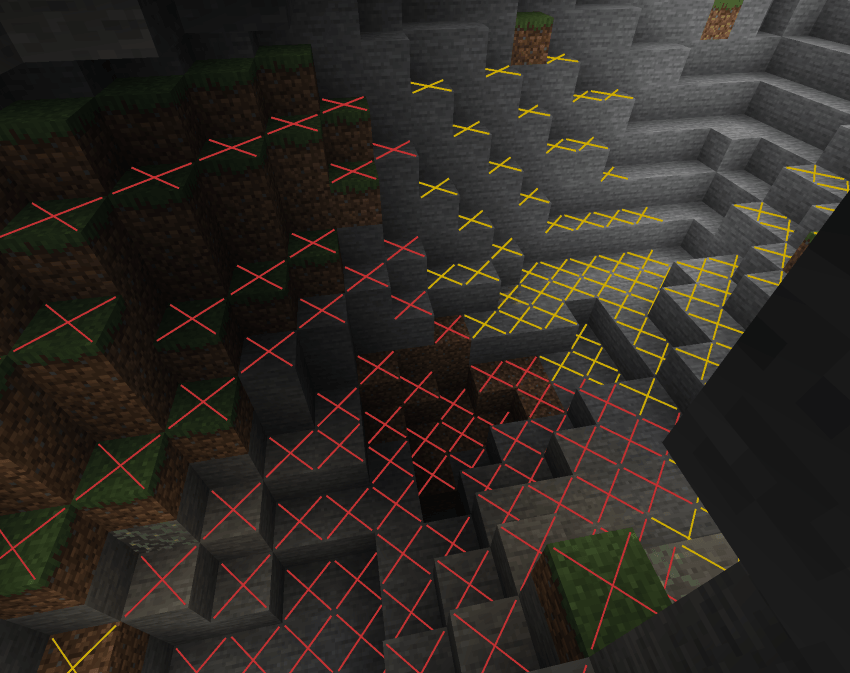
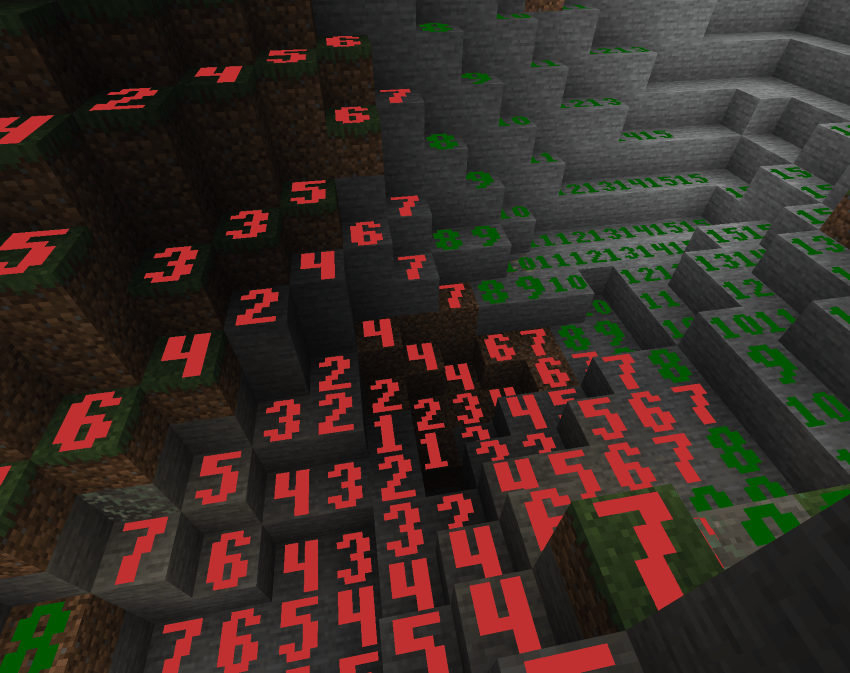
✨ Display Modes (cycle with Shift+F7) ✨
✖ Cross Mode
Red X on dangerous blocks, yellow X on blocks only safe during daytime, nothing on always-safe blocks. Clean and minimal.
🔴 Minimal Mode
Red numbers 0–7 on every block in that range. Quick danger-zone check with no extra noise.
🟢 Standard Mode
Numbers 0–15 on all blocks. Red for 0–7, green for 8–15. Full light level readout colored by value.
🟡 Advanced Mode
Numbers 0–15 on all blocks, but color is based on spawn danger: red for always-dangerous, yellow for daytime-only safe, green for always safe. Distinguishes block light vs sky light sources.
Custom Pixel-Art Numbers
Chunky, hand-crafted 5×7 bitmap digits rendered as colored quads directly on block faces. Bold, readable, and stylish — not blurry vanilla font text.
🎮 Controls 🎮
F7 — Toggle overlay on/off
Shift+F7 — Cycle through the 4 display modes
Settings screen — Accessible from NeoForge mod list for render distance and other options
❓ FAQ ❓
Does this need to be installed on the server?
No — purely client-side. Install on your client and join any server.
How is this different from other light overlay mods?
Custom pixel-art number rendering, 4 distinct modes including danger-aware coloring, time-of-day-accurate sky light, and a render distance slider up to 512 blocks.
Can I include this in my modpack?
Yes.
Where do I report bugs?
Open an issue on the GitHub repository. Please include your loader, MC version, and a latest.log.
Project description from CurseForge.
Pick your setup
Light Level Overlay by Minecraft version and loader
Choose the version and loader you play, then open the matching release.
Minecraft version
26.2
4 loader buildsForge lightleveloverlay-forge-26.2-1.0.0.jar 1
stable file
· 1 total · 10 Oct 2026Fabric lightleveloverlay-fabric-26.2-1.0.0.jar 2
stable files
· 2 total · 10 Oct 2026Quilt lightleveloverlay-quilt-26.2-1.0.0.jar 1
stable file
· 1 total · 10 Oct 2026NeoForge lightleveloverlay-neoforge-26.2-1.0.0.jar 2
stable files
· 2 total · 10 Oct 2026
Minecraft version
26.1.2
2 loader buildsMinecraft version
1.21.11
2 loader buildsCheck the dependencies, then try the file in a copied instance before changing a world you care about.
Recent files
Light Level Overlay versions and loaders
lightleveloverlay-quilt-26.2-1.0.0.jar
10 Oct 2026
Client Source doesn’t say Server Source doesn’t say Dependencies No extras listed Listed on Release listing
Check the 26.2 · Quilt setup Quilt26.2 release
lightleveloverlay-neoforge-26.2-1.0.0.jar
10 Oct 2026
Client Source doesn’t say Server Source doesn’t say Dependencies No extras listed Listed on Release listing
Check the 26.2 · NeoForge setup NeoForge26.2 release
lightleveloverlay-forge-26.2-1.0.0.jar
10 Oct 2026
Client Source doesn’t say Server Source doesn’t say Dependencies No extras listed Listed on Release listing
Check the 26.2 · Forge setup Forge26.2 release
lightleveloverlay-fabric-26.2-1.0.0.jar
10 Oct 2026
Client Source doesn’t say Server Source doesn’t say Dependencies No extras listed Listed on Release listing
Check the 26.2 · Fabric setup Fabric26.2 release
lightleveloverlay-26.3-neoforge-1.1.0.jar
21 Sept 2026
Client Source doesn’t say Server Source doesn’t say Dependencies No extras listed Listed on Release listing
Check the 26.3 · NeoForge setup NeoForge26.3 release
lightleveloverlay-26.3-forge-1.1.0.jar
21 Sept 2026
Client Source doesn’t say Server Source doesn’t say Dependencies No extras listed Listed on Release listing
Check the 26.3 · Forge setup Forge26.3 release
lightleveloverlay-26.3-fabric-1.1.0.jar
21 Sept 2026
Client Source doesn’t say Server Source doesn’t say Dependencies No extras listed Listed on Release listing
Check the 26.3 · Fabric setup Fabric26.3 release
fabric-1.0.0.jar
27 Jun 2026
Client Source doesn’t say Server Source doesn’t say Dependencies No extras listed Listed on Release listing
Check the 26.2 · Fabric setup Fabric26.2 release
neoforge-1.0.0.jar
27 Jun 2026
Client Source doesn’t say Server Source doesn’t say Dependencies No extras listed Listed on Release listing
Check the 26.2 · NeoForge setup NeoForge26.2 release
LightLevelneoforge-2.0.0.jar
neoforge-1.0.0.jar
18 Jun 2026
Client Source doesn’t say Server Source doesn’t say Dependencies No extras listed Listed on Release listing
Check the 26.1.2 · NeoForge setup NeoForge26.1.2 release
LightLevelfabric-2.0.0.jar
fabric-1.0.0.jar
18 Jun 2026
Client Source doesn’t say Server Source doesn’t say Dependencies No extras listed Listed on Release listing
Check the 26.1.2 · Fabric setup Fabric26.1.2 release
LightLevelNEOFORGE1.21.11.jar
lightlevelNEOFORGE1.21.11.jar
1 May 2026
Client Source doesn’t say Server Source doesn’t say Dependencies No extras listed Listed on Release listing
Check the 1.21.11 · NeoForge setup NeoForge1.21.11 release
Looking for an older file? The official CurseForge project page is in Resources.
 mod
CurseForge + Modrinth · Minecraft
Gingerbread houses
The all-in-one Christmas mod: gingerbread houses and decorated trees in the snow, presents you wrap for friends, an advent calendar, reindeer (watch for the red-nosed one), gingerbread men, Krampus, festive food, lights and decorations.
 mod
CurseForge + Modrinth · Minecraft
Numerical HUD
This mod replaces vanilla status bars with clean, animated numerical values and dynamic icons.
 mod
CurseForge · Minecraft
Eclipse Map
Minimap, world map with a seed map tab, and waypoints with light beams, death points and Xaero import.